Incident Overview
Harness AI SRE's incident management system provides a comprehensive platform for tracking, coordinating, and resolving service disruptions. From incident creation to resolution, teams can manage the entire incident lifecycle with automated workflows, real-time collaboration, and intelligent response procedures.
Overview
Incidents in Harness AI SRE help you:
- Create and track service disruptions with standardized incident types
- Coordinate response efforts across teams and stakeholders
- Document incident timelines with automated event tracking
- Execute automated remediation steps through integrated runbooks
- Generate comprehensive post-mortems and action items
- Integrate with monitoring tools for automatic incident creation
- Manage escalation policies and on-call notifications
Key features
Intelligent incident creation
- AI-powered problem description analysis and field auto-population
- Multiple creation methods: manual, alert-based, and monitoring integration
- Standardized incident types with pre-configured fields and workflows
- Quick Start functionality for rapid incident creation
Comprehensive incident management
- Real-time incident details page with editable fields
- Timeline tracking with automatic event logging
- Manual key event addition for important milestones
- Status updates and ownership management
- Integration with on-call schedules and escalation policies
Automated response procedures
- Runbook execution directly from incident interface
- Action item creation and assignment with due dates
- Automated workflow triggers based on incident type
- Integration with monitoring tools and alert systems
Collaboration and communication
- Timeline-based messaging and updates
- Structured status updates via email to service subscribers
- Team notifications and stakeholder communication
- Action item tracking and assignment
- Post-incident analysis and documentation
Create an incident
- Interactive Guide
- Step by Step
Follow this interactive guide to create and manage incidents with AI-powered assistance and automated workflows.
Step 1: Access incident creation
Open the incident creation flow:
-
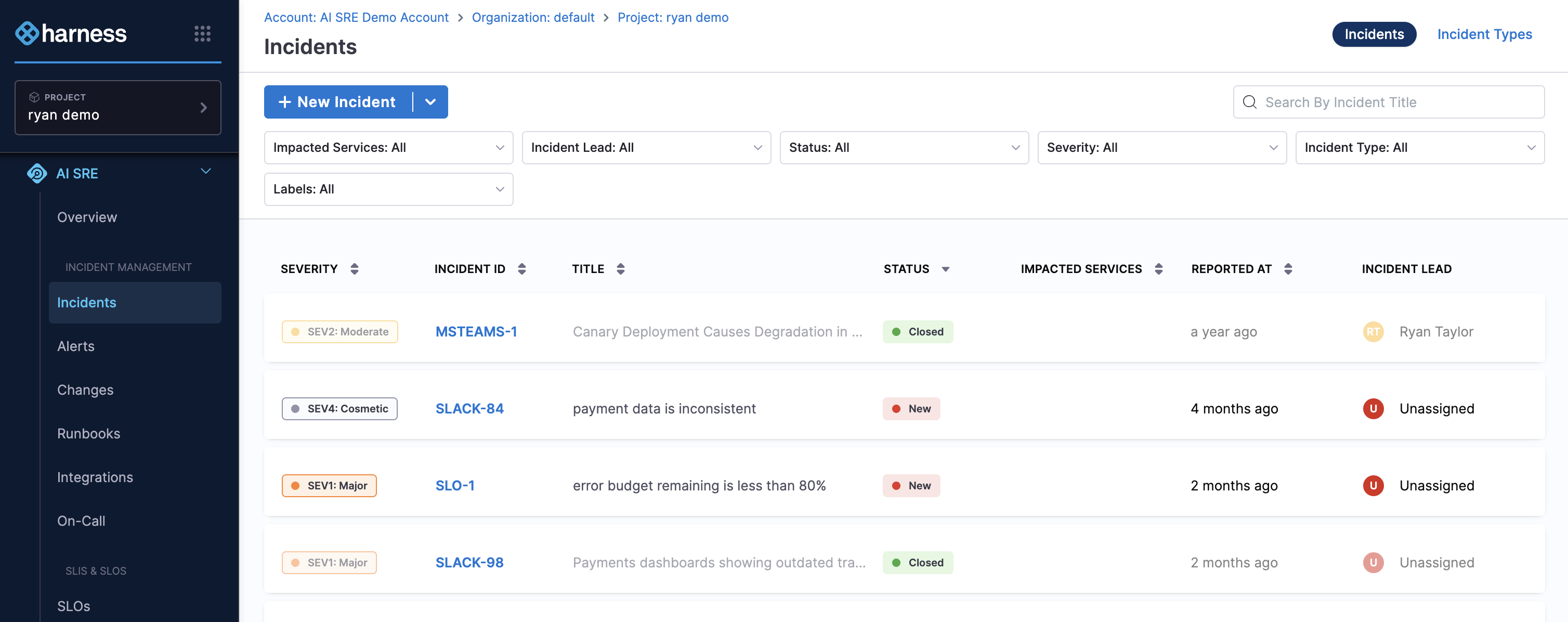
Navigate to Incidents from the left panel
-
Choose your creation method:
- Click New Incident for a blank incident
- Select an Incident Type from the dropdown next to "New Incident" for pre-configured templates
Step 2: Select incident type
Pick the incident type that matches the disruption:
-
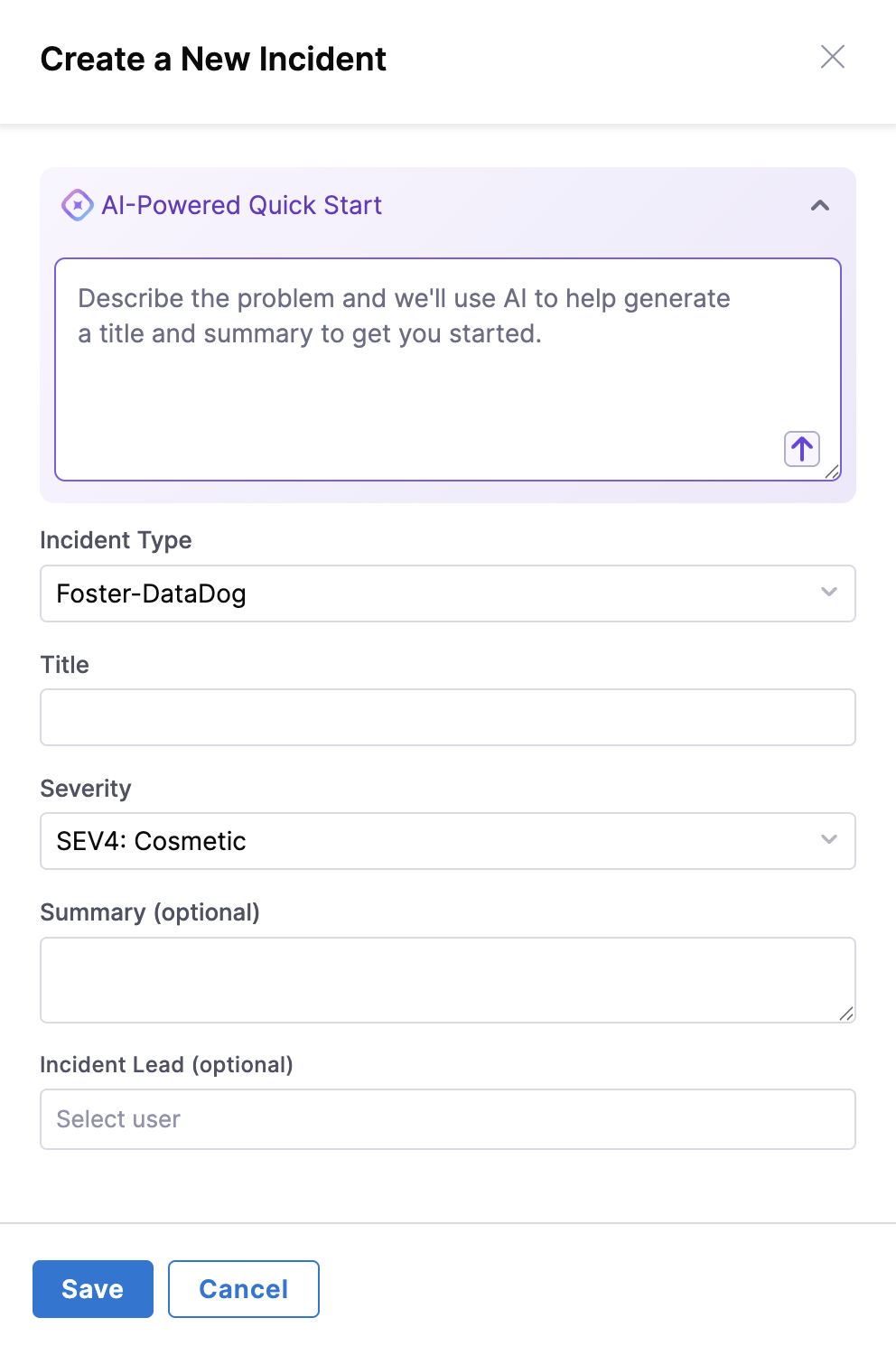
Choose the appropriate Incident Type from the available options
-
This will pre-populate relevant fields and associate appropriate runbooks
-
Incident types ensure consistent data collection and response procedures
Step 3: Describe the problem
Give the AI enough context to populate the incident:
- Use the Quick Start block to describe the problem
- Provide a clear, concise description of the issue
- The AI system will analyze your description and suggest field values
- Include relevant details like affected services, symptoms, and impact
Step 4: Generate incident fields
Let AI SRE derive field values from your description:
- Click the up arrow sign to process your description
- AI will automatically populate incident fields based on your description
- The system will suggest appropriate severity, priority, and other relevant fields
Step 5: Review and customize
Verify and adjust the generated values before saving:
- Review all auto-generated field values
- Manually change any field values that need adjustment:
- Title and description
- Severity and priority levels
- Add Assignee
- Add values to any custom fields added as per the Incident type
- Click Save to create the incident
Step 6: Manage incident details
Review and edit the incident from its details page:
- The Incident Details page will display with all incident information
- Use the Edit icon to edit individual fields as needed
- Click Edit to modify the Incident Summary
- Click Save after making any changes
Step 7: Add key events
Document important milestones on the incident:
- Click Add Key Event to manually document important milestones
- Type the key event description in the text box
- Include relevant details about actions taken or status changes
- Click the check mark to save the key event
- Remember to Save from the top right
Step 8: Monitor timeline activity
Track and post to the incident timeline:
- Navigate to the Timeline tab
- View all incident-related activity in chronological order
- Post messages to the timeline by typing in the text field and pressing Enter
- All automated actions and manual updates appear here
Step 9: Execute runbooks (optional)
Run automated response procedures from the incident:
- Click the Runbooks tab
- Click Execute Additional Runbook to link automated response procedures
- Select the appropriate runbook from available options
- Click Execute to perform the runbook actions
- Monitor execution progress and results
- Click Close when execution is completed
Step 10: Manage action items
Create and assign follow-up tasks:
- Navigate to the Action Items tab
- Click Create Action Item to add follow-up tasks
- Define the action item with:
- Clear description of the task
- Assignee responsible for completion
- Due date for completion
- Click the check mark to save the action item
- Use the Edit icon to edit action item status as needed
Step 11: Finalize and save
Confirm everything is documented, then save:
- Review all incident details, timeline events, and action items
- Ensure all necessary information is documented
- Click Save to finalize all changes
- The incident is now ready for ongoing management and resolution
Best practices
Incident creation and classification
- Choose appropriate incident types: Select the most specific incident type to ensure proper field configuration and runbook association
- Provide detailed descriptions: Use the Quick Start feature with comprehensive problem descriptions to enable accurate AI field population
- Verify auto-generated fields: Always review and adjust AI-suggested field values to ensure accuracy
- Set correct severity levels: Align severity with actual business impact and response time requirements
Incident response and management
- Acknowledge quickly: Respond to incidents promptly to minimize impact and meet SLA requirements
- Assess impact thoroughly: Evaluate affected services, user impact, and business consequences
- Execute relevant runbooks: Use associated runbooks for standardized response procedures
- Document all actions: Record every action taken in the timeline for audit trails and learning
- Update status regularly: Keep incident status current to inform stakeholders and trigger appropriate workflows
Timeline and event management
- Add key events: Document critical milestones, decisions, and turning points in the incident lifecycle
- Use timeline messaging: Communicate updates and coordination through the incident timeline
- Maintain chronological order: Ensure all events are properly timestamped and sequenced
- Include context: Provide sufficient detail in timeline entries for future reference and analysis
Action item management
- Create specific action items: Define clear, actionable tasks with specific outcomes
- Assign ownership: Ensure every action item has a designated owner and due date
- Track progress: Regularly update action item status and completion
- Follow up: Monitor action items through completion to prevent issues from recurring
Communication and collaboration
- Use structured communication: Follow incident communication templates and standards
- Update stakeholders regularly: Provide timely updates to affected teams and leadership
- Leverage integration channels: Use Slack, Teams, or other integrated communication tools
- Maintain professional tone: Keep all incident communication clear, factual, and professional
Post-incident activities
- Complete action items: Ensure all follow-up tasks are completed within specified timeframes
- Conduct reviews: Analyze incident response effectiveness and identify improvement opportunities
- Update documentation: Refine runbooks, procedures, and incident types based on lessons learned
- Share knowledge: Communicate insights and improvements with the broader team
Benefits
Incident management in AI SRE delivers the following benefits:
- Streamlined response: AI-powered incident creation reduces time to response and improves accuracy
- Standardized processes: Incident types ensure consistent handling across all teams and services
- Automated workflows: Integrated runbooks and action items automate response procedures
- Complete visibility: Timeline tracking and event logging provide full incident lifecycle visibility
- Enhanced collaboration: Built-in communication tools facilitate team coordination and stakeholder updates
- Continuous improvement: Action item tracking and post-incident analysis drive process optimization
- Integration ready: Seamless connection with monitoring tools, alert systems, and communication platforms
Next steps
Getting started
- Configure incident types: Standardize incident classification.
- Set up route alerts: Automatically create incidents from monitoring alerts.
- Configure on-call schedules: Ensure proper incident assignment and escalation.
Advanced configuration
- Customize incident fields: Capture specialized data.
- Set up incident workflows: Enable advanced automation.
- Configure incident templates: Standardize incident creation.
- Configure status updates: Communicate with stakeholders.
- Integrate monitoring tools: Generate incidents automatically.
Best practices resources
- AI SRE best practices guide: Review recommendations for running AI SRE.
- Incident response playbooks: Build runbooks for standardized response.
- AI SRE onboarding guide for administrators: Set up AI SRE for your organization.