Multi-Step AI Tasks - Natural Language Tests
Multi-step AI tasks in Harness AI Test Automation let you describe complete business workflows in natural language. Instead of writing brittle scripts or selectors, you state the desired outcome and Copilot plans the sequence, locates elements, navigates the UI, and verifies results for you.
What are Multi-Step AI Tasks?
Multi-step AI tasks represent high-level business operations that may involve multiple steps and decisions. They operate at a higher abstraction level than individual commands and let you describe the entire outcome you want, while Copilot figures out and executes the sequence of actions.
Key characteristics:
- Intent-driven end-to-end workflows
- Automatically decomposed into actionable steps
- Context-aware and resilient to UI changes
- Can include validation criteria and business rules
Creating Multi-Step Tasks
To create a task, describe the complete business action and any important constraints or expected outcomes. Copilot plans the sequence and executes it for you.
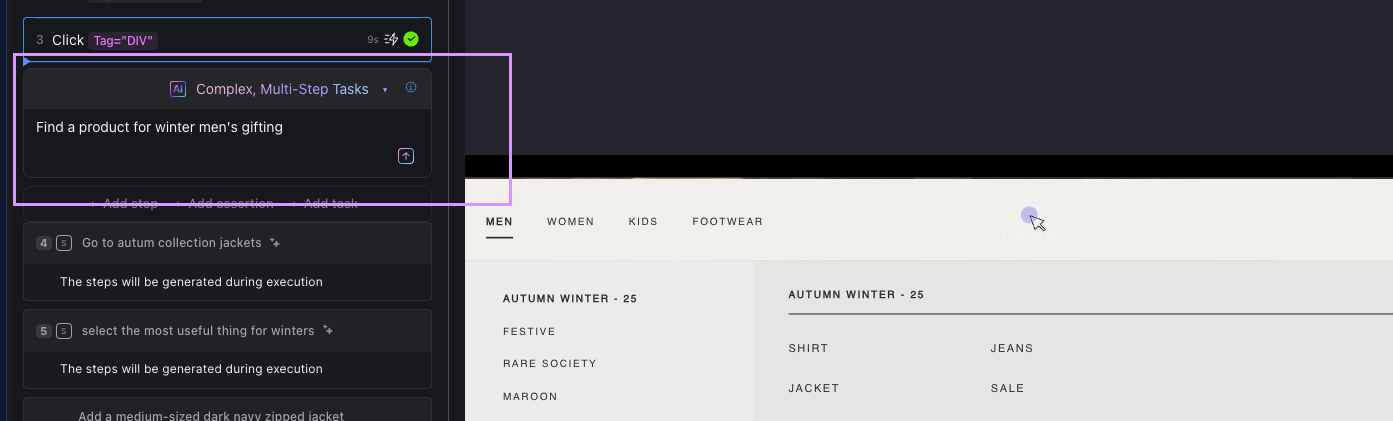
Basic prompt structure
- Task intent: What business outcome do you want?
- Context: Preconditions, page or account context, relevant entities
- Acceptance criteria: How success should be verified
Optional: Gherkin-format prompt
You don’t need a specific format, but for complex workflows you can use Gherkin (Given/When/Then) to clarify preconditions, actions, and expected outcomes.
Given I am on the jackets listing page
When I add a medium-sized dark navy zipped jacket priced between ₹3000 and ₹6000 to the cart
Then the cart should contain 1 item sized M-40 with a price in that range, and the checkout total should reflect the item price
Best practices
- Author an intent-based action which clearly represents a complete business workflow with specific values. For example, use "Deposit $100 into Checking Account" instead of "Make a deposit".
- Make your actions specific while including contextual details that reduce ambiguity, such as preconditions, account types, or expected outcomes (for example, "Deposit $100 into Checking Account and verify the updated balance reflects the deposit").
- While prompts don't need to follow a specific format, structure complex workflows using Gherkin syntax (Given/When/Then) to clarify preconditions, actions, and expected outcomes.
- Break down complex business processes into a sequence of smaller, focused tasks that can be more easily understood and executed by the AI.
- Include relevant business rules or validation criteria that should be considered during task execution (for example, "Transfer $500 from Savings to Checking, ensuring sufficient funds are available in Savings").
- Consider providing examples of expected outputs to guide the AI's understanding.
Example: Complete Multi-Step Task Scenario
Multi-step tasks can orchestrate complex business workflows by describing the desired outcome in natural language. Copilot then plans and executes the necessary steps autonomously, handling element location, navigation, and validation.
The example below demonstrates an e-commerce shopping workflow where Copilot adds a specific jacket to the cart based on detailed criteria. Instead of writing individual steps, you describe the complete business goal and Copilot figures out how to achieve it.
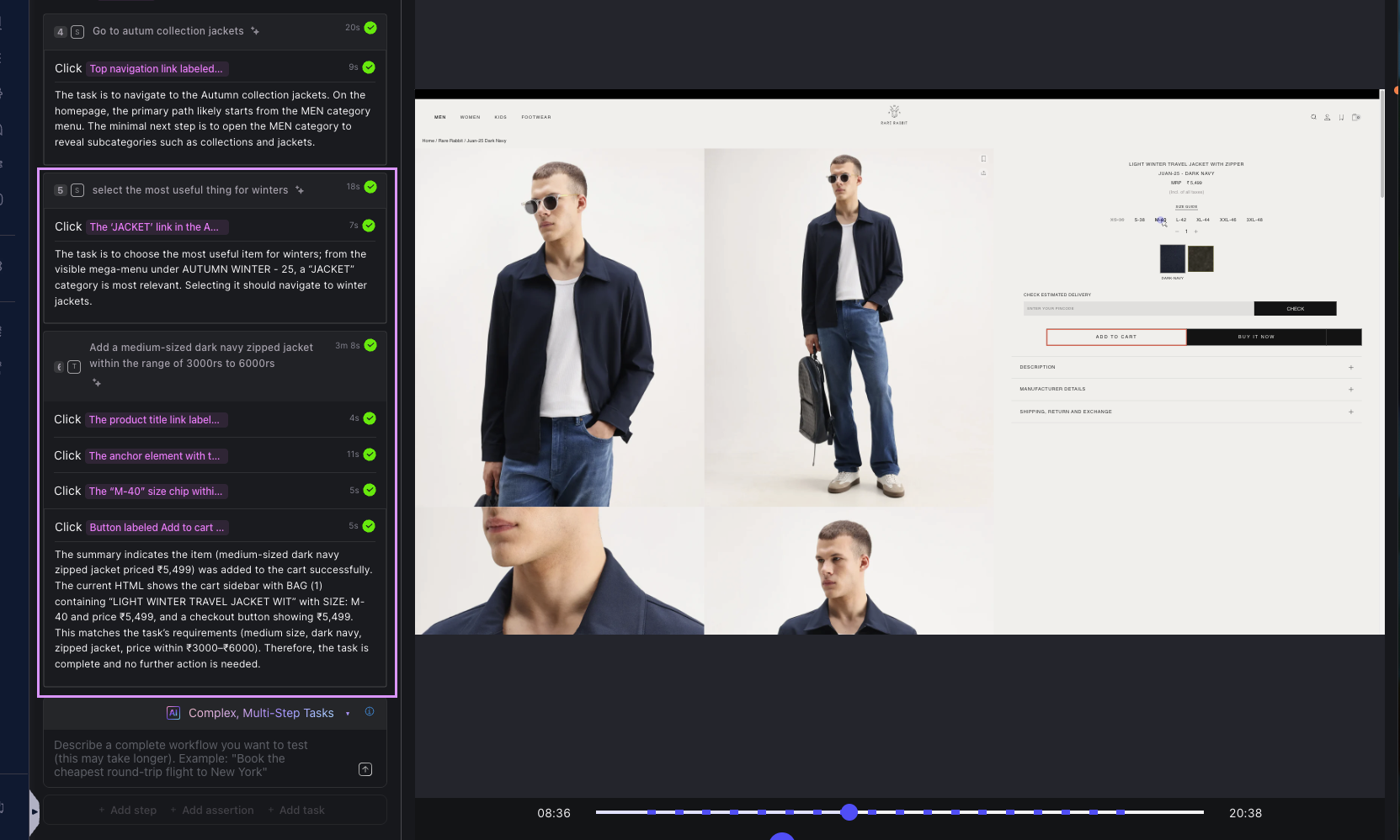
The task prompt:
Add a medium-sized dark navy zipped jacket within the range of ₹3000 to ₹6000 to the cart.
This single natural language instruction encapsulates the entire workflow. Copilot interprets the requirements (color, style, size, price range) and autonomously executes the necessary steps.
How Copilot executes the task:
- Page readiness check - Ensures the page is fully loaded and ready for interaction
- Product search - Locates products matching the characteristics (dark navy, zipped, jacket) within the specified price range (₹3000–₹6000)
- Product selection - Clicks the matching product card to open the detail page
- DOM stabilization - Anchors the detail page DOM to ensure reliable element identification
- Size selection - Selects size "M-40" (medium) from available options
- Add to cart - Clicks the "Add to cart" button
- Verification - Confirms the cart sidebar reflects the addition
The task demonstrates context-aware decision-making: Copilot understands that "medium-sized" maps to size M-40, identifies "dark navy" as a color filter, and validates that ₹5,499 falls within the ₹3000–₹6000 range.
Result validation:
The cart displays BAG (1) containing "LIGHT WINTER TRAVEL JACKET WIT" with SIZE: M-40 and price ₹5,499, with a checkout button showing the total ₹5,499. This confirms all task requirements were met: medium size, dark navy color, zipped jacket style, and price within the specified range.
Copilot signals task completion with "I am done with the task" and returns control to the user. The entire workflow (from product search to cart validation) executed without manual intervention or brittle selectors.
Optional: Gherkin format for complex workflows
For workflows requiring explicit preconditions and acceptance criteria, you can structure prompts using Gherkin syntax:
Given the jackets listing page is fully loaded
When I select a dark navy zipped jacket in the ₹3000–₹6000 price range and choose size M-40
Then the cart should show 1 item with SIZE: M-40 and the price within ₹3000–₹6000
This format clarifies the starting state, the action to perform, and the expected outcome, which can be helpful for complex multi-step scenarios or when collaborating with non-technical stakeholders.
Next steps
- Learn about Simple Steps - AI Actions for single, focused actions.
- Explore Assertions and Validations to express business-level checks.
- Review the Harness AI documentation for deeper capabilities.