Manage Artifacts and Registries
This guide covers the essential commands for working with the Artifact Registry from the command line. This will require installation of the Harness CLI and authentication to your Harness account.
Registry Management
The hc registry (or hc reg) command allows you to manage your Artifact Registry registries.
List Registries
View all registries in your project:
hc registry list --org devrel --project sd1
You can also use the short alias:
hc reg list --org devrel --project sd1
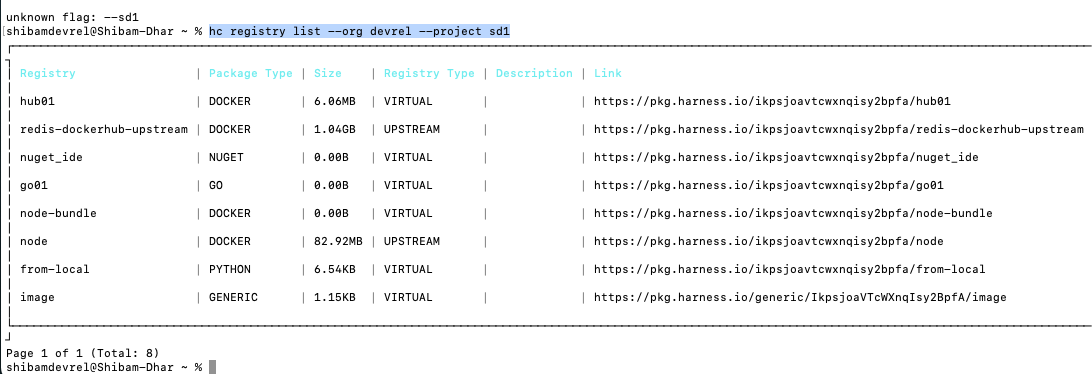
This displays a table with your registries, including their identifiers, package types, and other details provided that your authentication is at account level.
Get Registry Details
Retrieve detailed information about a specific registry:
hc registry get [?name] [flags]
Available flags:
--package-type stringpackage type--page int32page number (zero-indexed)--page-size int32number of items per page (default 10)
Go to the Artifact Registry documentation for a comprehensive list of supported package types.
You can also use global flags to override the org and project, to know more about global flags, refer to the Global Flags section.
Configure Package Manager Clients
Configure your package manager clients to work with supported Harness Artifact Registries. The hc registry configure command automatically sets up the necessary configuration files with the correct registry URLs and authentication for npm, Maven, pip, and NuGet.
Configure npm Client
Configure your npm client to use a Harness Artifact Registry virtual npm registry. This command updates your .npmrc file with the appropriate registry URL and authentication token.
hc registry configure npm [flags]
Required flags:
--registry string: Registry identifier
Flags:
--pkg-url string: Package registry base URL (e.g.,https://pkg.harness.io)--scope string: NPM scope (e.g.,@myorg) - configures scoped registry. If not provided, configures the default registry--global: Configure globally for the user (modifies~/.npmrc)--project-level: Configure at project level (creates/modifies.npmrcin current directory)
Example - Configure default registry:
hc registry configure npm --registry npmproxy --pkg-url https://pkg.harness.io
Example - Configure scoped registry:
hc registry configure npm --registry npmproxy --pkg-url https://pkg.harness.io --scope @myorg
Example - Configure globally:
hc registry configure npm --registry npmproxy --pkg-url https://pkg.harness.io --global
Example - Configure at project level:
hc registry configure npm --registry npmproxy --pkg-url https://pkg.harness.io --project-level
Configure other package manager clients
You can configure the following package manager clients:
hc registry configure [command] --registry <registry-identifier>
Available commands:
npm: Updates.npmrcfor npm registries.maven: Updates~/.m2/settings.xmlfor Maven.pip: Configures pip for PyPI registries.nuget: Configures NuGet/dotnet client.
All commands require the --registry flag and automatically resolve the registry URL from your login configuration. Use the -h flag on each command for additional options.
After configuration, use your native package manager commands (mvn deploy, pip install, dotnet restore) to interact with your Harness Artifact Registry directly.
Example - Configure Maven:
hc registry configure maven --registry maven-releases
Example - Configure pip:
hc registry configure pip --registry python-proxy
Example - Configure NuGet:
hc registry configure nuget --registry nuget-hosted
Manage Registry Metadata
Attach custom key-value pairs to registries for better organization and tracking.
Set Metadata
hc registry metadata set [flags]
Required flags:
--registry string: Registry identifier--metadata string: Metadata inkey:value,key:valueformat
Example:
hc registry metadata set --registry my-docker-reg --metadata "env:prod,region:us"
Get Metadata
hc registry metadata get [flags]
Required flags:
--registry string: Registry identifier
Example:
hc registry metadata get --registry my-docker-reg
Delete Metadata
hc registry metadata delete [flags]
Required flags:
--registry string: Registry identifier--metadata string: Metadata inkey:value,key:valueformat
Example:
hc registry metadata delete --registry my-docker-reg --metadata "env:prod"
Delete a Registry
Remove a registry from your project:
hc registry delete [name] [flags]
Example:
hc registry delete my-docker-registry
Deleting a registry will remove all artifacts stored within it. This action cannot be undone. Make sure to back up any important artifacts before deletion.
Audit dependencies with Dependency Firewall
The hc registry fw audit (or hc registry firewall audit) command evaluates dependencies from a manifest or lock file against your registry's firewall policies to identify which packages are allowed, blocked, or flagged with warnings. Use it to audit dependencies locally or in CI before deployment.
hc registry fw audit [flags]
Required flags:
-f, --file string: Path to dependency file- NPM: package.json, package-lock.json, pnpm-lock.yaml, yarn.lock
- Java: pom.xml, build.gradle, build.gradle.kts
- Python: requirements.txt, pyproject.toml, Pipfile.lock, poetry.lock
--registry string: Registry name
Add --org and --project when your CLI session is not already scoped to the target Harness org and project.
Audit scope by input file:
| Input file | Audit scope |
|---|---|
package.json | Direct dependencies |
package-lock.json, yarn.lock, pnpm-lock.yaml | Direct and transitive dependencies |
pom.xml, build.gradle, requirements.txt, and other manifests | Per package manager resolution |
Pass package.json to evaluate the direct dependencies listed under dependencies and devDependencies. Pass a lock file to include the full resolved graph, including transitive dependencies.
Example: audit direct dependencies without a lock file
hc registry fw audit --file package.json --registry <REGISTRY_NAME> --org <ORG> --project <PROJECT>
Example: audit the full dependency graph with a lock file
Pass the lock file your project uses. The audit scope is the same for each format: Harness parses the resolved dependency graph and evaluates every listed package version.
- npm
- Yarn
- pnpm
hc registry fw audit --file package-lock.json --registry <REGISTRY_NAME> --org <ORG> --project <PROJECT>
hc registry fw audit --file yarn.lock --registry <REGISTRY_NAME> --org <ORG> --project <PROJECT>
hc registry fw audit --file pnpm-lock.yaml --registry <REGISTRY_NAME> --org <ORG> --project <PROJECT>
If lock files are not stored in source control, generate one locally or in CI before you run a full audit. You can use the file for the audit without committing it to the repository.
npm install --package-lock-only
hc registry fw audit --file package-lock.json --registry <REGISTRY_NAME> --org <ORG> --project <PROJECT>
For other package managers, generate the lock file with your native tool (yarn install, pnpm install --lockfile-only) and pass the resulting yarn.lock or pnpm-lock.yaml to --file.
- PR checks: Run
hc registry fw audit --file package.jsonto review direct dependencies before merge. - CI full audit: Generate a lock file in the pipeline job, run the audit, and keep it in the job workspace without adding it to source control.
- Reproducible audits: Store lock files in source control when your team policy supports it so every audit resolves the same transitive graph.
- Pipeline tracking: Use
hc artifact npm install(or the equivalent for your package type) in Harness CI to populate the Affected Pipelines tab with dependency graph data.
Sample output:
  > Fetching registry details for: npmproxy...
  Found registry: d991f9d1-1cda-4a66-a13b-83dd2d9e0b82 (type: NPM)
  Parsing dependency file: package-lock.json...
  Found 15 dependencies in package-lock.json
  > Initiating bulk scan evaluation for registry: npmproxy...
  Bulk scan evaluation completed successfully

  Scan Results for 15 dependencies:
  > Warnings: 2...
  Allowed: 13

┌──────────────────────────────────┐
| Package Name | Version | Status  |
| body-parser  | 1.20.1  | WARN    |
| express      | 4.18.2  | ALLOWED |
| lodash       | 4.17.20 | WARN    |
| ...          | ...     | ...     |
└──────────────────────────────────┘
Get Firewall Status for an Artifact Version
The hc registry fw explain command gets detailed firewall and scan status information for a specific artifact version already stored in your registry.
hc registry fw explain [flags]
Required flags:
--registry string: Registry name--package string: Package name--version string: Package version
Example:
hc registry fw explain --registry npmproxy --package express --version 4.18.2 --org Devrel --project sd1
Sample output:
  Fetching registry details for: npmproxy...
  Found registry UUID: d991f9d1-1cda-4a66-a13b-83dd2d9e0b82
  > Initiating scan evaluation for express@4.18.2...
  Scan evaluation completed successfully

  > Scan Result...
   Package:     express
   Version:     4.18.2
   Scan Status: ALLOWED
   Scan ID:     0e2ed1a8-3977-481a-8bb7-1ccc7b0f399c

  This artifact version is ALLOWED by the firewall

  > Fetching detailed scan information...

Scan Details:
============================================================
Last Evaluated: 2026-02-18 11:18:06 IST
Possible scan statuses:
- ALLOWED: The artifact passes all firewall policies and is safe to use
- BLOCKED: The artifact violates firewall policies and should not be used
- WARN: The artifact has potential issues but is not blocked
Artifact Management
The hc artifact (or hc art) command allows you to manage artifacts within your registries.
List Artifacts
The list command is hierarchical and can show different levels of detail depending on the arguments provided.
List Artifacts
hc artifact list [flags]
Shows all available artifacts in your project.
List All Artifacts in a Registry
This will show all artifacts in the specified registry.
hc artifact list --registry <registry> --org <org> --project <project>
Example:
hc artifact list --registry hub01 --org devrel --project sd1

Pagination Options
For large result sets, control the output with pagination:
hc artifact list --registry <registry> --page 0 --page-size 20
Available flags:
--page: Page number (zero-indexed)--page-size: Number of items per page (default: 10)--registry: Name of the registry
Push Artifacts
Push artifacts to your registry using the appropriate subcommand for your package type.
General syntax:
hc artifact push [command]
Available commands:
genericgocondacargocomposerdartnugetpythonrpmnpmswift
Pick the appropriate command based on your package type. Use the -h flag to get help and understand the necessary flags for each command.
Example: Push a generic artifact
hc artifact push go my-go-registry v1.2.3
When you push supported single-file artifacts with the Harness CLI, the CLI automatically sends checksum digests with the upload request. The registry verifies that the received bytes match before the artifact is stored.
- No configuration required: You do not need to add flags or settings to your push commands.
- Supported uploads: Single-file (octet-stream) uploads, including Generic, Composer, Conan, RPM, Python, Dart, and Debian packages.
- Excluded uploads: Multipart form uploads where multiple parts are sent in one request (for example
hc artifact push go), and Maven uploads that send multiple files in a single deployment. - On failure: The registry returns 409 Conflict if the uploaded content does not match the declared digest.
This check validates upload integrity only. It is not the same as package-manager checksum verification at install time.
Pull Artifacts
Download artifacts from your registry to your local machine.
General syntax:
hc artifact pull [command]
Available commands:
generic
Pick the appropriate command based on your package type. Use the -h flag to get help and understand the necessary flags for each command.
Example with package URL:
hc artifact pull generic image cli-arti/latest/package.json ./dummy --pkg-url https://pkg.harness.io

This downloads the specified artifact to the destination path on your local machine.
Install packages with dependency tracking
The Harness CLI provides wrapper commands that run your native package install while adding Dependency Firewall evaluation and dependency graph generation. The dependency graph populates the Pulled in By field and Affected Pipelines tab in the Dependency Firewall dashboard.
Supported commands:
| Package type | Command | Wraps |
|---|---|---|
| npm | hc artifact npm install | npm install |
| npm | hc artifact npm ci | npm ci |
| Maven | hc artifact mvn install | mvn install |
| Python | hc artifact pip install | pip install |
| NuGet/.NET | hc artifact dotnet restore | dotnet restore |
All other subcommands are passed through to the native tool without firewall evaluation.
What these commands do:
- Run the native install command, routing package resolution through your configured upstream proxy.
- Evaluate dependencies against Dependency Firewall policies, showing dependency error details at the time of installation.
- Upload the dependency graph to Harness, populating the Pulled in By and Affected Pipelines views in the Dependency Firewall dashboard.
Go to Affected Pipelines to understand how pipeline tracking works, including environment variable mapping and dependency resolution details.
Prerequisites:
- Authenticate with
hc auth login - Configure the package manager client with
hc registry configure npm|pip|maven|nuget - Dependency Firewall must be enabled on the upstream proxy registry
Example: npm
hc auth login --api-url https://app.harness.io --api-token $HARNESS_API_TOKEN --account $HARNESS_ACCOUNT_ID
hc registry configure npm --registry npm-upstream --org default --project my-project --global
hc artifact npm install
Example: Maven
hc auth login --api-url https://app.harness.io --api-token $HARNESS_API_TOKEN --account $HARNESS_ACCOUNT_ID
hc registry configure maven --registry maven-upstream
hc artifact mvn install
Example: Python
hc auth login --api-url https://app.harness.io --api-token $HARNESS_API_TOKEN --account $HARNESS_ACCOUNT_ID
hc registry configure pip --registry pypi-upstream
hc artifact pip install
Example: dotnet
hc auth login --api-url https://app.harness.io --api-token $HARNESS_API_TOKEN --account $HARNESS_ACCOUNT_ID
hc registry configure nuget --registry nuget-upstream
hc artifact dotnet restore
Example output (npm):
⚡ Detecting HAR registry...
  ✅ Found HAR registry: npm-upstream
⚡ Running npm install...
  ❌ npm install failed (firewall may have blocked packages)
⚡ Resolving complete dependency list...
  ✅ Resolved 15 total dependencies (including transitive)
⚡ Fetching firewall evaluation info...
  ✅ Firewall evaluation completed (15 packages)

FIREWALL EVALUATION: 15 package(s) evaluated

  ❌ BLOCKED  lodash@4.18.1
    Policy Set: Firewall
      Category: License | Policy: firewall-license

  ✅ PASSED   express@4.18.2

  ▶ Uploading build info...
  ✅ Build info uploaded (15 nodes)
After the build info is uploaded, the Dependency Firewall dashboard shows:
- Pulled in By: Which direct dependencies pull in each blocked transitive dependency
- Affected Pipelines: Which pipelines encountered blocked dependencies
Go to Affected Pipelines to understand the full dashboard view and pipeline tracking.
Manage Artifact Metadata
Attach custom key-value pairs to packages or specific versions for better organization, tracking, and automation workflows.
Metadata can be applied at two levels:
- Package-level: Applies to the entire package (omit
--versionflag) - Version-level: Applies to a specific version (include
--versionflag)
Set Metadata
hc artifact metadata set [flags]
Required flags:
--registry string: Registry identifier--package string: Package name--metadata string: Metadata inkey:value,key:valueformat
Optional flags:
--version string: Version (for version-level metadata)
Example - Package-level metadata:
hc artifact metadata set --registry r1 --package nginx --metadata "owner:team-a"
Example - Version-level metadata:
hc artifact metadata set --registry r1 --package nginx --version 1.2.3 --metadata "approved:true"
Get Metadata
hc artifact metadata get [flags]
Required flags:
--registry string: Registry identifier--package string: Package name
Optional flags:
--version string: Version (for version-level metadata)
Example - Package-level:
hc artifact metadata get --registry r1 --package nginx
Example - Version-level:
hc artifact metadata get --registry r1 --package nginx --version 1.2.3
Delete Metadata
hc artifact metadata delete [flags]
Required flags:
--registry string: Registry identifier--package string: Package name--metadata string: Metadata inkey:value,key:valueformat
Optional flags:
--version string: Version (for version-level metadata)
Example - Package-level:
hc artifact metadata delete --registry r1 --package nginx --metadata "owner:team-a"
Example - Version-level:
hc artifact metadata delete --registry r1 --package nginx --version 1.2.3 --metadata "approved:true"
Delete Artifacts
Delete a specific version of an artifact, all versions, or use wildcard patterns to bulk delete multiple artifacts from the Harness Artifact Registry.
hc artifact delete [artifact-name] [flags]
Required flags:
--registry string: Name of the registry
Optional flags:
--version string: Specific version to delete (if not provided, deletes all versions). Supports glob wildcard patterns (for example,1.0.*).--dry-run: Preview which packages or versions would be deleted without performing the actual deletion (default:true)--force: Perform a hard (permanent) delete. When omitted, artifacts are soft deleted.
Example - Delete a specific version:
hc artifact delete my-app --registry my-docker-registry --version 1.0.0 --dry-run=false
Example - Delete all versions:
Omit the --version flag to delete the entire artifact and all its versions:
hc artifact delete my-app --registry my-docker-registry --dry-run=false
The --dry-run flag defaults to true. This means running hc artifact delete without --dry-run=false only previews the impacted artifacts and does not delete anything. Always pass --dry-run=false when you are ready to execute the deletion.
Bulk delete with wildcard patterns
Use wildcard patterns in the artifact name or version to delete multiple artifacts at once.
Wildcard-based bulk deletion is supported for Generic, Maven, npm, Python, NuGet, Go, Conda, Composer, Swift, and Dart registries. Docker and Helm registries do not support bulk delete.
Example - Preview all artifacts matching a pattern:
hc artifact delete "my-app-*" --registry my-generic-registry
This runs in dry-run mode and displays the list of impacted packages without deleting anything.
Example - Delete all artifacts matching a pattern:
hc artifact delete "my-app-*" --registry my-generic-registry --dry-run=false
Example - Delete versions matching a pattern:
hc artifact delete my-app --registry my-generic-registry --version "1.0.*" --dry-run=false
Example - Force (permanent) delete with wildcard:
hc artifact delete "temp-*" --registry my-generic-registry --dry-run=false --force
When using --force, deletion is permanent and cannot be undone. Without --force, artifacts are soft deleted. Always run with --dry-run first (the default) to verify the list of impacted artifacts before executing.
Copy Artifacts
Copy a specific version of an artifact package from one registry to another within your Harness Artifact Registry.
hc artifact copy <SRC_REGISTRY>/<PACKAGE_NAME>/<VERSION> <DEST_REGISTRY> [flags]
Optional flags:
--artifact-type string: Artifact type (e.g.,modelordataset)
Example:
hc artifact copy source-registry/nginx/1.2.3 destination-registry
Example with artifact type:
hc artifact copy ml-registry/my-model/v2.0 prod-registry --artifact-type model
Tips and Best Practices
1. Use Command Aliases
Save time with short aliases:
hc reginstead ofhc registryhc artinstead ofhc artifact
2. Get Help Anytime
Use the --help flag to see all available options:
hc [command] --help
hc registry list --help
3. Pagination for Large Datasets
Control output when working with many artifacts:
hc artifact list my-registry --page-size 50
4. Scripting and Automation
Use JSON or YAML format for parsing in scripts:
hc registry list --format json | jq '.[] | .identifier'
5. Work Across Projects
Use global flags to work with different projects without changing configuration:
hc registry list --project dev-project
hc registry list --project prod-project
6. Audit dependencies for security
Use firewall audit to check dependencies before deployment. Pass package.json for direct dependencies only, or a lock file for full transitive analysis:
hc registry fw audit --file package.json --registry <REGISTRY_NAME>
hc registry fw audit --file package-lock.json --registry <REGISTRY_NAME>
Go to Audit dependencies with Dependency Firewall for audit scope, lock file generation, and best practices.
7. Configure Package Managers Once
Set up your package manager client configuration once, then use standard commands:
hc registry configure npm --registry npmproxy --pkg-url https://pkg.harness.io --project-level
After configuration, use standard package manager commands like npm install, mvn deploy, pip install, and dotnet restore without additional setup.