Configure Policies and Policy Sets
Dependency Firewall uses Harness Policy as Code to evaluate artifacts against security rules. To get started, you need to create policies and policy sets that define the evaluation criteria for your upstream proxy registries.
Prerequisites
Before configuring policies for Dependency Firewall, familiarize yourself with Harness Policy as Code:
- Harness Governance Overview - Learn about policies, policy sets, and how they work in Harness
- Harness Governance Quickstart - Step-by-step guide to creating your first policy and policy set
Policies are written in Rego, the policy language from Open Policy Agent (OPA). If you're new to Rego, check out the free OPA Policy Authoring course.
Dependency Firewall policy templates
When creating a policy in the Harness Policy Library, you find five built-in templates specifically designed for Dependency Firewall: CVSS Threshold, License Policy, Package Age, OSS Risk Level, and Malicious Package. You can use these templates as-is, customize them, or create your own custom policies from scratch using Rego.
Go to Built-in Policy Templates for full details on each template, detection methodology, recommended fail actions, and how to combine them in a single policy set.
You can edit any template or create completely custom policies using Rego. When customizing policies, ensure that the output format remains the same. Dependency Firewall expects a specific output structure to properly evaluate and categorize violations.
Entity Type for Dependency Firewall
When creating or editing policies for Dependency Firewall, you must select the entity type: Upstream Proxy. This entity type is specific to Dependency Firewall and ensures that your policy appears in the policy library when creating policy sets for upstream proxy registries.
Creating Policy Sets
To create and enforce a policy set for Dependency Firewall:
- Follow the standard process for creating a policy set in Harness. When creating the policy set, make sure to:
- Set the Entity Type to Upstream Proxy
- Set On what event should the policy set be evaluated to On Evaluation
- Select the scope where the policy set will apply (Account, Organization, or Project level)
- Click Add Policy and select the Dependency Firewall policies you created earlier
- Save the policy set
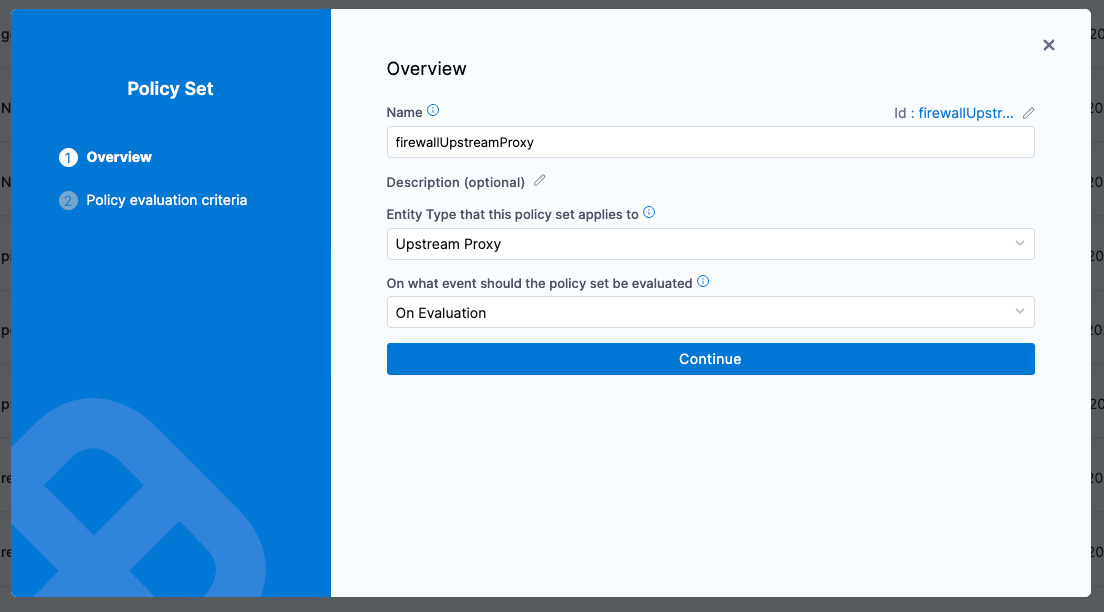
-
On the Policy evaluation criteria step, set the fail action for each policy in the set. This is what Dependency Firewall uses at pull time to decide the artifact verdict.
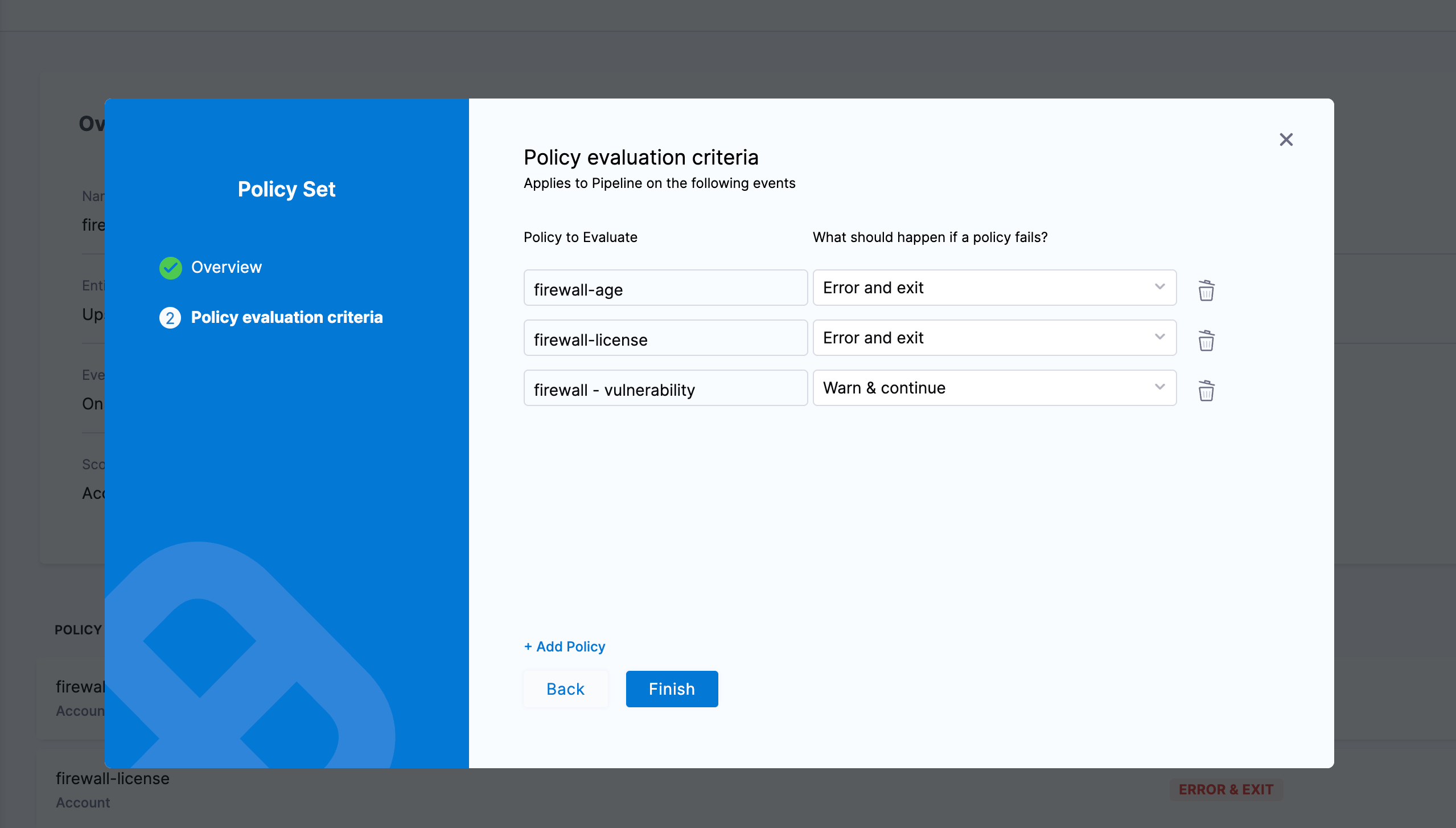
For each policy, choose one of two fail actions:
- Error and exit: if this policy fails, the artifact verdict is Blocked. The artifact is not cached in the upstream proxy and cannot be used. An exemption is required to consume it.
- Warn & continue: if this policy fails, the artifact verdict is Warning. By default the artifact is still cached and remains usable; the violation only shows up on the Dependency Firewall dashboard. If the upstream proxy registry has Quarantine artifacts on 'Warn and Continue' fail criteria selected, the artifact is also quarantined and requires an exemption. Go to How the quarantine checkbox behaves to understand the full behavior.
You can mix fail actions across policies in the same set. For example, set vulnerability policies to Error and exit for hard enforcement and set license or package age policies to Warn & continue for visibility-only enforcement.
-
Enable enforcement by navigating to the Policy Sets list, finding your Dependency Firewall policy set, and toggling the Enforced switch to ON.

When enforced, the policy set automatically applies to all upstream proxy registries with Dependency Firewall enabled within the policy set's scope. Account level applies to all upstream proxy registries in the account, Organization level applies to all upstream proxy registries in that organization, and Project level applies only to upstream proxy registries in that specific project.
Policy sets only apply to upstream proxy registries that have Dependency Firewall enabled. Make sure to enable Dependency Firewall in your upstream proxy registry configuration.