Infrastructure Provisioning FAQs
This topic answers common questions about infrastructure provisioning in Harness Continuous Delivery (CD).
Go to the provisioning overview to understand how provisioning works.
Supported provisioners and integrations
Does Harness support a custom provisioning tool?
Harness supports Terraform, Terragrunt, AWS CloudFormation, Azure ARM, and Azure Blueprint provisioners. To support other provisioners or your existing shell script implementations, Harness includes Shell Script provisioning.
Go to Shell Script provisioning to configure it.
Does Harness support database orchestration?
Yes. Harness supports database orchestration with Database DevOps. You can create pipelines that include steps for deploying database changes, similar to Liquibase and Flyway, as well as custom SQL scripts. This keeps your database schema in sync with your application code in a controlled, automated manner.
Go to Database DevOps to orchestrate database changes alongside your deployments.
Does Harness support Cosmos DB?
To orchestrate SQL changes to the database, customize the functionality using the following:
To create a Cosmos DB, Harness supports creation through:
Does Harness support Azure Cache?
Azure Cache is not an application that you deploy. It is a managed Redis service by Azure. Harness can help spin up Azure Cache through its infrastructure provisioning capabilities:
Does Harness support Azure App Services?
No. Harness does not support Azure App Services as a native deployment type like Azure Web Apps.
Harness supports deployment templates to achieve this use case. Alternatively, you can orchestrate the release through:
Can Harness connect to a Databricks cluster?
No. Harness does not have a native integration. If you use Terraform, define the access block by following the Databricks Terraform provider documentation. Wherever the delegate is hosted, it needs network access to reach and communicate with Databricks.
Shell Script provisioning
Does the Shell Script Provisioning step have built-in output variables?
The Shell Script Provisioning step does not have script output variables like the Shell Script step. Its variable configuration only provides input variables.
How do I access output variables from the Shell Script Provisioning step?
The Shell Script Provisioning step expects the output to be written in JSON to the file $PROVISIONER_OUTPUT_PATH. You then access it in a subsequent step with an instance variable, for example:
<+pipeline.stages.shellscriptprovision.spec.execution.steps.shell1.output.Instances>
Why do I not see Bitbucket or GitHub options when storing my shell script in the Harness File Store?
Currently, there are only two options to select the shell script provisioning script: inline and the Harness File Store.
Is there a predefined rollback step for Shell Script provisioning?
No. An out-of-the-box rollback step is not available. Add your own scripts under the Rollback section of the stage Environment.
CloudFormation provisioning
Is there a way to simulate CloudFormation changes without applying them?
Yes. Use the change set feature. First, create a change set to preview the changes. Once you are satisfied with the preview, execute the change set using the aws cloudformation execute-change-set command. This lets you assess the impact of the changes before applying them.
How do I use CloudFormation with Harness?
You can use CloudFormation with Harness in two ways:
- Dynamic infrastructure provisioning: Provision the target infrastructure for a deployment as part of the stage Environment settings, then deploy to that provisioned infrastructure in the same stage.
- Ad hoc provisioning: Provision resources other than the target infrastructure for the deployment.
Azure provisioning
Why can I not deploy an ARM template?
If you get the following error when deploying ARM templates, the $schema and contentVersion parameters might not have been removed from the parameters file. This is due to a limitation in the Azure Java SDK and REST API.
Status code 400, "{"error":{"code":"InvalidRequestContent","message":"The request content was invalid and could not be deserialized: 'Error converting value \"https://schema.management.azure.com/schemas/2015-01-01/deploymentParameters.json#\" to type 'Azure.Deployments.Core.Definitions.DeploymentParameterDefinition'. Path 'properties.parameters.$schema', line 1, position 6636.'."}}"
Go to ARM parameter file to review a valid example.
AWS CDK provisioning
How do I use AWS CDK infrastructure provisioning in Harness?
Harness lets you run AWS CDK workloads through container-based steps.
Go to AWS CDK provisioning to learn more.
Does AWS CDK still require feature flags to use?
No. AWS CDK is generally available and does not require any feature flags to enable and use.
Go to AWS CDK provisioning to learn more.
What is the current and future support for CDK, including zipped files and CDK as a deployment type?
CDK currently supports containerized images but not zipped files. CDK is not a deployment type; it functions similarly to CloudFormation. Support for zipped files is planned. Native canary and blue-green deployments are not possible with CDK due to its black-box nature.
How do I resolve a ModuleNotFoundError for aws_cdk in a CDK step?
The ModuleNotFoundError for aws_cdk occurs because the required Python packages are not installed in the CDK Synth step container. Add a pip install command within the step.
Terraform provisioning and configuration
How does Harness support Terraform?
Harness lets you use Terraform to provision infrastructure as part of your deployment process. Harness can provision any resource supported by a Terraform provider or plugin.
Go to Terraform provisioning with Harness to review the process.
Do I need to deploy an application to use Terraform?
No. You do not need to deploy artifacts through Harness services to use Terraform provisioning in a workflow. You can use Terraform to provision infrastructure without deploying any artifact.
What deployment strategies can I use Terraform with?
You can use Terraform with all deployment strategies.
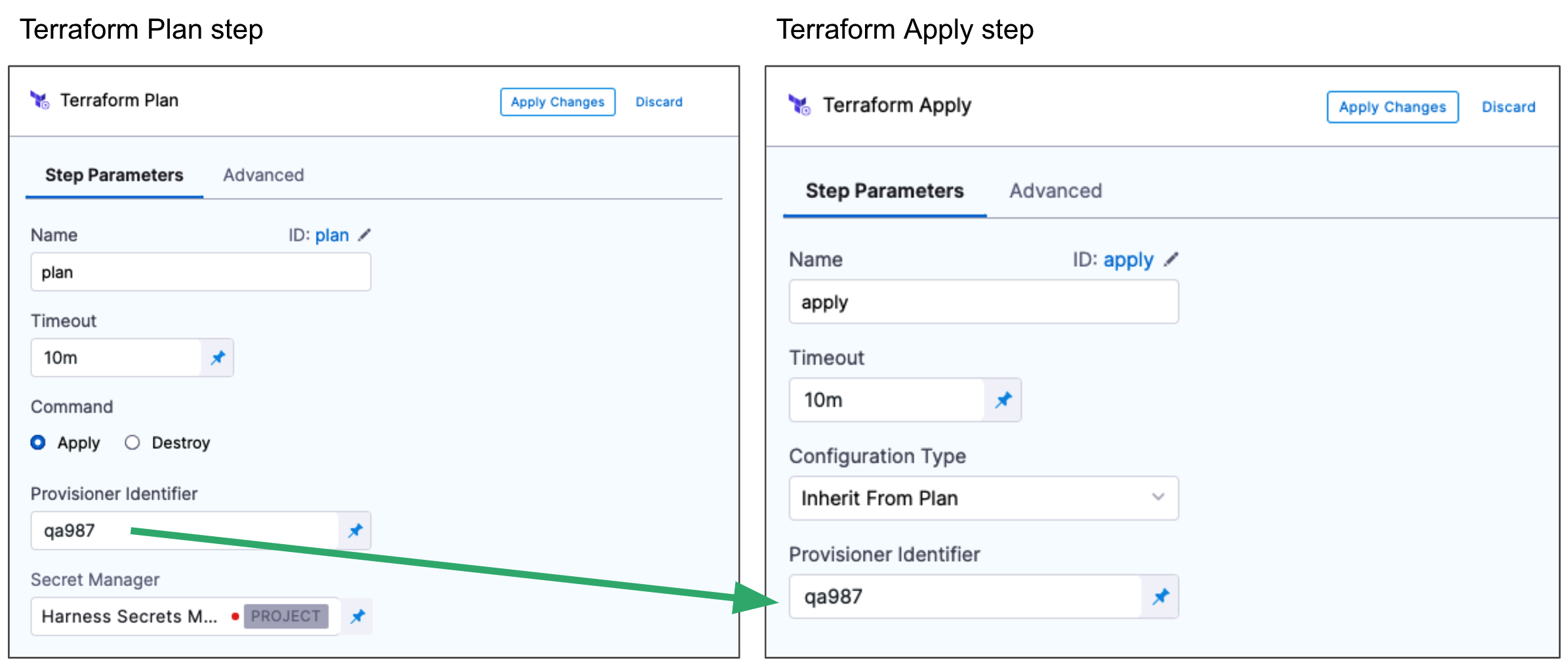
Can I perform a Terraform dry run?
Yes. The Terraform Plan and Terraform Apply steps can run as a dry run, just like the terraform plan command.
First, add the Terraform Plan step and define the Terraform script for it to use. Next, add the Terraform Apply step, select Inherit from Plan in Configuration Type, and reference the Terraform Plan step using the same Provisioner Identifier.
Can I remove resources provisioned with Terraform?
Yes. Add a Terraform Destroy step to remove any provisioned infrastructure, just like the terraform destroy command. Go to the Terraform destroy documentation to review the command.
Go to Remove provisioned infrastructure with the Terraform Destroy step to configure it in Harness.
Can Terraform vars in a Terraform step contain a hyphen?
No. Terraform vars are exported as shell environment variables. Shell variable names cannot contain a hyphen, so this is not supported.
Why is my Terraform script directory initializing with a null value in the path?
The Terraform script directory on the delegate is based on default values such as org and project, and it also includes the provisioner identifier in the path. If you use the provisioner identifier with an expression and the expression resolves to null, you see a null value in the initialized path.
Does the Terraform step keep the working directory persistent?
No. In both the Plan and Apply steps, Harness cleans up the Terraform directories.
How do I access files created during the Terraform Plan step in the Apply step?
The workspace is cleaned after every run of the Plan or Apply step. Use version control to store these files and reference them later.
Is there a way to persist the Terraform steps working directory?
No. By design, Harness always cleans the working directory on each Terraform step, and the working directory cannot be persisted.
If a Terraform Apply step is inside a stage with a matrix or loop, is the repo cloned every time the step runs?
Yes. The underlying repo is cloned for each run of the step in the loop.
Are there access permissions or restrictions affecting the execution of Python commands within Terraform?
No. There are no restrictions on running Python in Terraform.
In Terraform, how do I return a null value from a for_each?
In Terraform, you can return a null value from a for_each expression by using the null literal directly. For example:
variable "my_map" {
  type = map(any)
  default = {
    key1 = "value1"
    key2 = null
  }
}

resource "aws_instance" "my_instances" {
  for_each = var.my_map

  # Other resource attributes...
}
key2 in the my_map variable is set to a null value, so Terraform does not create an instance for that key when using for_each.
How do I get a file from a different source and use it in a Terraform step at runtime?
Use a Shell Script step to fetch the file from your source and store it on the delegate at a specific path, then reference that path in your Terraform config. Ensure that your Plan and Apply steps run on the same delegate.
Go to Run all pipeline steps in one pod to keep steps on the same delegate.
How do I use a custom stage to run the Terraform Cloud Run step?
The Run step is only supported in CI and CD stages. For a custom stage, use the Shell Script step.
Why is my environment variable not working in Terraform Plan or Apply?
Some environment variables are exclusive to Terraform Enterprise or Terraform Cloud. For example, TFE_PARALLELISM is a Terraform Enterprise environment variable that is not supported by the Terraform CLI. To use these environment variables, use either Terraform Enterprise or Terraform Cloud.
How do I handle a Terraform pipeline secret in the tfvar file?
Multi-line secrets might not render correctly. Using Terraform's heredoc syntax (<<EOF ... EOF) can help retain formatting.
How do I dynamically select infrastructure in my deployment?
Use runtime expressions to dynamically select infrastructure based on environment conditions. This requires predefined mappings of environment-to-infrastructure variables.
Should I create my Terraform pipeline in the CI or CD module?
The decision depends on your use case and deployment strategy.
If your goal is to automate the deployment of infrastructure whenever your code changes, and you use Terraform for provisioning, create the pipeline in the CD module. This keeps your application infrastructure current with code changes and provides automated deployment.
If your use of Terraform is focused on provisioning infrastructure for your CI/CD pipeline itself, create the pipeline in the CI module. This automates the provisioning of your pipeline infrastructure and keeps it up to date.
In general, the CI module builds and tests code, while the CD module deploys code to production. Your specific use case and deployment strategy guide the decision. You can also incorporate both types of processes within a single pipeline, depending on your requirements.
Can I define optional tfvar files in Terraform?
Yes. Harness supports optional Terraform var files.
Go to Optional Terraform var files to configure them.
Terraform versions, caching, and delegates
Is there a way to cache Terraform plugins in delegates?
Yes. Set the TF_PLUGIN_CACHE_DIR environment variable.
Go to the Terraform provider plugin cache documentation to review the configuration.
Is there a way to cache Terraform plugins for Harness Terraform pipeline executions?
Yes. Use the caching functionality provided by Terraform. Set the following environment variable for the Terraform pipelines:
TF_PLUGIN_CACHE_DIR=/opt/harness-delegate/<plugincachedirectory>
Can I run a Terraform step with a specific Terraform version and another pipeline with a different version?
Yes. Use two different delegates with the required Terraform version installed on each.
How many versions of Terraform does Harness support?
Harness does not include Terraform on the Harness Delegate. You must install Terraform on the delegate when you use Terraform in Harness. Harness supports the following Terraform versions: v1.3.5, v1.1.9, v1.0.0, v0.15.5, v0.15.0, and v0.14.0. Some Harness features might require specific Terraform versions.
Go to CD integrations and supported technologies to review the current supported versions.
Can I run multiple Terraform pipelines concurrently?
The terraform init command does not work if you run init for the same working directory in parallel. Such concurrent execution fails with the error Failed to Install Provider.
Which certificate does Harness use to validate connectivity to the Terraform Cloud endpoint?
The Terraform Cloud connector uses the delegate to test connectivity, and for any task run by the delegate, it uses the JVM trustStore for SSL validation. If the Terraform Cloud endpoint uses a self-signed certificate, update the delegate trustStore with the certificate details.
Is there a way to switch AWS accounts while using the native Terraform step?
Yes. Harness supports an AWS connector so the Terraform Plan and Apply steps can assume a role to provision infrastructure.
Go to AWS connector to configure role-based authentication.
Terraform outputs, secrets, and state
How do I assign a Terraform output to a Harness pipeline or stage variable?
Harness captures the output of the Apply step. Use the following to copy the JSON output to a file:
echo "<+pipeline.stages.EC2_deploy.spec.execution.steps.TerraformApply_1.output.TF_JSON_OUTPUT_ENCRYPTED>" > /opt/harness-delegate/aaabbb.txt
Go to Encrypt the Terraform Apply JSON outputs to review the output encryption steps.
Can I use a Terraform plan from one stage in the Apply step of another stage?
No. The Inherit from Plan option for the Terraform Apply step works only within the same stage. You cannot run the Plan step in one stage and use Inherit from Plan for the Apply step in another stage.
What is the recommended way to save the state file for Terraform pipelines?
For testing scenarios, you can run Terraform without a remote backend for saving the state file. For production runs, always start with a remote backend configured from the first run.
How do I ensure the state file is saved in the Terraform Enterprise (TFE) workspace when running a Terraform apply locally on the delegate?
Check whether the Harness delegate has the permissions to write to the target workspace. If the delegate lacks the required permissions, the state file is not uploaded to the TFE workspace.
Is the state file uniquely identified by the combination of provisioner ID and workspace name?
Yes. State files are uniquely identified using the provisioner ID and workspace name, which is why the provisioner ID should always be unique.
How do I use outputs from the Terraform or Terragrunt Apply steps?
You access outputs from Terraform or Terragrunt Apply steps the same way. After the Apply step runs, the outputs are available in the Step Output section and are accessed using expressions. For example:
<+pipeline.stages.stag1.spec.execution.steps.TerraformApply_4.output.get("test-output-name2")>
Go to Run a Terraform Plan with the Terraform Apply step to review output usage.
Can I use my own vault to store the Terraform Apply step output?
Currently, only the Harness secret manager is supported.
How do I encrypt my Terraform output?
Terraform output can be encrypted once you configure a secret manager for the Encrypt JSON output field under the optional configuration of the Terraform Apply step.
How does the Encrypt JSON output setting work in the Terraform Apply step?
This setting temporarily creates a secret that stores the Terraform output JSON. The secret is created using the Harness Secret Manager provider and is available during pipeline execution. The secret is deleted at the end of the execution.
Go to Encrypt the Terraform Apply JSON outputs to learn more.
How do I retrieve encrypted Terraform output data from a Terraform Apply step?
Find the TF_JSON_OUTPUT_ENCRYPTED output variable and reference it using a Harness expression. For example:
<+pipeline.stages.stage1.spec.execution.steps.TerraformApply_1.output.TF_JSON_OUTPUT_ENCRYPTED>
The value is encrypted in the Harness UI, but the values are available in downstream steps and stages.
Go to Encrypt the Terraform Apply JSON outputs to learn more.
How long does the secret created from the Terraform Apply step stay in place, and how is it overridden?
The secret is always unique, but its expression stays the same for a given Terraform Apply step. It is stored in the secrets at the project level and exists until the pipeline finishes. Once the pipeline finishes execution (passed, failed, or aborted), Harness cleans up the secret. There is no way to control how long it is kept.
Does Harness support storing the Terraform plan on the delegate temporarily?
Yes. You can store the Terraform plan on the delegate and use it in the Apply step. This bypasses the restriction to store the plan in a secrets manager and lets you store it locally. Harness Delegate version 24.04.82705 or later is required.
Go to Store plan on Harness Delegate to configure this.
Are there any limitations to Terraform rollback?
Yes. Rollback reverts to the last successful state. For example, if modules 1 and 2 deployed successfully and module 3 failed, the rollback reverts to the successful state of modules 1 and 2. If module 3 succeeds and the subsequent deployment fails, the rollback includes only the state with module 3 deployed, excluding modules 1 and 2.
Rollback is not possible if the Terraform Apply step runs with the Skip state storage option enabled and no Terraform backend is configured in the Terraform files. In that scenario, the Rollback step would be incorrectly set up and could lead to unexpected results.
Harness Terraform Provider and resource management
What is the correct way to specify org-level or account-level connectors in Terraform resources?
Always prefix the scope of the connector reference before providing it in the resource file. For example, for an org-level connector, the correct way to specify it is org.myconnectorref.
Why do I get an error that a project-level resource cannot be used at the org level?
Harness has a top-down hierarchy of resources: account, org, and then project. You can reference a parent-level resource at the child level, but not the reverse. You can reference an account-level resource while creating a project-level resource, but not a project-level resource while creating an account-level resource.
How do I get the YAML for all three service-specific override types using the Terraform provider?
Go to the example usage in the Harness Terraform provider platform_service_overrides_v2 resource to review the YAML for all three override types.
How do I deploy infrastructure using a scripted method as part of my CD stage?
Use the Harness Terraform Provider.
Go to Terraform provisioning with Harness to configure it.
Does Harness allow rotation of harness_platform_token in Terraform resource management?
No.
Go to the Harness Terraform provider platform_token resource to review token management.
How do I fetch the provisioner ID in a pipeline using Terraform with an expression?
Fetch the provisioner ID in a pipeline using the expression <+stage.pipeline.variables.HARNESS_PROVISIONER_ID>.
Go to Provision infrastructure dynamically with Terraform to learn more.
Why does the Terraform provider not allow changing the pipeline name in an input set created using the Terraform provider?
The input set is associated with specific pipelines. Once it is created, it cannot be associated with other pipelines. That is why changing the pipeline identifier returns an error.
You can change the other attributes of the input set in the YAML, such as the variables and their values, but not the tagged pipeline.
How do I create a Harness project from Terraform?
Prepare a Terraform script of the resources you want to create in your project. If you want to create a project with Terraform in an org, first set up all the required resources using the Terraform provider script. You can reference the Terraform resources from the Harness Terraform Provider API documentation.
How do I migrate a service to a higher scope?
Currently, there is no built-in way to move or upgrade services to higher scopes. When sharing a service, it needs a scope at either the organization or account level. You can use the Terraform provider to recreate those services at a higher level.
Go to Onboard with the Terraform provider to learn how.
What are the best ways to create Harness deployment secrets, connectors, and pipelines?
Creating resources depends on your requirements. Harness provides three ways to create resources:
- Terraform
- UI
- API
Choose the option that best suits your needs:
What happens when I use V1 YAML with Terraform or the API to create entities?
There is no automated upgrade path from V1 to V2 YAML schemas. You must manually update your YAML to V2. Harness does not automatically convert V1 YAML to V2.
How do I handle a cyclical dependency that Terraform's linear dependency graph cannot resolve?
A cyclical dependency can occur when you use Terraform to manage pipelines. Review the pipeline definitions carefully to identify and break the cycle.
Go to the Terraform documentation to review dependency management.
How do I fetch the API status to build automation based on the result?
For example, for the delegate token creation API:
curl -i -X POST 'https://app.harness.io/ng/api/delegate-token-ng?accountIdentifier=xxxxxxxxxxxxxxxxxxx&orgIdentifier=string&projectIdentifier=string&tokenName=tokendelnew&revokeAfter=0' \
-H 'x-api-key: xxxxxxxxxxxxxxxxxxxxxxxxxxxxxxxxxxxxx'
The output is:
{
  "metaData": {},
  "resource": {
    "uuid": null,
    "accountId": "jxxxxxxxxxxxxxhg",
    "name": "tokendelnew",
    "createdBy": null,
    "createdByNgUser": {
      "type": "SERVICE_ACCOUNT",
      "name": "Terraformrpoviderusheer",
      "email": "terrio",
      "username": "Terraformrpoviderusheer",
      "accountId": "jxxxxxxxxxxxxxxxx_hg",
      "jwtclaims": {}
    },
    "createdAt": 17xxxxxxxxxxx,
    "status": "ACTIVE",
    "value": "OTxxxxxxxxxxxxxxxxxxxxxxxg=",
    "ownerIdentifier": null,
    "revokeAfter": 0
  },
  "responseMessages": []
}
Use the status from the output. In case of failure, it is ERROR. You can also use the HTTP output codes, such as 200 for success and 400 for failure.
Deployment and provisioning issues
Why do I get a "Backend not initialised" error when running terragrunt plan with a specific module?
When dealing with specific modules, Harness does not run terraform init directly; instead, it uses the terragrunt terragrunt-info command. To initialize the backend properly, run terraform init. This initialization is triggered automatically when you select the All modules option.
Why does my CloudFormation create stack operation fail with an InsufficientDataHealthStatus validation error?
The parameter value InsufficientDataHealthStatus is not within the allowed values per the AWS documentation. The full error looks like this:
Exception: Invalid request: Parameter 'InsufficientDataHealthStatus' must be one of AllowedValues (Service: AmazonCloudFormation; Status Code: 400; Error Code: ValidationError; Request ID: ...; Proxy: null) while creating stack: HarnessStack-route53
The allowed values are:
Healthy: Route 53 considers the health check to be healthy.
Unhealthy: Route 53 considers the health check to be unhealthy.
LastKnownStatus: Route 53 uses the status of the health check from the last time that CloudWatch had sufficient data to determine the alarm state. For new health checks that have no last known status, the default status for the health check is healthy.
Go to the AWS Route 53 health check configuration reference to review the allowed values.
Why is the resource constraint holding the deployment for two pipelines with different infrastructures but the same service?
The deployment might be held because the infrastructure key is created from the service ID, environment ID, and connector ID. If the connector ID is missing, the infrastructure key remains the same for both pipelines.
To resolve this and allow simultaneous deployment, you can:
- Add a connector: In the Select Host field, specify a connector.
- Change the secret identifier: Ensure the secret ID is different for each pipeline.
This approach prevents parallel deployments when a pipeline is triggered both from the API and manually at the same time.
How do I configure and use custom runners with specific resource requirements for specific pipelines?
You can select infrastructure per pipeline in Harness. For Harness Cloud, you can scale resources as needed. Alternatively, if you run builds on your own EKS cluster, you can define CPU and memory requirements within the pipeline.
Go to Set up a Kubernetes cluster build infrastructure to configure build resources.
Why is my Terraform plan failing in a pipeline?
Terraform plans can fail due to incorrect configurations, missing credentials, or conflicts with existing resources.
Service instances and licensing
Are Harness service instances counted with Terraform provisioning?
Harness service instances (SIs) are not consumed and no additional licensing is required when a Harness pipeline uses Terraform to provision resources. When Harness deploys artifacts through Harness services to the provisioned infrastructure in the same pipeline, SI licensing is consumed.