Provisioning overview
Harness provides flexible provisioning options to support different deployment workflows and infrastructure requirements. Depending on your use case, you can provision infrastructure in different ways.
Harness supports the following provisioning use cases:
- Ad hoc provisioning: Temporary and on-demand provisioning of resources for specific tasks or purposes.
- Dynamic infrastructure provisioning: Provisions the target deployment environment as part of the deployment process. It is used for temporary pre-production environments, such as development, testing, and QA. Production environments are generally pre-provisioned and exist before deployment.
What will you learn in this topic?
- Ad hoc provisioning: How to provision resources with provisioning steps in the stage Execution section, and which provisioners and steps are available.
- Dynamic infrastructure provisioning: How Harness provisions and maps target infrastructure during pipeline execution, and which deployment types are supported.
- Output mapping: How to map provisioner outputs to Harness infrastructure settings using the
<+provisioner.OUTPUT_NAME>expression. - Combined provisioning: How ad hoc and dynamic provisioning work together in a single stage.
Ad hoc provisioning
Ad hoc provisioning creates infrastructure on demand to support a specific task or short-term requirement.
To perform ad hoc provisioning in your Harness Deploy stage, you use provisioning steps as part of the stage Execution section.
For example, in the following figure, Harness Terraform Plan and Apply steps provision the required AWS IAM resources, which are independent of the rolling deployment to the Kubernetes cluster itself.
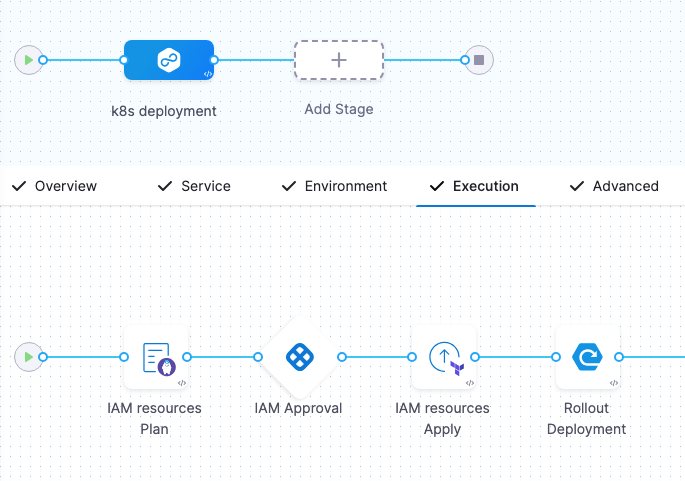
Ad hoc provisioning steps
The following topics describe how to use each supported provisioner for ad hoc provisioning:
- Terraform:
- Terraform Plan
- Terraform Apply
- Terraform Rollback (enable the Rollback setting to view this step).
- Terraform Cloud
- Terragrunt:
- CloudFormation:
- Create Stack
- Delete Stack
- Rollback Stack (enable the Rollback setting to view this step).
- Azure:
- Shell Script:
- AWS CDK:
Dynamic infrastructure provisioning
Dynamic infrastructure provisioning creates your target infrastructure dynamically during the execution of your pipeline.
To perform dynamic provisioning in your Harness Deploy stage, you add provisioning steps to the stage Environment settings. Then you map specific provisioner script or template outputs to the target infrastructure in the same stage Environment section.
For example, the Terraform Apply step in the Environment section provisions the name of the target Kubernetes cluster namespace, which is then mapped to that stage's target Infrastructure.
At deployment runtime, Harness performs the following:
- Provisions the target environment using your script or template.
- Uses the script or template outputs to locate it and deploy to it.
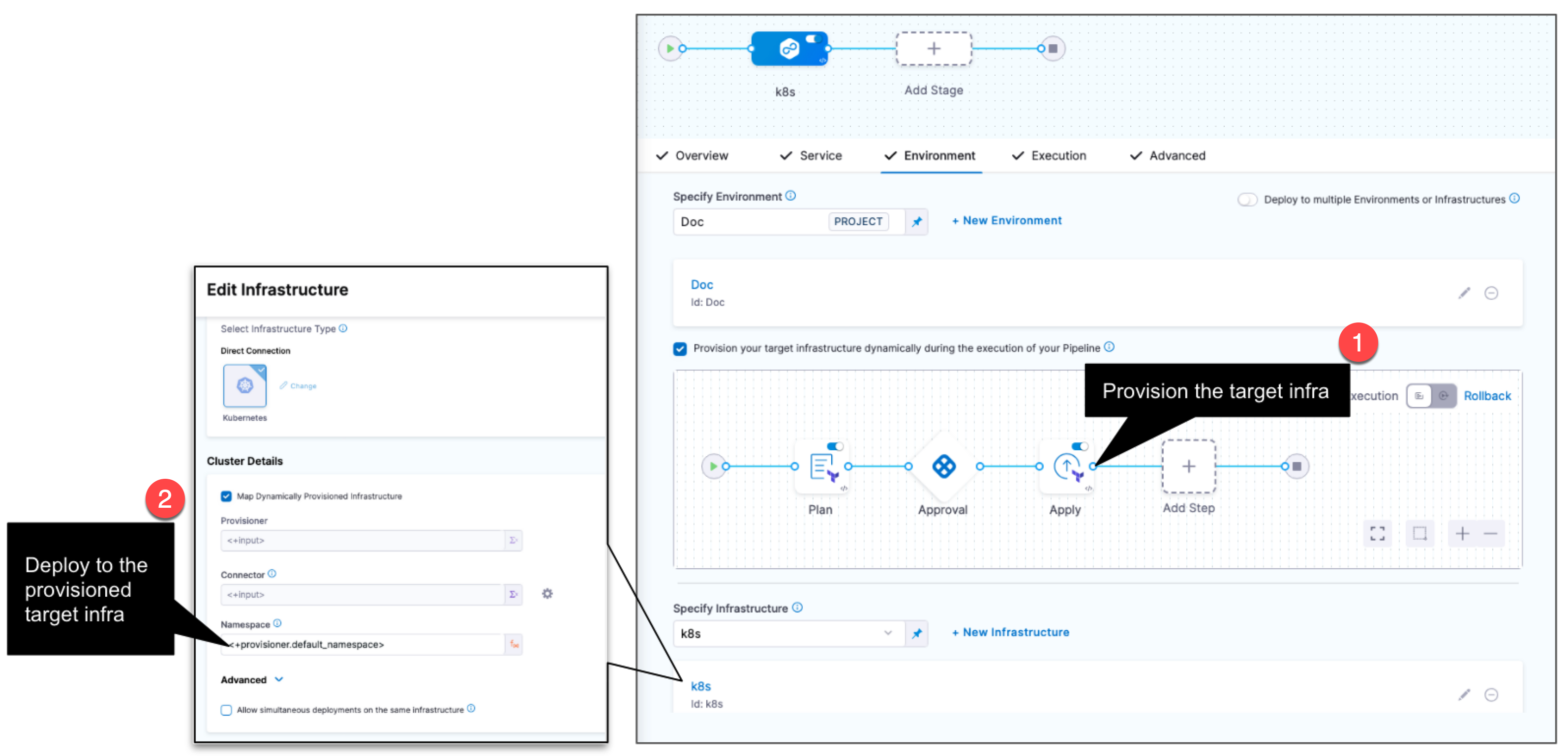
Only provisioners that produce outputs can be used in an Infrastructure Definition to dynamically provision deployment target infrastructure.
- Dynamic provisioning of target infrastructure is not supported for the AWS ASG, AWS SAM, and SpotInst deployment types.
- Dynamic provisioning is not supported when using multiple services and environments in a pipeline stage.
Dynamic provisioning by deployment type
Use the following topics to learn how to perform dynamic provisioning for each supported deployment type:
- Kubernetes infrastructure (also applies to Helm, Native Helm, and Kustomize).
- Azure Web Apps
- AWS ECS
- AWS Lambda
- Google Cloud Functions
- Serverless.com framework for AWS Lambda
- Tanzu Application Services
- VM deployments using SSH
- VM deployments using WinRM
Dynamic provisioning and deployment type support matrix
The following table lists the provisioners supported for dynamic provisioning with each deployment type:
| Terraform and Terraform Cloud | CloudFormation | Terragrunt | Azure Resource Manager (ARM) | Azure Blueprint | Shell Script | AWS CDK | |
|---|---|---|---|---|---|---|---|
| Kubernetes | ✔️ | ✔️ | ✔️ | ✔️ | ✔️ | ✔️ | ✔️ |
| Azure Web Apps | ✔️ | ✔️ | ✔️ | ✔️ | ✔️ | ✔️ | |
| AWS ECS | ✔️ | ✔️ | ✔️ | ✔️ | ✔️ | ||
| AWS Lambda | ✔️ | ✔️ | ✔️ | ✔️ | ✔️ | ||
| Spot Elastigroup | ✔️ | ✔️ | ✔️ | ✔️ | ✔️ | ||
| Google Cloud Functions | ✔️ | ✔️ | ✔️ | ✔️ | |||
| Serverless.com framework | ✔️ | ✔️ | ✔️ | ✔️ | ✔️ | ||
| Tanzu Application Services | ✔️ | ✔️ | ✔️ | ✔️ | ✔️ | ✔️ | ✔️ |
| SSH deployments | ✔️ | ✔️ | ✔️ | ✔️ | ✔️ | ✔️ | ✔️ |
| WinRM deployments | ✔️ | ✔️ | ✔️ | ✔️ | ✔️ | ✔️ | ✔️ |
Dynamic provisioning outputs for mapping
To use dynamic provisioning, you map outputs from your provisioner script or template that tell Harness what infrastructure to provision and use as the deployment target infrastructure.
You use these outputs in Harness expressions that you enter in the Harness infrastructure settings.
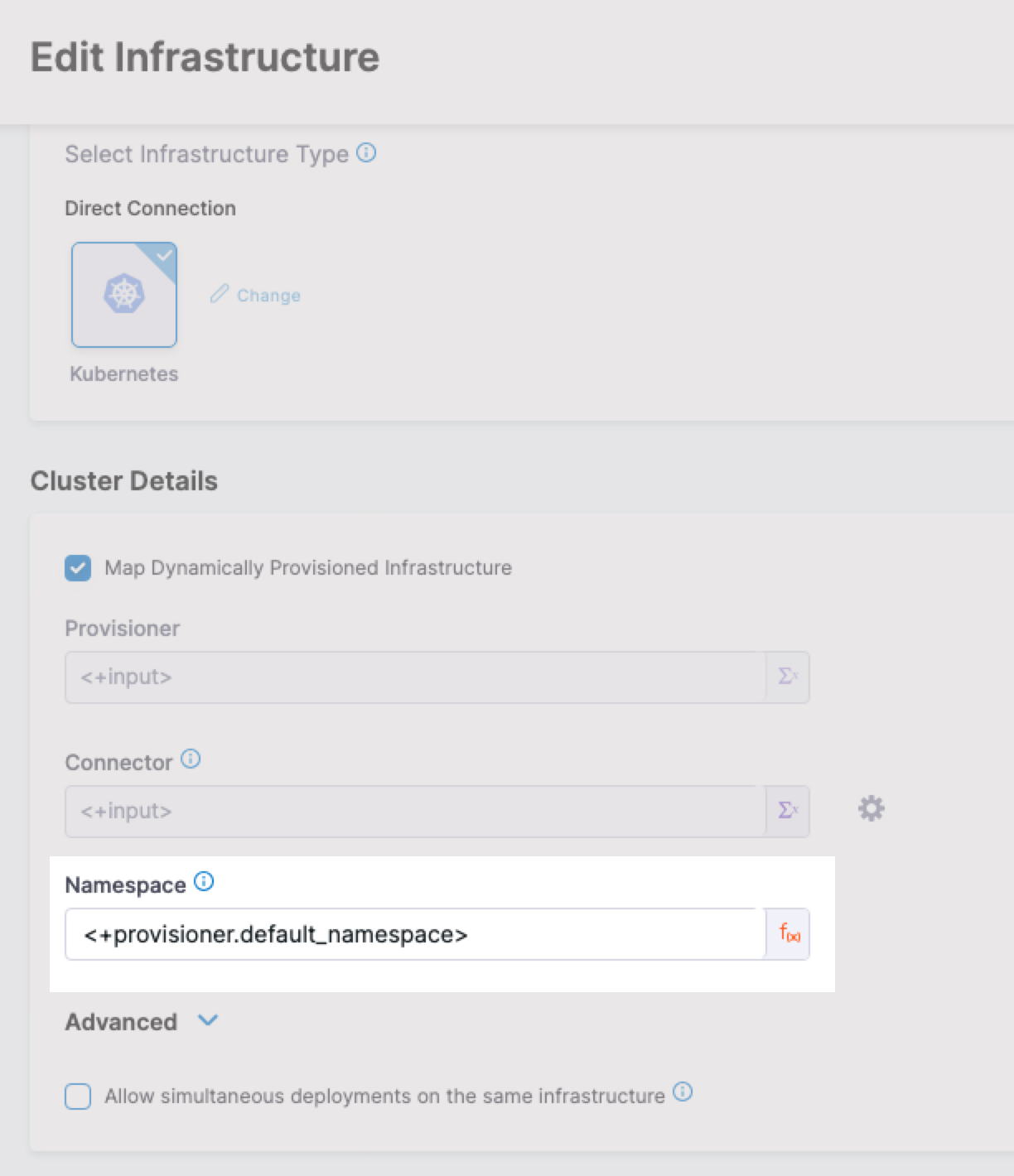
The format for the expression is <+provisioner.OUTPUT_NAME>.
For example, if a Terraform script has the following output, the expression is <+provisioner.default_namespace>:
output "default_namespace" {
  value = kubernetes_namespace.example.metadata[0].name
}
The following figure shows the expression used to map the output in the infrastructure settings:
The following table shows the Infrastructure Definition settings that are mapped to provisioner outputs:
| Infra type | Infra settings that require mapping |
|---|---|
| Kubernetes Direct | Namespace, Release Name (optional) |
| Kubernetes GCP | Namespace, Cluster, Release Name (optional) |
| Kubernetes Azure | Namespace, Cluster |
| Kubernetes AWS | Namespace, Cluster, Release Name (optional) |
| Physical Data Center | Host Array Path, Host Attributes |
| SSH and WinRM on AWS | Region, Tags |
| SSH and WinRM on Azure | Subscription Id, Resource Group, Tags |
| Azure Web App | Subscription, Resource Group |
| Google Cloud Functions | Region, Project |
| AWS Lambda | Region |
| AWS ECS | Region, Cluster |
| Tanzu App Services | Organization, Space |
| Serverless.com AWS Lambda | Region, Stage |
Combine ad hoc and dynamic provisioning
You can use ad hoc and dynamic provisioning together in the same stage.
For example, you can:
- Dynamically provision the target deployment Kubernetes namespace in the stage Environment.
- Deploy your services to the provisioned namespace in the stage Execution.
- Use subsequent ad hoc provisioning steps in Execution to change the provisioned namespace.
You configure dynamic provisioning in a CD Deploy stage's Environment settings and ad hoc provisioning in its Execution settings.
At deployment runtime, Harness processes the Environment settings first, along with its dynamic provisioning, followed by the Execution settings, containing its ad hoc provisioning.
Consequently, the Environment settings cannot reference subsequent Execution settings, but the Execution settings can reference previous Environment settings.
For example, if you dynamically provisioned a Kubernetes namespace in the Environment settings and mapped the namespace output using the expression <+provisioner.default_namespace>, you can reference the namespace in the Execution steps settings using the same expression, including any files that those steps use.
However, if you performed ad hoc provisioning in the Execution steps, you cannot reference the outputs of those steps in the Environment settings.
Provisioning infrastructure with Azure Resource Manager (ARM) does not consume Harness Service Instances (SIs) or require additional licensing.
If the same stage or pipeline also deploys artifacts to the provisioned infrastructure using Harness services, Service Instance licensing is consumed.
Next steps
- Go to Infrastructure provisioning FAQs to review frequently asked questions about Harness infrastructure provisioning.
- Go to Terragrunt provisioning to provision infrastructure with Terragrunt.
- Go to Shell Script provisioning to provision infrastructure with a shell script.
- Go to Kubernetes infrastructure to define and dynamically provision Kubernetes target infrastructure.