GitOps Sync with Multiple Rollout Steps
This advanced example demonstrates a complete pipeline that starts with a GitOps sync step followed by multiple GitOps Rollout steps, showing how to pass values between steps.
Overview
Harness provides a powerful expression system to access outputs from previous steps. This enables dynamic configuration where steps automatically discover and use the correct rollout details without hardcoding values.
Key Benefits
- Dynamic Configuration: Steps automatically discover and use the correct rollout details
- Reusability: The same pipeline can work across different environments and applications
- Error Reduction: No hardcoded values that could become outdated
- Maintainability: Changes to rollout names or namespaces are automatically reflected
Pipeline Overview
Here's a visual representation of the pipeline:
To use Argo Rollouts with Harness GitOps pipelines, ensure the CDS_GITOPS_ENABLE_ROLLOUTS_PIPELINE_UX feature flag is enabled in your Harness account.
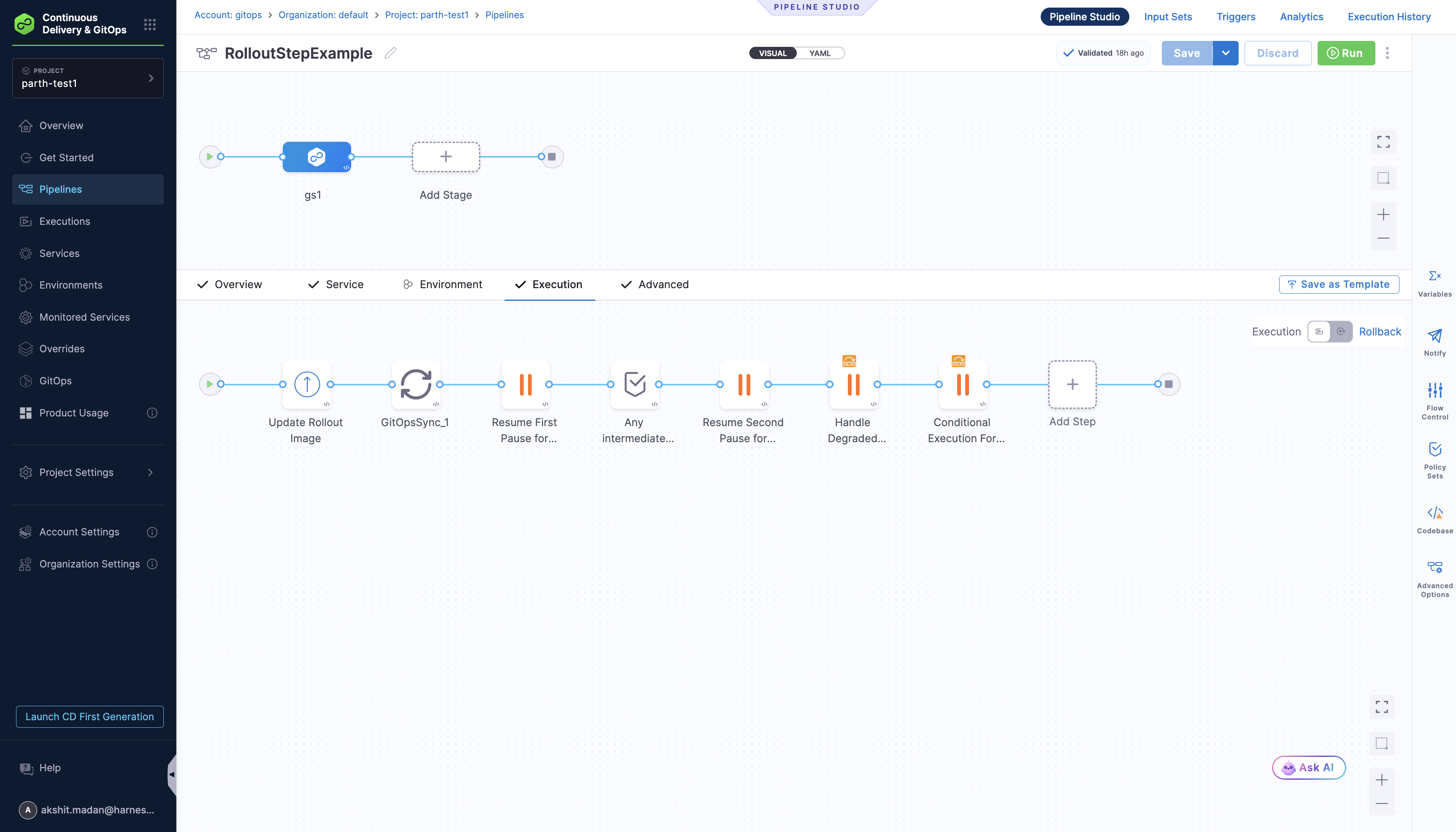
This pipeline consists of the following key steps:
- Update Rollout Image: Updates the image tag in your GitOps Application's manifest
- GitOps Sync: Synchronizes the GitOps Application to apply the image update, which triggers a new rollout
- Resume First Pause for Rollout: Resumes the rollout from the first pause step
- Any Intermediate Steps: Optional placeholder steps for custom logic
- Resume Second Pause for Rollout: Resumes the rollout from the second pause step
- Handle Degraded Rollout: Handles degraded rollout states with retry action
- Conditional Execution For Rollout: Conditional execution based on application name
Pipeline YAML
pipeline:
  name: RolloutStepExample
  identifier: RolloutStepExample
  projectIdentifier: projectidentifier
  orgIdentifier: default
  tags: {}
  stages:
    - stage:
        name: gs1
        identifier: gs1
        description: ""
        type: Deployment
        spec:
          deploymentType: Kubernetes
          gitOpsEnabled: true
          service:
            serviceRef: svc1
          execution:
            steps:
              - step:
                  type: UpdateGitOpsApp
                  name: Update Rollout Image
                  identifier: Update_Rollout_Image
                  spec:
                    targetRevision: master
                    kustomize:
                      images:
                        - argoproj/load-tester:latest
                        - argoproj/rollouts-demo:yellow
                      replicas: []
                    applicationName: app-rollout-example
                    agentId: qaargoagent
                  timeout: 10m
              - step:
                  type: GitOpsSync
                  name: GitOpsSync_1
                  identifier: GitOpsSync_1
                  spec:
                    prune: false
                    dryRun: false
                    applyOnly: false
                    forceApply: false
                    applicationsList:
                      - applicationName: app-rollout-example
                        agentId: qaargoagent
                    retryStrategy: {}
                    retry: false
                    syncOptions:
                      skipSchemaValidation: false
                      autoCreateNamespace: false
                      pruneResourcesAtLast: false
                      applyOutOfSyncOnly: false
                      replaceResources: false
                      prunePropagationPolicy: foreground
                  timeout: 10m
              - step:
                  type: GitOpsRollout
                  name: Resume First Pause for Rollout
                  identifier: Resume_First_Pause_for_Rollout
                  spec:
                    appName: <+execution.steps.GitOpsSync_1.gitops.discoveredRollouts[0].appName>
                    agentIdentifier: <+execution.steps.GitOpsSync_1.gitops.discoveredRollouts[0].agentIdentifier>
                    namespace: <+execution.steps.GitOpsSync_1.gitops.discoveredRollouts[0].namespace>
                    rolloutName: <+execution.steps.GitOpsSync_1.gitops.discoveredRollouts[0].rolloutName>
                    waitUntilHealthStatus:
                      healthStatus: Suspended
                    autoRolloutAction: resume
                  timeout: 10m
                  failureStrategies:
                    - onFailure:
                        errors:
                          - AllErrors
                        action:
                          type: Ignore
              - step:
                  type: Wait
                  name: Any intermediate steps
                  identifier: Any_intermediate_steps
                  spec:
                    duration: 30s
              - step:
                  type: GitOpsRollout
                  name: Resume Second Pause for Rollout
                  identifier: Resume_Second_Pause_for_Rollout
                  spec:
                    appName: <+execution.steps.GitOpsSync_1.gitops.discoveredRollouts[0].appName>
                    agentIdentifier: <+execution.steps.GitOpsSync_1.gitops.discoveredRollouts[0].agentIdentifier>
                    namespace: <+execution.steps.GitOpsSync_1.gitops.discoveredRollouts[0].namespace>
                    rolloutName: <+execution.steps.GitOpsSync_1.gitops.discoveredRollouts[0].rolloutName>
                    waitUntilHealthStatus:
                      healthStatus: Suspended
                    autoRolloutAction: resume
                  timeout: 10m
                  failureStrategies:
                    - onFailure:
                        errors:
                          - AllErrors
                        action:
                          type: Ignore
              - step:
                  type: GitOpsRollout
                  name: Handle Degraded Rollout
                  identifier: Handle_Degraded_Rollout
                  spec:
                    appName: <+execution.steps.GitOpsSync_1.gitops.discoveredRollouts[0].appName>
                    agentIdentifier: <+execution.steps.GitOpsSync_1.gitops.discoveredRollouts[0].agentIdentifier>
                    namespace: <+execution.steps.GitOpsSync_1.gitops.discoveredRollouts[0].namespace>
                    rolloutName: <+execution.steps.GitOpsSync_1.gitops.discoveredRollouts[0].rolloutName>
                    autoRolloutAction: retry
                  timeout: 10m
                  when:
                    stageStatus: Failure
              - step:
                  type: GitOpsRollout
                  name: Conditional Execution For Rollout
                  identifier: Conditional_Execution_For_Rollout
                  spec:
                    appName: <+execution.steps.GitOpsSync_1.gitops.discoveredRollouts[0].appName>
                    agentIdentifier: <+execution.steps.GitOpsSync_1.gitops.discoveredRollouts[0].agentIdentifier>
                    namespace: <+execution.steps.GitOpsSync_1.gitops.discoveredRollouts[0].namespace>
                    rolloutName: <+execution.steps.GitOpsSync_1.gitops.discoveredRollouts[0].rolloutName>
                    autoRolloutAction: restart
                  timeout: 10m
                  when:
                    stageStatus: All
                    condition: <+pipeline.stages.gs1.spec.execution.steps.GitOpsSync_1.gitops.applications[0].name>=="app-rollout-example"
            rollbackSteps: []
          environment:
            environmentRef: env1
            deployToAll: true
        tags: {}
        failureStrategies:
          - onFailure:
              errors:
                - AllErrors
              action:
                type: StageRollback
How to Get Values from Previous Steps
Harness provides a powerful expression system to access outputs from previous steps. Here's how it works:
1. Accessing GitOps Sync Outputs
The GitOps Sync step outputs discovered rollouts that can be used in subsequent steps:
<+execution.steps.<step_identifier>.gitops.discoveredRollouts[<index>].<field>>
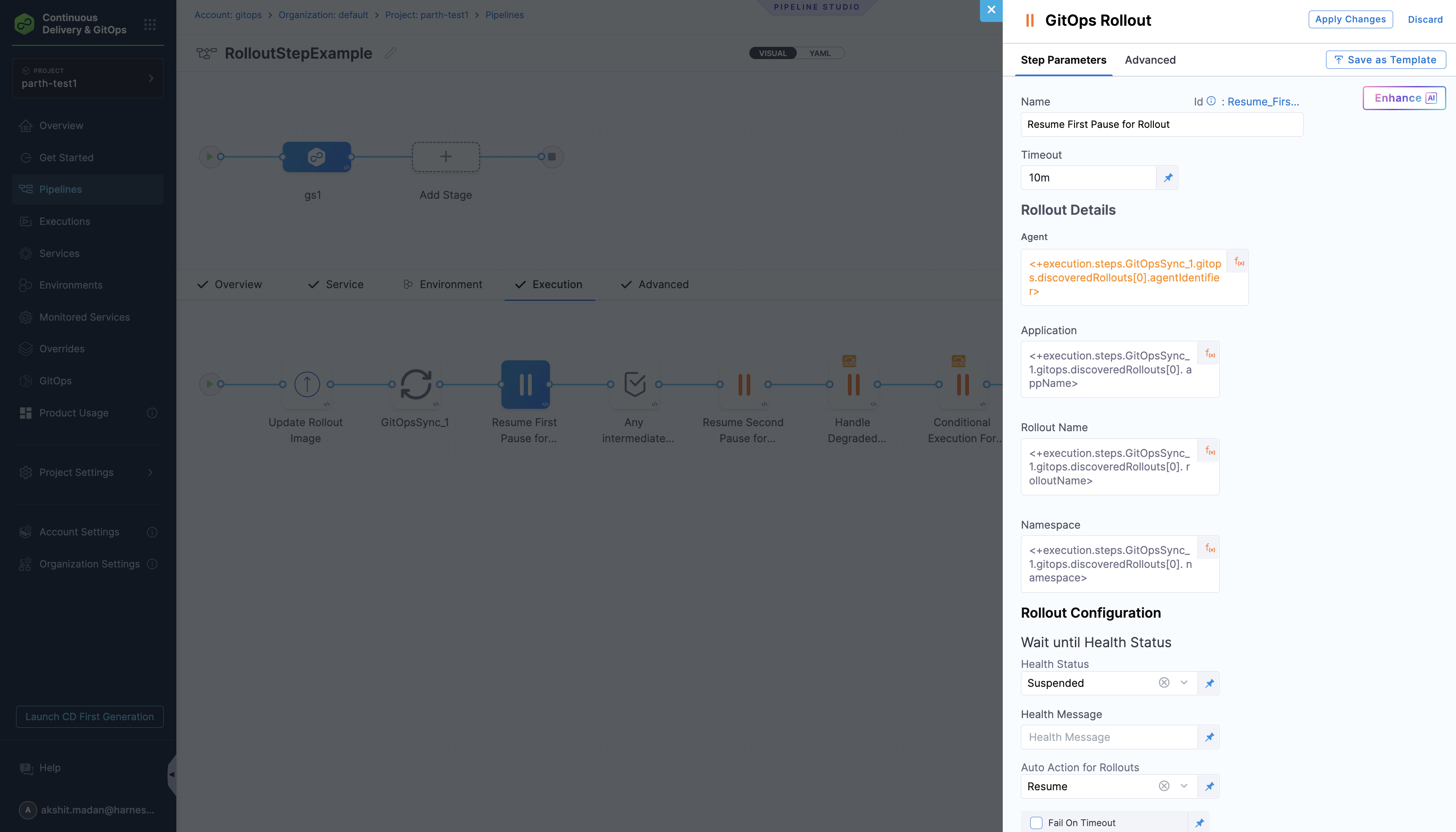
Available fields:
agentIdentifier- The GitOps agent identifierappName- The GitOps application namerolloutName- The Rollout resource namenamespace- The namespace where the rollout is deployed
2. Expression Examples
# Get the first discovered rollout's agent
<+execution.steps.gitops_sync_step.gitops.discoveredRollouts[0].agentIdentifier>

# Get the rollout name
<+execution.steps.gitops_sync_step.gitops.discoveredRollouts[0].rolloutName>

# Get the namespace
<+execution.steps.gitops_sync_step.gitops.discoveredRollouts[0].namespace>
3. Multiple Rollouts
If you have multiple rollouts, access them by index:
# First rollout
<+execution.steps.gitops_sync_step.gitops.discoveredRollouts[0].rolloutName>

# Second rollout
<+execution.steps.gitops_sync_step.gitops.discoveredRollouts[1].rolloutName>
4. Accessing Other Step Outputs
You can also access outputs from other step types:
# Access shell script outputs
<+execution.steps.shell_step.output.outputVariables.VAR_NAME>

# Access HTTP response
<+execution.steps.http_step.output.responseBody>

# Access artifact information
<+execution.steps.build_step.output.artifactPath>
Step-by-Step Explanation
Step 1: Update Rollout Image
- Purpose: Updates the container image in your GitOps Application's manifest
- Configuration: Uses the
UpdateGitOpsAppstep to modify the image tag in the rollout manifest - Key Settings:
targetRevision: Git branch containing your manifestskustomize.images: Specify the new image to deployapplicationName: Your GitOps Application nameagentId: GitOps Agent identifier
Step 2: GitOps Sync
- Purpose: Synchronizes the GitOps Application to apply the image update
- Configuration: Uses the
GitOpsSyncstep to trigger a sync operation - Key Settings:
applicationsList: List of applications to syncsyncOptions: Various sync configuration optionstimeout: Maximum time to wait for sync completion
Step 3: Resume First Pause for Rollout
- Purpose: Resumes the rollout from the first pause step
- Configuration: Uses the
GitOpsRolloutstep with resume action - Key Settings:
autoRolloutAction: Set toresumewaitUntilHealthStatus: Set toSuspendedto wait for pause state- Uses expressions from the Sync step to get rollout details
failureStrategies: Ignore errors to continue pipeline
Step 4: Any Intermediate Steps
- Purpose: Placeholder for custom logic or additional processing
- Configuration: Uses the
Waitstep for simple delays - Use Cases:
- Add custom validation logic
- Insert additional processing steps
- Create delays between operations
Step 5: Resume Second Pause for Rollout
- Purpose: Resumes the rollout from the second pause step
- Configuration: Uses the
GitOpsRolloutstep with resume action - Key Settings:
autoRolloutAction: Set toresumewaitUntilHealthStatus: Set toSuspendedto wait for pause state- Uses expressions from the Sync step to get rollout details
Step 6: Handle Degraded Rollout
- Purpose: Handles degraded rollout states with retry action
- Configuration: Uses the
GitOpsRolloutstep with retry action - Key Settings:
autoRolloutAction: Set toretrywhen: Set toFailureto only run on stage failure- Uses expressions from the Sync step to get rollout details
Step 7: Conditional Execution For Rollout
- Purpose: Conditional execution based on application name
- Configuration: Uses the
GitOpsRolloutstep with restart action - Key Settings:
autoRolloutAction: Set torestartwhen: Conditional execution with custom condition- Uses expressions to check application name
Best Practices
- Use descriptive step identifiers for easier reference
- Add timeout values appropriate for your deployment size
- Include health checks for critical production deployments
- Consider manual approval steps for production environments
- Test expressions in the pipeline editor before saving