Services overview
A Harness service represents what you're deploying. Services represent your microservices and other workloads. Each service contains a Service Definition that defines your deployment artifacts, manifests or specifications, configuration files, and service-specific variables.
Harness services are deployed to Harness environments. Select Environments to see the environments in this project.
Select Services to see the service list for your project. From this dashboard, you can create new services and monitor your existing ones.
Video: Services
Video: Services and environments at the account and org level
Creating services
You can create services from:
- An account
- An organization
- Within a pipeline
- Outside a pipeline
When you create a service in a pipeline, it's automatically added to Services. You can add the same service to as many pipelines as you need.
For more information, go to create services.
Creating services at an account or organization level
You can create a service at an account or organization level from the Harness UI using APIs or Terraform.
- Pipeline Studio
- API
- Terraform
To create a service at an account or organization level, go to Organization Resources >Services.
Creating an account level service enables you to manage the service globally across the organizations and projects within the account.
An account level service can only reference connectors for the manifests and artifacts within the account. These services are global and cannot have dependencies at a lower hierarchy level.
Shared services can also be created and managed at account or organization levels.
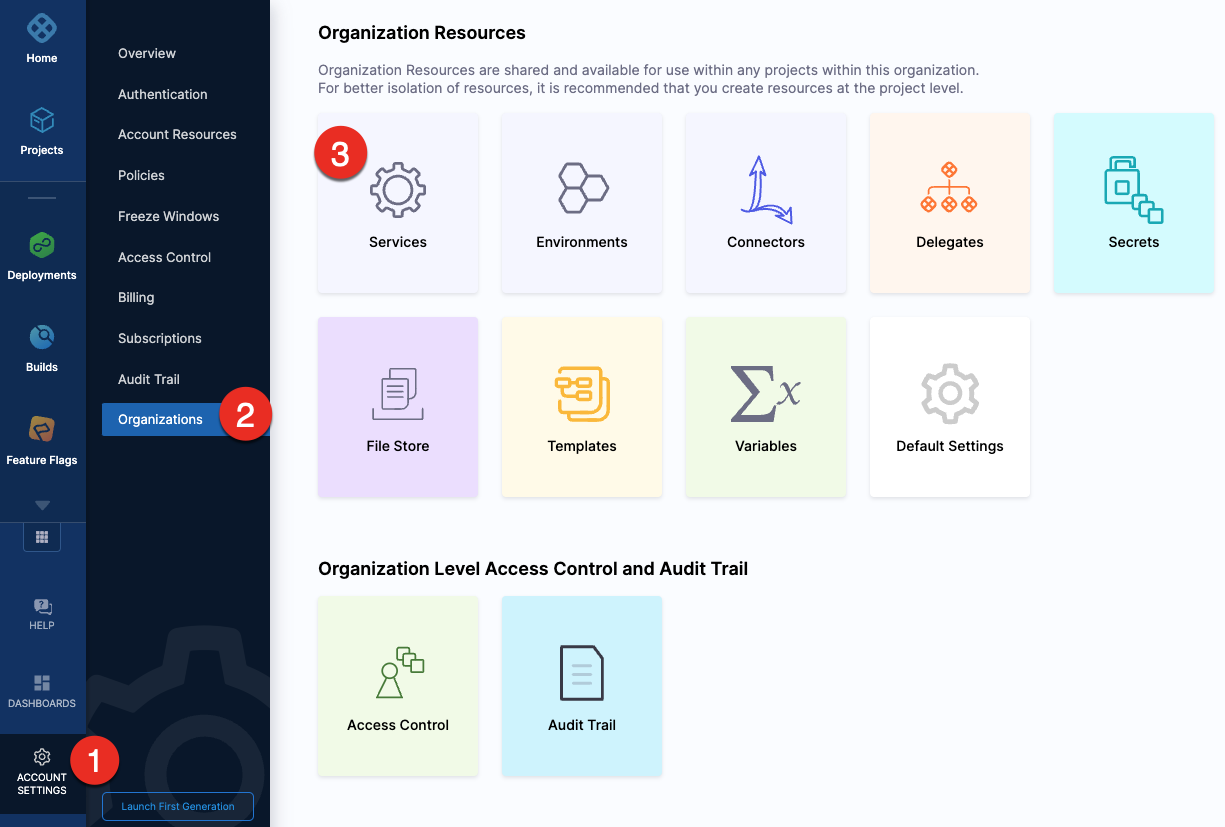
When using an account level deployment stage template, you can reference an account level service only. Similarly, for organization level stage templates, you can reference organization level services only.
However, when using a deployment stage in a pipeline that has service configured as a runtime input, you can pick services from project, organization, or account levels to pass them as runtime inputs based on your RBAC.
Go to add a stage template for more information.
Expand the section below to see a sample account level service YAML.Account level service YAML
Expand the section below to see a sample organization level service YAML.Organization level service YAML
For information about creating a service API, go to create a service.
The orgIdentifier and projectIdentifier field definitions are optional, and depend on where you want to create the service. For example, if you create a service at an account level, you will not need org or project identifiers in the post API call payload.
For information about creating a Harness platform service, go to harness_platform_service (Resource).
The org_id and project_id field definitions are optional, and depend on where you want to create the service. For example, if you create a service at an account level, you will not need org or project identifiers.
Expand the section below to see a sample platform service in Terraform.Harness platform service
Creating services outside a pipeline
To create a service from outside of a pipeline, you use Services in the navigation pane.
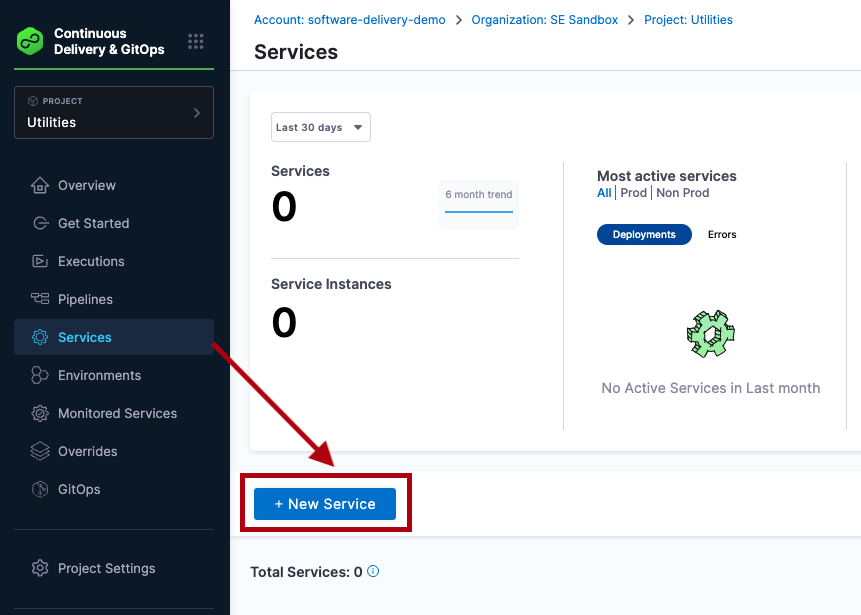
Creating services inside a pipeline
To create a service from inside of a pipeline, select the Services tab of a new CD stage, then select New Service.
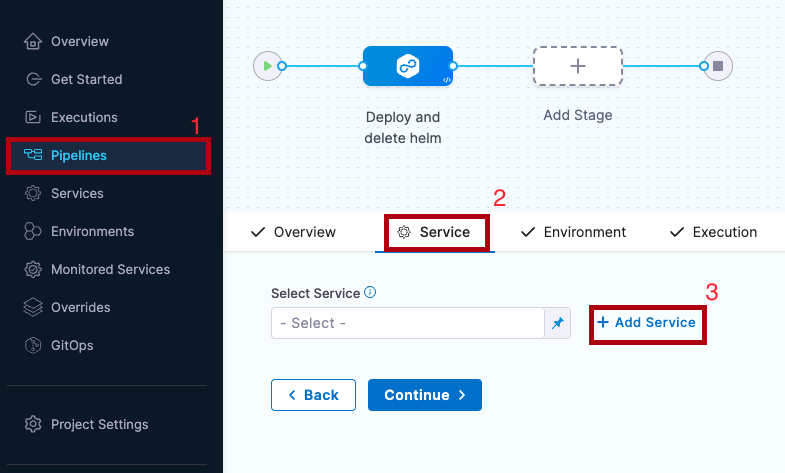
Once the service and its service definition are saved, you can select it in any pipeline.
When you select the service in a pipeline, you can select Edit Service to edit its Service Definition.
When you create the new service you define its Service Definition. For example, a Kubernetes Service Definition with a Kubernetes manifest and Docker artifact.
Clone Services
You can clone services across scopes i.e from one project to another, project to organization, account to project etc.
Select More Options (⋮), then select Clone.

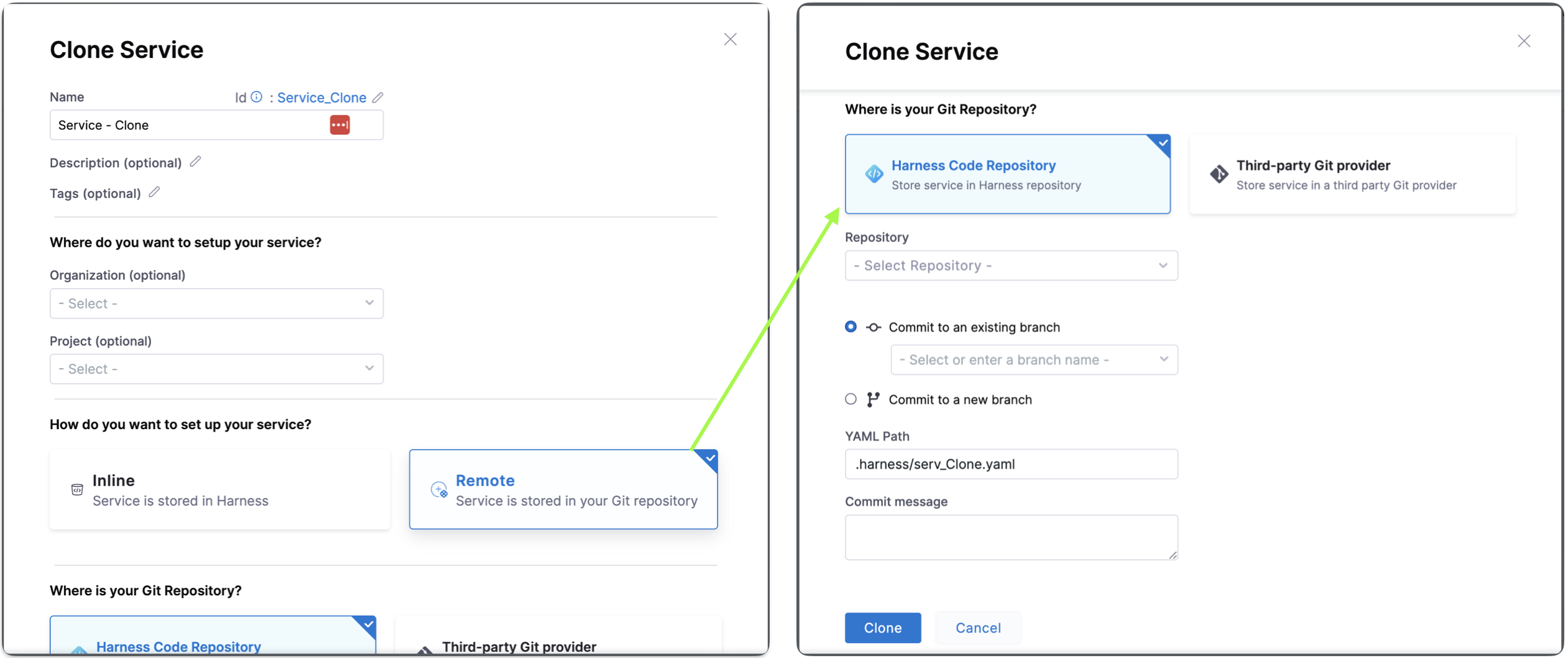
Once you click on Clone, you will see Clone Service settings:
You can change the Name, add tags and description for this clone service.
You can change the Organization and Project where you want to clone the service.
You can choose between Inline and Remote to set up your service. Choose Inline when you want your service to be stored in Harness. Choose Remote when storing your service in a Third-party Git repository or Harness Code Repository.
To clone a remote service to an inline service, you have to specify the source branch where the remote service is stored.
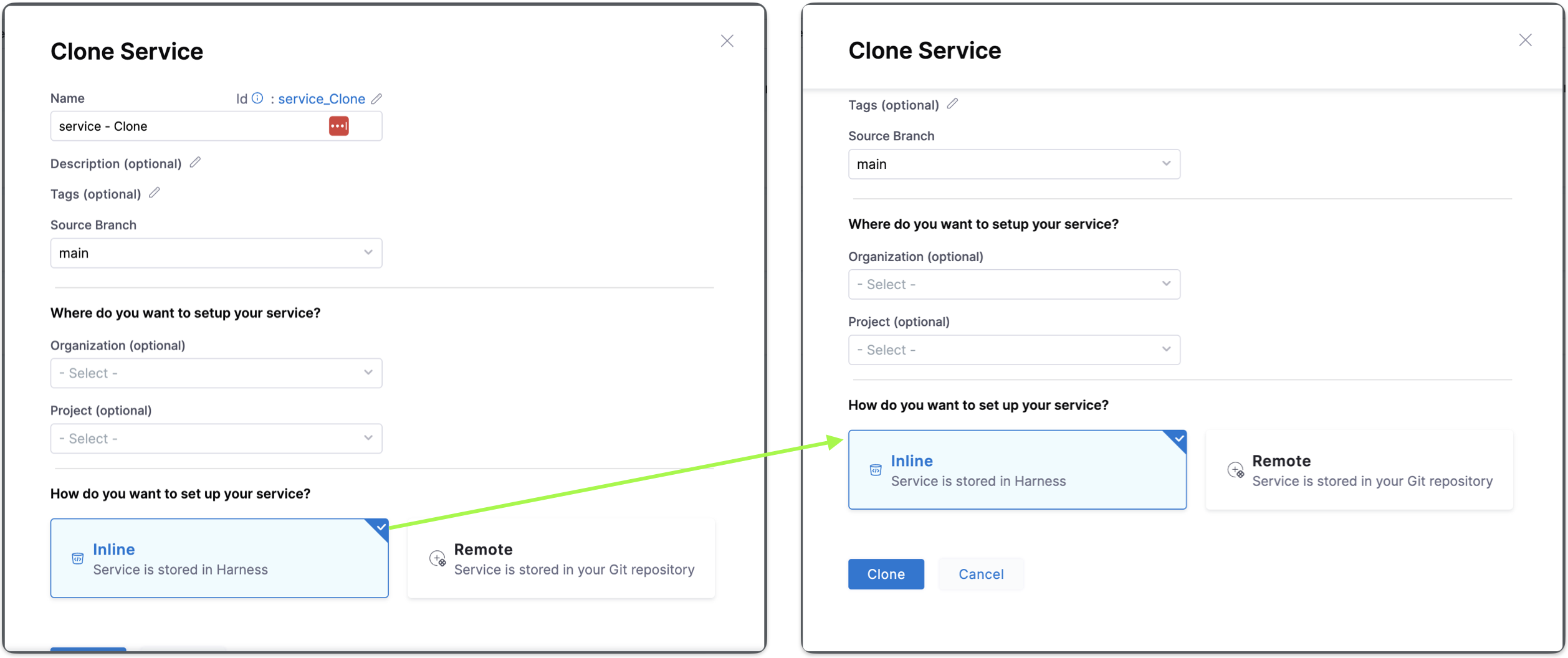
To clone an inline service or remote service to a remote service, you must specify the target repository, Harness Code Repository to store the service in the Harness repository or Third-party Git provider to store the service in a third party Git provider, define the Git Connector if Third-party Git provider. Specify the Repository name, the YAML path, and the commit message.
When you clone a service from a different organization or project, the connector referenced in the service doesn't get cloned and must be explicitly created.
Runtime inputs and expressions in services
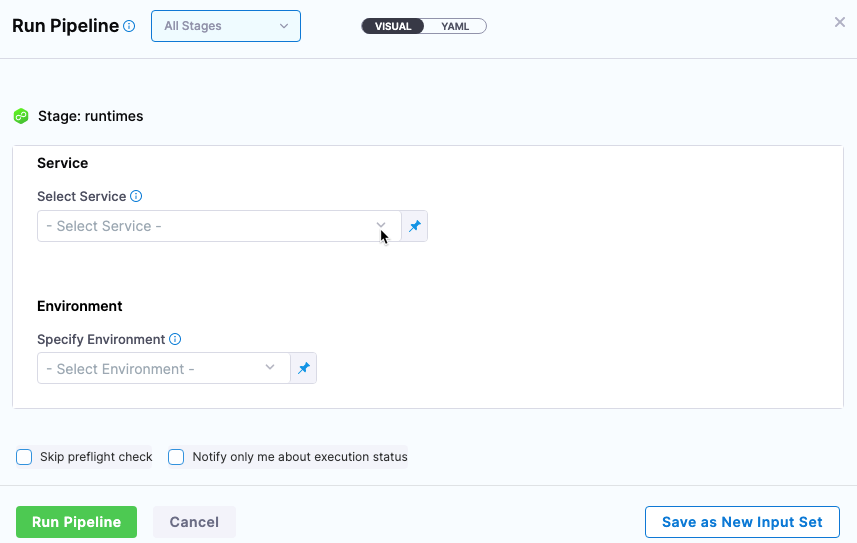
If you use runtime inputs in your services, users will need to provide values for these when they run pipelines using these services.
If you use expressions in your services, Harness must be able to resolve these expressions when users run pipelines using these services.
Select Runtime input for the service.
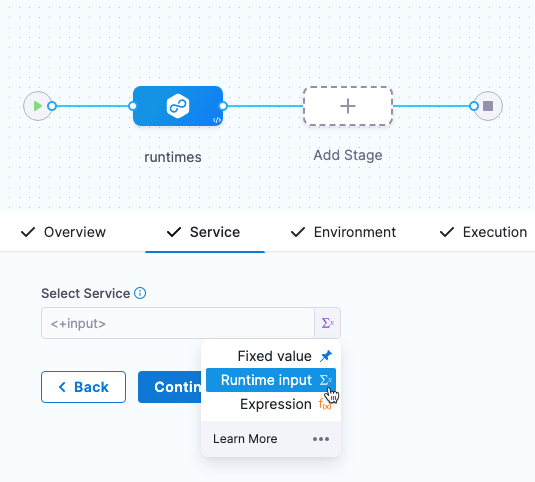
When you run the pipeline, you can select the service for runtime inputs.
For more information on runtime inputs and expressions, go to Fixed Values, Runtime Inputs, and Expressions.
Services RBAC
Go to RBAC in Harness for examples of RBAC use cases for services.
Access permission is needed to deploy to a service
One of the most important advantages of services is the ability to define roles that determines who can deploy them.
In order for a role to allow deployments using services, the role must have the access permission enabled for services.
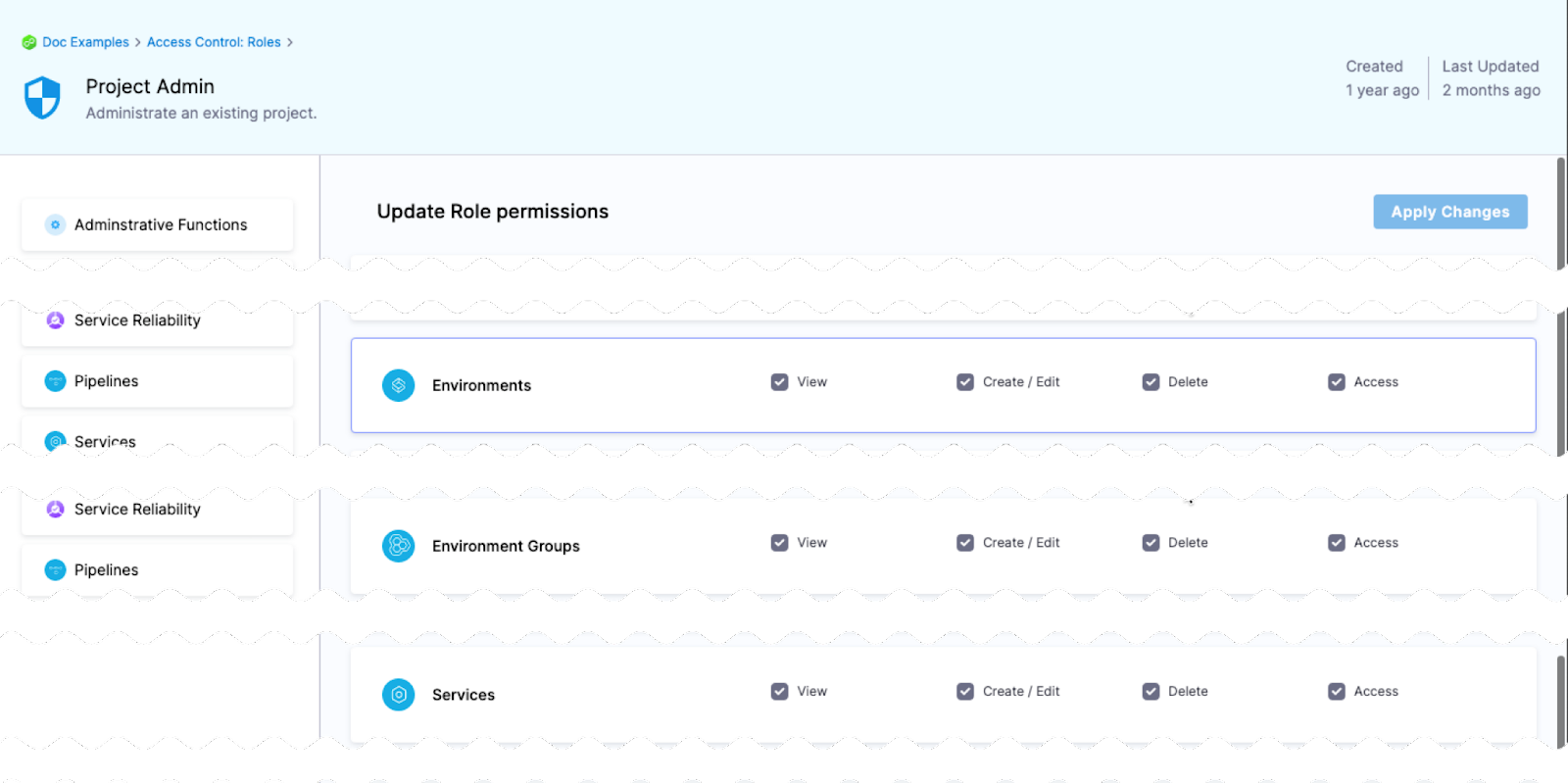
The View, Create, Edit, Delete, and Manage permissions enable you to deploy a service.
If a role does not have the Access permission for Services, a user or user group assigned that role cannot deploy any service.
Restrict access to specific services for a user or user group
You can restrict a user or user group to using specific services only.
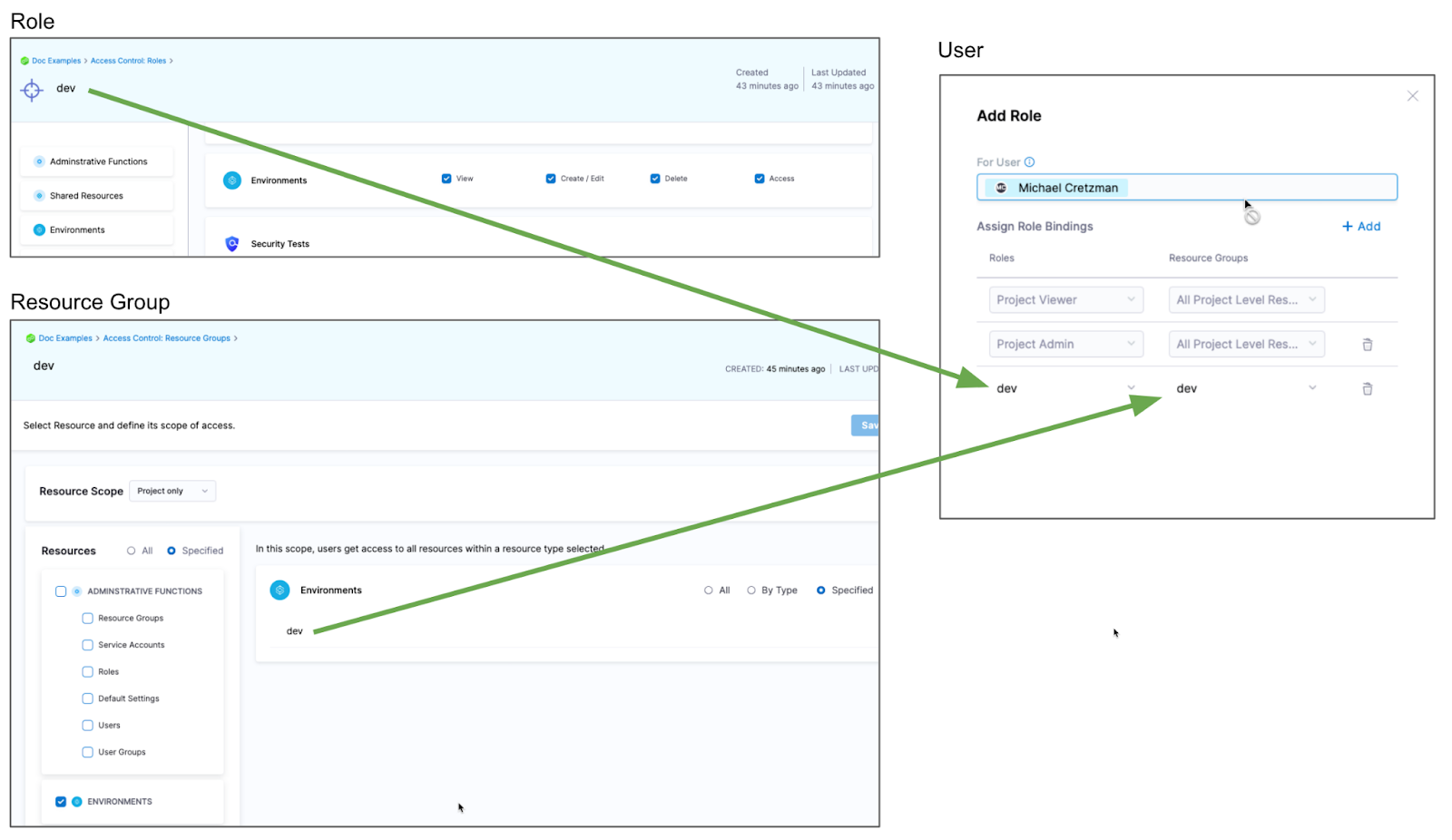
If you want to restrict a user or user group to deploy using a specific service only, do the following:
- Create a resource group and select the service.
- Create a role and give the user or user group permissions. The Access permission is needed for deployments.
- Assign the role and resource group to the user or user group.
Metadata sync with bidirectional sync
When you store a service remotely in Git with bidirectional sync enabled, Harness automatically syncs entity metadata — name, description, and tags — back to Harness when those fields are updated on the Git side for the default branch.
Previously, modifying service metadata directly in the Git repository did not propagate those changes to Harness, requiring a separate update from the Harness UI. With metadata sync, any change committed to the default branch in Git is reflected in Harness automatically. This sync applies only to the default branch; metadata changes on other branches are not synced.
This feature is behind the feature flag CDS_GITX_WEBHOOK_SYNC_ENTITY_METADATA. Contact Harness Support to enable it.
Deleting a Service in Harness
For information on deleting services in Harness, go to Deleting a Service in Harness in Service-based licensing and usage for CD.