Code Coverage requires the feature flag CI_CODE_COVERAGE to be enabled on your account. To use hcli commands for uploading coverage reports, you must also set the environment variable CI_ENABLE_HCLI_FOR_TESTS=true in your pipeline.
Contact Harness Support to enable the feature flag. Go to Environment variables to configure environment variables.
Code Coverage
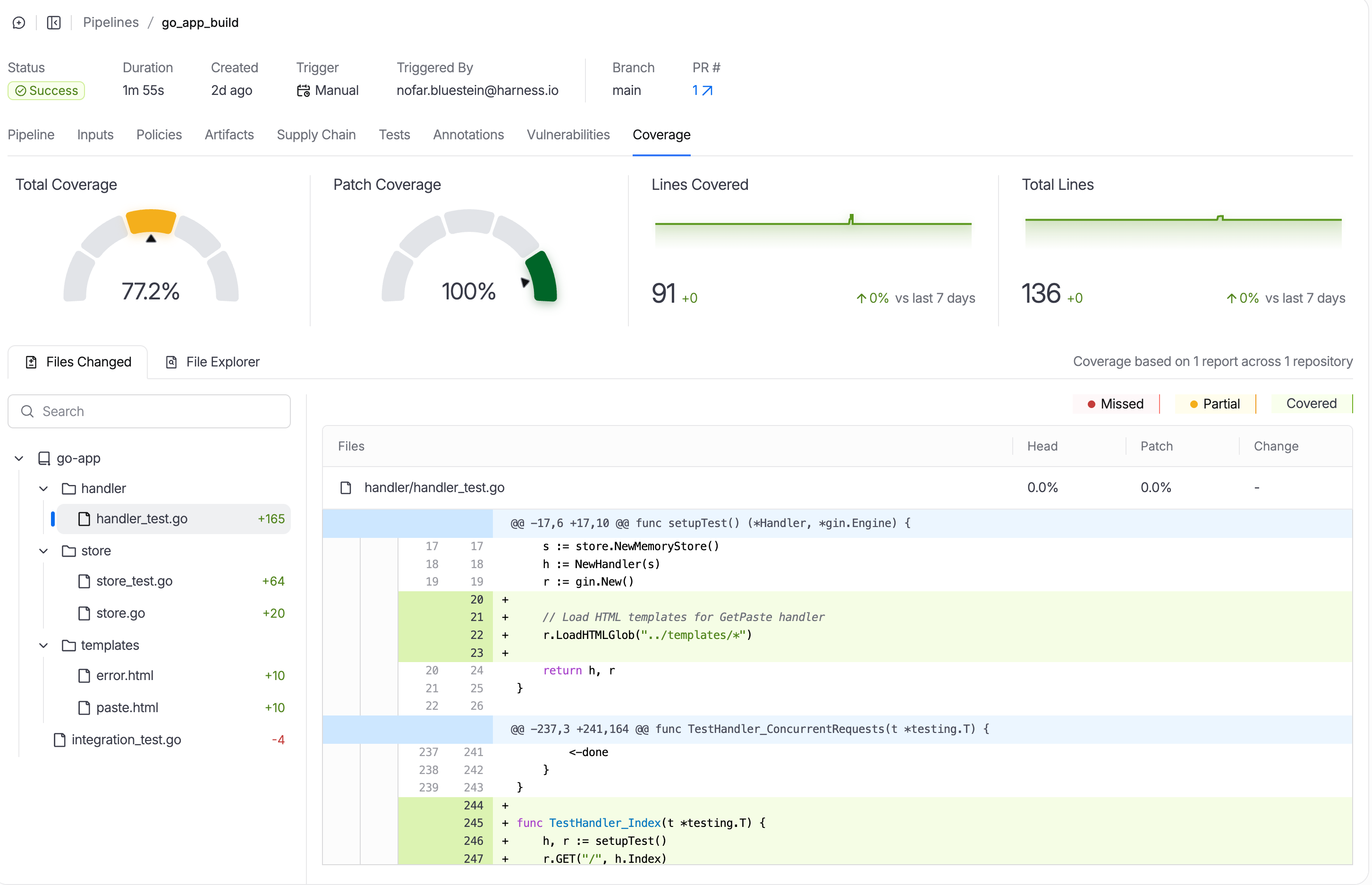
Code coverage shows what percentage of your code is exercised by tests. Harness displays coverage metrics in the Coverage tab of your pipeline execution, helping you identify untested code paths.
What You'll See
| Metric | Description |
|---|---|
| Total Coverage | Percentage of all lines covered by tests |
| Patch Coverage | Percentage of changed lines covered (PRs only) |
| Per-File Breakdown | Coverage percentage for each source file |
For pull requests, the diff view shows line-by-line coverage:
- Green - Line is covered
- Red - Line is not covered
- Yellow - Partially covered (some branches)
Supported Formats
| Format | File Extension | Languages |
|---|---|---|
| LCOV | .info, .lcov | Python, Node.js, JavaScript, C/C++ |
| JaCoCo XML | .xml | Java, Kotlin, Scala |
| Go Coverage | .out | Go |
Pipeline Examples
- Python
- Java/Gradle
- Go
- step:
    type: Run
    name: Run Tests with Coverage
    spec:
      shell: Sh
      command: |-
        # Install dependencies
        pip install pytest pytest-cov

        # Run tests with coverage
        pytest tests/ \
          --junitxml=test-results.xml \
          --cov=src \
          --cov-report=lcov:lcov.info \
          -v

        # Upload test results
        hcli test-reports upload test-results.xml

        # Upload coverage to Harness
        hcli cov upload --file=lcov.info

        # Quality gate (optional)
        hcli cov wait-until --gt=70 --patch-gt=80 --timeout=1m
- step:
    type: Run
    name: Run Tests with Coverage
    spec:
      shell: Sh
      command: |-
        # Run tests with JaCoCo coverage
        ./gradlew test jacocoTestReport

        # Upload test results
        hcli test-reports upload "build/test-results/test/*.xml"

        # Upload coverage
        hcli cov upload --file=build/reports/jacoco/test/jacocoTestReport.xml

        # Quality gate (optional)
        hcli cov wait-until --gt=70 --patch-gt=80 --timeout=1m
- step:
    type: Run
    name: Run Tests with Coverage
    spec:
      shell: Sh
      command: |-
        # Install JUnit reporter
        go install github.com/jstemmer/go-junit-report/v2@latest

        # Run tests with coverage
        go test -v -coverprofile=coverage.out ./... 2>&1 | go-junit-report > report.xml

        # Upload test results
        hcli test-reports upload report.xml

        # Upload coverage
        hcli cov upload --file=coverage.out

        # Quality gate (optional)
        hcli cov wait-until --gt=70 --patch-gt=80 --timeout=1m
Analyze Coverage Locally
Before uploading, you can analyze coverage locally:
hcli cov analyze --file lcov.info
This outputs coverage statistics without uploading to Harness, useful for debugging or local development.
Quality Gates
Enforce minimum coverage thresholds to fail pipelines that don't meet your standards. Use hcli cov wait-until to block the pipeline until coverage meets the specified thresholds.
You can specify one or both thresholds as needed:
# Check both total and patch coverage
hcli cov wait-until --gt=70 --patch-gt=80 --timeout=1m

# Check only total coverage
hcli cov wait-until --gt=70 --timeout=1m

# Check only patch coverage (for PRs)
hcli cov wait-until --patch-gt=80 --timeout=1m
This command:
- Waits for coverage data to be available
- Checks thresholds (if specified):
--gt: total coverage percentage--patch-gt: patch coverage percentage (for PRs)
- Fails the pipeline if any specified threshold is not met
Example output when the quality gate fails:
Coverage: 84.53%
Lines: 579/685 covered
Patch Coverage: 78.57%
Patch Lines: 11/14 covered
Quality Gate FAILED:
  - patch coverage 78.57% is not > 80.00%
Error: quality gate failed: 1 threshold(s) not met
Quality Gate Parameters
| Parameter | Required | Description |
|---|---|---|
--gt | No | Minimum total coverage percentage required |
--patch-gt | No | Minimum patch coverage percentage required (for PRs) |
--timeout | No | How long to wait for coverage data (e.g., 1m, 30s). Default: 30s |
CLI Reference
cov upload
Upload coverage reports to Harness. Automatically detects CI environment and configuration.
hcli cov upload --file=<coverage-file>
| Parameter | Required | Description |
|---|---|---|
--file | Yes | Path to coverage file (LCOV .info or Go .out). Can be specified multiple times |
--base | No | Base branch for diff coverage tracking (e.g., main, origin/main) |
--patch | No | Only include coverage for lines changed in the diff (requires --base) |
--tags | No | Tags to apply to the uploaded coverage report (can be specified multiple times) |
--verbose | No | Enable verbose output for debugging (true or false) |
--log-level | No | Set log level: debug, info, warn, error (default: info) |
cov analyze
hcli cov analyze --file <coverage-file>
| Parameter | Required | Description |
|---|---|---|
--file | Yes | Path to coverage file |
cov wait-until
Wait for coverage data and enforce quality gates. Automatically detects CI environment. Specify one or both thresholds as needed.
hcli cov wait-until [--gt=<total-threshold>] [--patch-gt=<patch-threshold>] [--timeout=<duration>]
| Parameter | Required | Description |
|---|---|---|
--gt | No | Minimum total coverage percentage (e.g., 70) |
--patch-gt | No | Minimum patch coverage percentage (e.g., 80) |
--timeout | No | Wait timeout (e.g., 1m, 30s). Default: 30s |
Troubleshooting
| Issue | Solution |
|---|---|
| Coverage shows 0% | Verify the coverage file path matches your tool's output |
| Patch coverage not showing | Ensure you're running on a pull request build |
| File not found | Confirm coverage file was generated before the upload step |
| Invalid format | Verify the file format matches supported types (LCOV, Go) |
| Incomplete or inaccurate coverage | Check if tests failed or exited early. Some test runs that terminate prematurely (test failures with --exitfirst, crashes, timeouts) may generate incomplete coverage data. Ensure all tests complete successfully before evaluating coverage metrics |
Next Steps
- Upload test results to see tests alongside coverage
- View flaky tests to identify unreliable tests