Use Harness Cloud build infrastructure
With Harness Cloud, you can run builds in isolation on Harness-managed VMs that are preconfigured with tools, packages, and settings commonly used in CI pipelines. Harness hosts, maintains, and upgrades these machines so that you can focus on building software instead of maintaining build infrastructure.
Harness Cloud provides the following advantages:
- Use Cloud credits to run builds on Harness-managed infrastructure. No need to set-up and maintain the infrastructure yourself
- Starter pipelines for different programming languages.
- Blazing fast builds on Linux, macOS, and Windows.
- Get the latest features first. Harness may enable features for Harness Cloud before rolling them out to other build infrastructure options.
For a comparison of build infrastructure options, go to Which build infrastructure is right for me.
When a build runs on Harness Cloud, Harness runs each CI stage in a new, ephemeral VM.
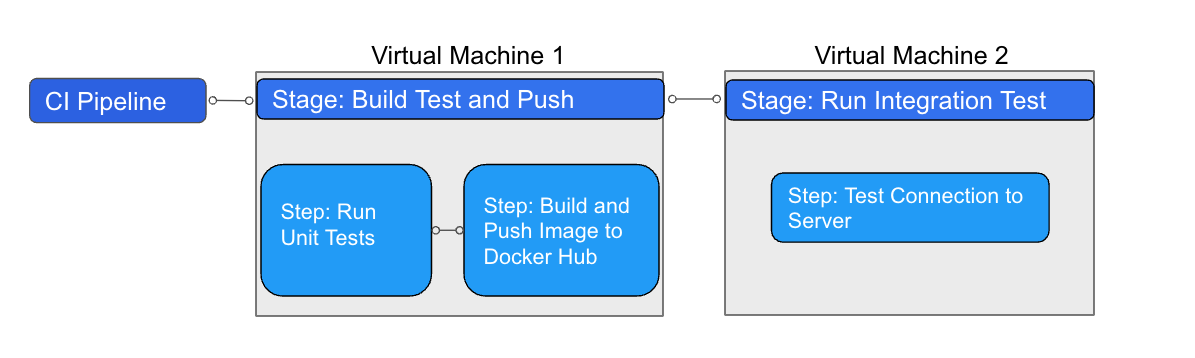
The steps in each stage execute on the stage's dedicated VM. This allows the stage's steps to share information through the underlying filesystem. You can run CI steps directly on the VM or in a Docker container. When the stage is complete, the VM automatically terminates.
What you will learn
- The platforms, VM images, and machine sizes available on Harness Cloud.
- How to configure a pipeline stage to run on Harness Cloud.
- The connector and secret manager requirements for Harness Cloud.
- How to access privately hosted resources and apply Harness Cloud best practices.
Before you begin
- Ensure you have a Harness CI project and the required connector and secret manager configuration. Go to Requirements for connectors and secrets to review access requirements.
Billing and Cloud credits
Free plans get 2000 free Harness Cloud credits each month. If you are using a paid CI plan, you can purchase build credit packages.
Harness can invoice in arrears for overages. For more information about Harness Cloud billing and build credit consumption, go to Subscriptions and licenses.
Free plans require credit card validation to use Harness Cloud. If you do not want to provide a credit card, consider using local runner build infrastructure.
Platforms and image specifications
Harness Cloud supports Linux, macOS, and Windows platforms. Each CI stage that runs on Harness Cloud is executed on a Harness-managed VM image.
The VM image defines:
- The operating system (for example, Ubuntu 22.04, Ubuntu 24.04, macOS, or Windows)
- A curated set of pre-installed tools maintained and updated by Harness
Go to Harness Cloud VM Images to review image components and preinstalled software.
After selecting a base VM image, you can customize the build environment at pipeline execution time by:
- Locking specific tool versions
- Installing additional tools that are not pre-installed
- Running steps directly on the host VM or inside Docker containers
These customizations are applied on top of the selected VM image, are re-applied on each run, and do not modify the underlying image. Learn more
You can also use Bring Your Own Image (BYOI) to create fully custom VM images with your tools and dependencies pre-installed, eliminating the need to install them at pipeline runtime. Go to Harness Cloud BYOI and BYOI on Harness Cloud VM Images to build custom VM images.
To enable Windows and macOS for Harness Cloud, contact Harness Support.
Requirements for connectors and secrets
Harness Cloud resolves connectors and secrets through the Harness Platform, not through a delegate. This determines which authentication methods and secret managers you can use.
Connectors
- All connectors must connect through the Harness Platform, not a delegate.
- AWS connectors cannot use IRSA or AssumeRole.
- GCP and Azure connectors cannot use authentication that inherits credentials from the delegate.
Secret managers
On Harness Cloud, the Harness Built-in Secret Manager is supported. HashiCorp Vault is supported using OIDC, and AWS Secrets Manager and Google Cloud Secret Manager are supported using OIDC or static credentials. Go to Secret resolution on Harness Cloud build infrastructure to review the supported secret managers.
Use Harness Cloud
You can configure your pipelines to use Harness Cloud in minutes.
- Visual editor
- YAML editor
- Go to the pipeline where you want to use Harness Cloud build infrastructure.
- Select the Build stage, and then select the Infrastructure tab.
- Select Harness Cloud and the desired Platform.
- Save and run your pipeline.
To enable Harness Cloud build infrastructure in your pipeline YAML, specify the platform and runtime in the stage.spec. For example:
platform:
  os: Linux
  arch: Amd64
runtime:
  type: Cloud
  spec: {}
- In
runtime, you must includetype: Cloud. - In
platform, specify theosandarch. For a list of supported operating systems and architectures, go to Platforms and image specifications.
Pipeline YAML example
The following YAML example describes a basic CI pipeline that uses Harness Cloud build infrastructure:
pipeline:
  name: Build sample-app
  identifier: Build_sample_app_1677210779657
  projectIdentifier: my-app-project
  orgIdentifier: default
  properties:
    ci:
      codebase:
        connectorRef: account.GitHub_example
        repoName: my-gh-account/example-repo
        build: <+input>
  stages:
    - stage:
        name: Build
        identifier: Build
        type: CI
        spec:
          cloneCodebase: true
          execution:
            steps:
              - step:
                  type: Run
                  name: Echo Welcome Message
                  identifier: Echo_Welcome_Message
                  spec:
                    shell: Sh
                    command: echo "Welcome to Harness CI"
          platform:
            os: Linux
            arch: Amd64
          runtime:
            type: Cloud
            spec: {}
Use resource classes
You can use the YAML editor to change the cloud machine size.
Resource class support is now Generally Available (GA). If this feature is not yet enabled in your account, reach out to Harness Support for assistance.
To select a resource class size, set the desired size as the value for the size property in the CI stage cloud infrastructure runtime configuration. For example:
platform:
  os: Linux
  arch: Amd64
runtime:
  type: Cloud
  spec:
    size: xlarge # optional
Go to Harness Cloud billing and cloud credits to review all available resource classes in Harness Cloud.
Hardware acceleration
Harness supports hardware acceleration using nested virtualization on Linux/AMD Cloud machines.
By enabling this feature, Android SDK tools and emulators can run more efficiently within virtualized environments, making Android test execution faster and optimizing build time.
To enable this feature, set the nestedVirtualization property to true as shown below.
- To enable
nestedVirtualizationuse the YAML editor, as this option is currently unavailable in the visual editor. - When using hardware acceleration, run your steps directly on the VM, rather than inside a container. Running inside a container is currently not supported with hardware acceleration.
- Hardware acceleration is available for all machine sizes, when using Linux with AMD architecture on Harness Cloud.
- stage:
    name: build
    identifier: build
    type: CI
    spec:
      platform:
        os: Linux
        arch: Amd64
      runtime:
        type: Cloud
        spec:
          nestedVirtualization: true
          size: xlarge # optional
Access privately hosted resources
When running builds on Harness Cloud, you may need to access internal resources that are not publicly accessible, such as:
- Internal artifact repositories
- Private source code management systems (SCMs)
- Internal APIs and services
- On-premises databases
Harness supports multiple approaches to enable secure communication between Harness Cloud infrastructure and your private network:
- IP allowlisting - Allow Harness Cloud IP ranges through your firewall
- Private network connectivity - Use cloud provider solutions like AWS PrivateLink or GCP Private Service Connect (Enterprise)
IP allowlisting
Your networking or security team can allowlist the IP ranges used by Harness Cloud to permit traffic from Harness-managed build infrastructure to your private resources.
Go to Retrieve allowlisted IPs for Harness Cloud to retrieve allowlisted IPs via API.
Go to Allowlist Harness domains and IPs to review IP allowlisting in detail, or contact Harness Support.
Private network connectivity (Enterprise)
For enterprise customers with strict compliance and security requirements, you can use cloud provider private networking solutions for enhanced security without exposing traffic to the public internet.
Go to Private network connectivity options to review private network connectivity, including AWS PrivateLink and GCP Private Service Connect.
Harness Cloud best practices
- Do not hardcode system environment variables. Instead, use references like
$HOMEor$USER. - Do not hardcode the number of processors/threads. Instead, use commands like
nprocto specify threads/jobs in your build and test commands. - Do not use tools that only run on a specific cloud environment, such as
gcloud. Harness Cloud sources its build VMs from a variety of cloud providers. It is impossible to predict which specific cloud provider hosts the Harness Cloud VM that your build uses during any single execution. Therefore, avoid using tools (such as gsutil or gcloud) that require a specific cloud provider's environment. - Know the requirements for connectors and secrets.
- Know that Harness Cloud machine images can change. If your pipeline relies on a specific version of a software, tool, or environment, make sure you lock versions to prevent your pipeline from failing when the image changes.
- Know that you can add steps to your pipeline to specify versions of tools and lock versions, set up environments, or install additional tools.
- Run
apt-get updatebefore installing additional software that might not be in the image's packages list.
Queue Intelligence
With Queue Intelligence, Harness CI can queue and run build jobs in sequence when the build infrastructure receives more jobs than it can run concurrently.
The Queue Intelligence feature introduces a queued state for individual builds. Builds progress through the following states:
pending: Build request created and waiting for a delegate. The maximum timeout for this state is 12 hours.queued: Build request queued by a delegate. The maximum timeout for this state is 12 hours. When viewing the build in the UI, this state is indicated by a Queued license limit reached message.running: The delegate runs a build for each build stage in the pipeline. The maximum timeout for this state is one hour.
Troubleshoot Harness Cloud build infrastructure
Go to the CI Knowledge Base for questions and issues related to Harness Cloud build infrastructure, including:
- Account verification error with Harness Cloud on Free plan.
- Cannot use STO steps with Harness Cloud macOS runners.
- Is Harness Cloud compatible with tools like gsutil or gcloud?
- Connector or delegate errors when using Harness Cloud.
- Built-in Harness Docker Connector is not working with Harness Cloud build infrastructure.
- Can I use xcode for a MacOS build with Harness Cloud?
- Can I get logs for a service running on Harness Cloud when a specific Run step is executing?
Known issues
Harness Cloud macOS platform .netrc file can have incorrect permissions
There is a known issue impacting macOS machines on Harness Cloud build infrastructure due to incorrect permissions for the .netrc file at /Users/anka/.netrc. The permissions are set to 644 when they should be 600.
This can cause errors when installing Cocoapods. If your build installs Cocoapods, uses a macOS platform on Harness Cloud build infrastructure, and fails due to an error like Couldn't determine repo type for URL when installing Cocoapods, then, until this issue is fixed, make sure the pipeline edits the permissions on the .netrc file before attempting to install Cocoapods.
Harness Cloud Windows platforms can fail to clone BitBucket Cloud repos
Due to a BitBucket Cloud issue, specific versions of BitBucket Cloud could fail to clone repos on Windows platforms running Git version 2.44.
Atlassian released a fix for this issue; however, if you use a Harness Cloud Windows platform and your build is unable to clone your BitBucket Cloud repo, do the following:
- Disable Clone Codebase.
- At the beginning of your build stage, add a Run step that uses the
harness/drone-gitimage and Git commands to clone your BitBucket cloud repo.