State Migration
When you use Harness Infrastructure as Code Management (IaCM), one of its benefits is automatic state storage for your workspaceA workspace is a one-to-one mapping of your infrastructure state. It is used to store and manage your infrastructure state in Harness IaCM.. Harness state is used automatically when no backend code block is configured in your OpenTofu or Terraform code. You can also use the Harness-stored state locally or in other workflows through an HTTP backend block configured for your workspace location and identifier.
If you currently use third-party state storage, you can continue to use that backend as configured with Harness IaCM. If you want Harness to hold the state instead, migrate it with the local CLI, a Harness pipeline, or the Harness API.
If you need to move state in the other direction, out of Harness-managed storage and into an external backend you control, go to Migrate state out of Harness.
Before you begin
- Existing workspace: Migration targets a workspace that already exists in Harness. Go to Create a workspace to create one.
- State access permission: You need a Harness API key with Workspace Access State (
iac_workspace_accessstate) on the target workspace. Go to the Permissions reference to review IaCM workspace permissions. An administrator must assign a role that includes it. Go to RBAC in Harness and Manage roles to configure roles. - Harness API key: Required by the local CLI and API methods. Go to Add and manage API keys to create one.
- OpenTofu or Terraform CLI: Required locally for every method except the pipeline method.
- Access to your current backend: Credentials that let you read your existing state, so the CLI can initialize against it before the migration.
Migrate state into Harness
Harness supports three ways to move existing state into Harness-managed storage. Use the local CLI when you want direct control over the migration, a Harness pipeline when your workspace can already authenticate to the existing backend, and the API when you have a state file on disk.
Harness versions every state change, so you can review the result of any method in the workspace State tab. Go to State management to understand how Harness stores and versions state.
Migrate with the local CLI
Migrate your state files to Harness IaCM by configuring your OpenTofu or Terraform codebase locally.
To migrate state with the local CLI, do the following:
-
Set authentication for your existing backend configuration and initialize your project successfully with
tofu init. If your existing state lives in Terraform Cloud, go to Migrate from Terraform Cloud first. -
Go to the workspace in Harness and select the CLI Integration tab, then copy the HTTP backend block shown there into your OpenTofu code and remove the existing backend block. OpenTofu and Terraform allow only one backend block, so replace the old block rather than adding a second one.
-
Set the
TF_HTTP_PASSWORDenvironment variable to your Harness API key so the CLI can authenticate to the IaCM backend:export TF_HTTP_PASSWORD=<your-harness-api-key> -
Run
tofu init -migrate-stateto move your state from the existing backend into Harness.
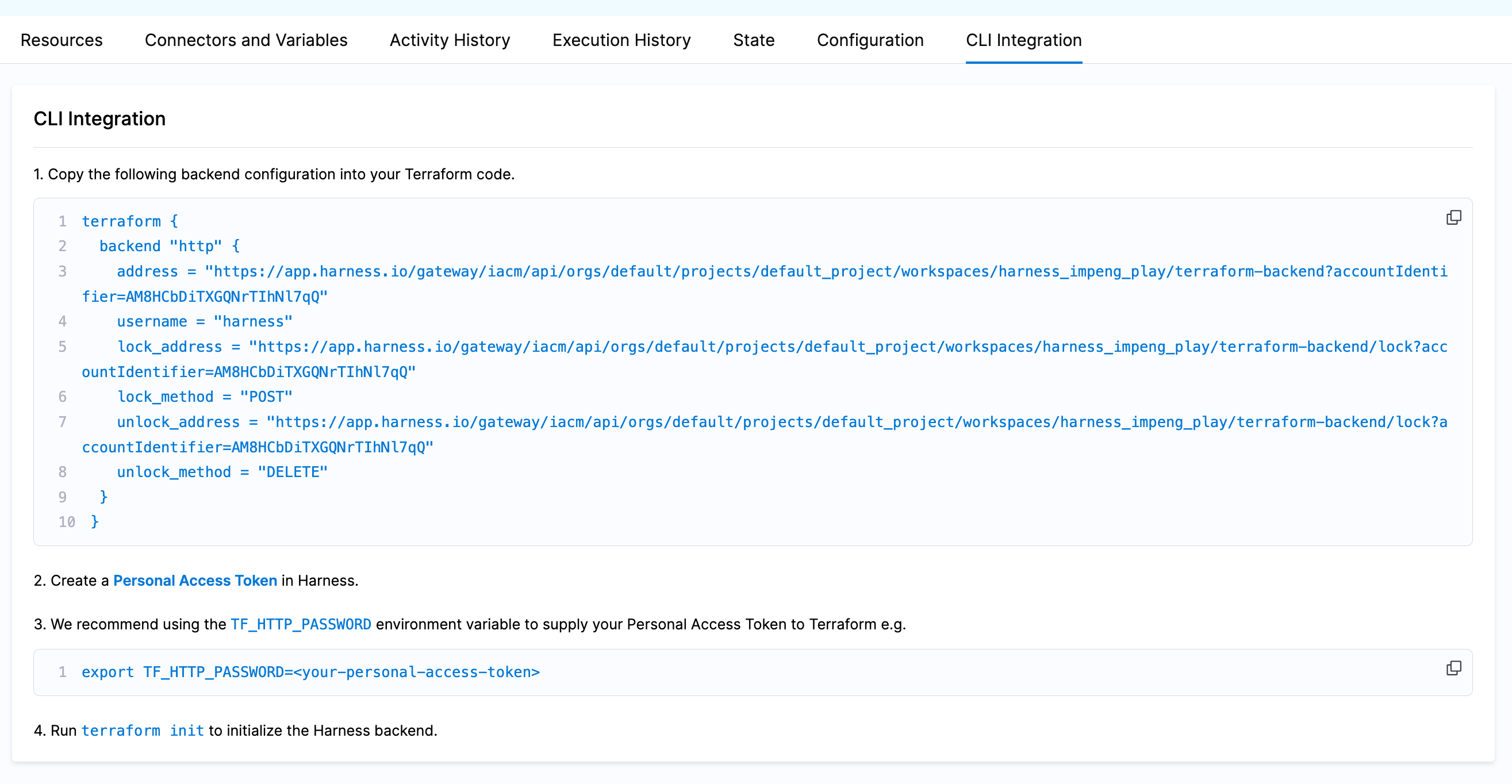
The CLI Integration tab provides the HTTP backend block, prepopulated with your workspace location and identifier
To validate the migration, open the workspace State tab in Harness and confirm the state is populated.
Once the state is in Harness, remove the backend block from your codebase to prepare the code for execution in IaCM. You can also keep the IaCM HTTP backend block in a local file listed in your .gitignore file, so you can keep using the Harness state locally. A committed backend block overrides the workspace-managed backend during pipeline execution, so it must not be checked in.
Migrate from Terraform Cloud
Terraform Cloud (TFC) does not support a direct tofu init -migrate-state conversion to third-party backends such as Harness IaCM. Pull the state out of Terraform Cloud first, then run the local CLI migration against that local state.
To move Terraform Cloud state to a local backend, do the following:
-
Initialize your project successfully against your Terraform Cloud remote state.
-
Pull your state locally:
tofu state pull > terraform.tfstate -
Remove the Terraform Cloud backend block from your code.
-
Delete your current settings by removing the
.terraformdirectory, then reinitialize the project:rm -rf .terraformtofu init
At this point you are using a local backend that holds the content of your Terraform Cloud state, and you can continue with Migrate with the local CLI.
Go to the OpenTofu state command reference to review the state inspection and manipulation commands used here.
Migrate with a Harness pipeline
Another strategy is to run a successful tofu apply in an IaCM pipeline with your existing backend configuration still set. During an apply, Harness takes a snapshot of your state into Harness, which is what populates the State and Resources tabs in the workspace.
To migrate state with a pipeline, do the following:
- Configure your workspace with everything needed to run an
apply, including the credentials that authenticate to your existing backend. Set those credentials as workspace environment variables. Go to Connectors and variables to add them. - Run the pipeline and let the
applystep complete. - Open the State tab in the target workspace to confirm the state was copied into Harness.
- Remove the existing backend block from your OpenTofu code.
The next time IaCM executes the code, Harness sees that no backend is configured and loads the Harness-stored state automatically.
Migrate with the Harness API
You can use the Harness API to load an existing state file directly into an existing workspace. The example below assumes a terraform.tfstate file in the current directory.
A handy command to pull your remote state locally is tofu state pull > terraform.tfstate.
The request takes the following values:
HARNESS_ACCOUNT_ID,HARNESS_ORG_ID,HARNESS_PROJECT_ID,HARNESS_WORKSPACE_ID: Identifiers for the target workspace. All four appear in the workspace URL in Harness, and in the address of the backend block on the workspace CLI Integration tab.HARNESS_PLATFORM_API_KEY: A Harness API key with Workspace Access State on that workspace.
HARNESS_ACCOUNT_ID=some_account_id
HARNESS_PLATFORM_API_KEY=some_api_token
HARNESS_ORG_ID=some_org
HARNESS_PROJECT_ID=some_project
HARNESS_WORKSPACE_ID=some_workspace

curl -isX POST --fail-with-body \
  "https://app.harness.io/gateway/iacm/api/orgs/${HARNESS_ORG_ID}/projects/${HARNESS_PROJECT_ID}/workspaces/${HARNESS_WORKSPACE_ID}/terraform-backend?accountIdentifier=${HARNESS_ACCOUNT_ID}" \
  -H "x-api-key: ${HARNESS_PLATFORM_API_KEY}" \
  -H "Content-Type: application/json" \
  --data-binary "@terraform.tfstate"
Use --data-binary rather than -d, because -d strips newlines from the file and sends it as form-encoded content instead of JSON.
A 2xx response means the state was accepted. Open the workspace State tab to confirm the contents. Because Harness versions state, run this call against a workspace whose current state you are ready to replace, and review the existing version in the State tab first if the workspace has already run an apply.
Migrate state out of Harness
Moving state out of Harness-managed IaCM storage into your own remote backend (for example an Azure Storage Account, AWS S3, or GCS bucket) is not a separate one-click flow. Use the CLI Integration approach to pull your state locally, then hand it off to your target backend with standard OpenTofu or Terraform commands.
-
Go to the workspace's CLI Integration tab and copy the
backend "http"block into a local.tffile. -
Set
TF_HTTP_PASSWORDto your Harness API key, then runtofu initagainst that local backend file. -
Pull a local copy of the state:
tofu state pull > terraform.tfstate -
Replace the
backend "http"block with abackendblock for your target external backend. Go to Use Existing Remote State to review example blocks per provider. OpenTofu and Terraform allow only one backend block, so remove the HTTP block rather than adding a second one. -
Run
tofu init -migrate-stateto move the pulled state into the new backend. -
Confirm the migration by running
tofu state listagainst the new backend and checking that your resources are present. -
Commit the new
backendblock to your repository, and set the backend credentials as workspace environment variables so pipeline runs can authenticate to it. Go to Use Existing Remote State to review the required credentials per provider, and to Dynamic backend configuration to pass backend values through environment variables instead of hardcoding them.
Steps 3 and 4 move a plaintext terraform.tfstate file outside of Harness. If your state contains sensitive values, handle the local file the same way you would any other secret, and avoid routing it through shared or logged transfer paths, for example uploading it to a file share and then pulling it down again with a separate CLI. Delete the local copy once step 6 confirms the migration.
Once the external backend block is committed, Harness runs standard OpenTofu or Terraform initialization against that backend instead of injecting its own HTTP backend configuration. Applies executed through IaCM continue to snapshot state into Harness, so the State and Resources tabs stay populated. State locking is then handled entirely by your backend, because IaCM adds no locking layer of its own on external backends. Go to Use Existing Remote State to review how each provider implements locking.
Troubleshooting
Harness IaCM HTTP backend returns 401 or 403 when running tofu init with TF_HTTP_PASSWORD set
Confirm TF_HTTP_PASSWORD holds a valid Harness API key that has not expired, and that the key's role grants Workspace Access State (iac_workspace_accessstate) on the target workspace.
tofu init -migrate-state fails with a backend configuration changed error
Run tofu init -reconfigure only if you intend to discard the previous backend association. To migrate state, keep exactly one backend block in your configuration and delete the .terraform directory before retrying.
Error acquiring the state lock while migrating state into a Harness IaCM workspace
Wait for any running pipeline on the workspace to finish before migrating, because it holds the state lock. Retry the migration once the execution completes.
tofu state pull from Terraform Cloud returns empty or partial state
Confirm you are authenticated to the correct Terraform Cloud organization and workspace, and that the project initialized successfully against the cloud backend before pulling.
Next steps
Your state now lives where you intend it to, either in Harness-managed storage or in a backend you control. Configure the pipeline that will operate against it next.
- Use Existing Remote State: Configure S3, GCS, or Azure Blob Storage as your backend.
- Dynamic backend configuration: Pass backend values through environment variables at init time.
- State management: Review how Harness encrypts, versions, and locks state.