Cost Estimation
Harness IaCM provides two independent cost visibility features for workspaces. Cloud Cost Estimation uses Infracost to estimate monthly cost changes from a Terraform or OpenTofu plan, while Cloud Cost Management Integration pulls actual infrastructure costs and optimization recommendations from the Harness Cloud Cost Management (CCM) module. Enable either or both features per workspace from the Configuration tab.
Before you begin
- Workspace configuration access: You need View and Edit permissions for IaCM workspaces to enable cost features. Go to Workspace RBAC to configure permissions.
- Terraform-based workspace: Cloud Cost Estimation works with Terraform and OpenTofu workspaces. Go to Create a workspace to set up a workspace.
- CCM Integration (optional): Cloud Cost Management Integration requires the Harness CCM module to be active on your account and cloud resources provisioned on AWS, Azure, or GCP.
- Paid Infracost Cloud (optional): Add an Infracost API key only if you subscribe to a paid Infracost Cloud plan and maintain custom pricing there. Go to Infracost Cloud and Infracost documentation for account types and setup.
How cost estimation works
Harness IaCM integrates with Infracost to estimate cloud infrastructure costs by analyzing Terraform plan output. When enabled, Harness automatically runs Infracost during every Terraform plan operation and calculates the estimated monthly cost difference based on current cloud provider pricing.
Key characteristics:
- Approximations only: Cost estimates may differ from actual costs based on your cloud provider agreement, usage patterns, and regional pricing variations.
- Infrastructure focus: Estimates cover infrastructure costs (compute, storage, networking) but not usage-based charges like data transfer or API calls.
- Cloud provider support: Works with AWS, Azure, and Google Cloud Platform.
- Infracost Cloud API key (optional): Harness integrates Infracost into IaCM, so estimates use public list prices from the open-source pricing data without an Infracost Cloud account. Set
INFRACOST_API_KEYonly if you have a paid Infracost Cloud plan and you define custom pricing in Infracost Cloud; otherwise the key does not add value.
Cloud Cost Management Integration
Cloud Cost Management Integration is currently pending release. Contact Harness Support to request access.
Cloud Cost Management (CCM) Integration connects a workspace to the Harness CCM module to surface actual cloud infrastructure costs and cost optimization recommendations for the resources the workspace manages.
When enabled, Harness syncs cost and recommendation data from CCM approximately every 12 hours and writes it to the workspace. The following data appears on the workspace Overview tab:
- Current Monthly Cost: The total actual monthly spend for cloud resources in this workspace, based on usage data from your cloud provider as reported by CCM.
- Optimization Opportunity: The estimated potential monthly savings from CCM cost recommendations, along with a count of available recommendations.
How it differs from Cloud Cost Estimation
| Cloud Cost Estimation | Cloud Cost Management Integration | |
|---|---|---|
| Data source | Infracost (plan-time estimates) | Harness CCM (actual usage costs) |
| When it runs | During each Terraform or OpenTofu plan | Approximately every 12 hours in the background |
| What it shows | Estimated cost change from a planned change | Actual current monthly spend and savings opportunities |
| Where it appears | Approval steps, Cost Change Estimation tab | Workspace Overview tab |
| Cloud provider support | AWS, Azure, GCP | AWS, Azure, GCP |
CCM Integration requires provisioned cloud resources with recognized provider types (AWS, Azure, or GCP) and the Harness CCM module active on your account.
Enable cloud cost features
Both cost features are controlled from the Cloud Cost Integration section of the workspace Configuration tab. You can enable either or both independently.
- In your IaCM project, go to Workspaces.
- Select the workspace you want to configure.
- Go to the Configuration tab.
- Under Cloud Cost Integration, toggle the features you want to enable:
- Cloud Cost Estimation: Enables Infracost-based cost estimates during Terraform and OpenTofu plan operations. Estimates appear in approval steps and the Cost Change Estimation tab.
- Cloud Cost Management Integration: Pulls actual infrastructure costs and optimization recommendations from the Harness CCM module. Results appear on the workspace Overview tab.
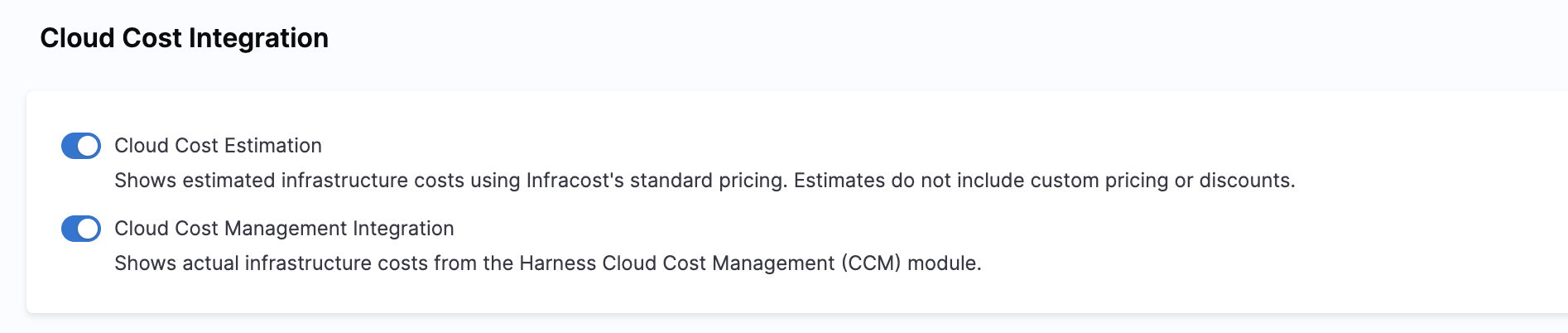
Settings apply immediately. Future pipeline executions will reflect the updated configuration.
Where to view cost data
Each cost feature surfaces data in a different location.
Workspace Overview tab
When Cloud Cost Management Integration is enabled, the workspace Overview tab displays the Current Monthly Cost and Optimization Opportunity cards. These show actual infrastructure costs and CCM recommendations for the resources managed by the workspace.
Go to Workspaces overview to understand the workspace Overview tab.
Approval steps
When your pipeline includes an approval step after a Terraform plan, the approval interface displays Infracost cost estimates alongside resource changes. This allows approvers to review the estimated financial impact before authorizing the apply operation.
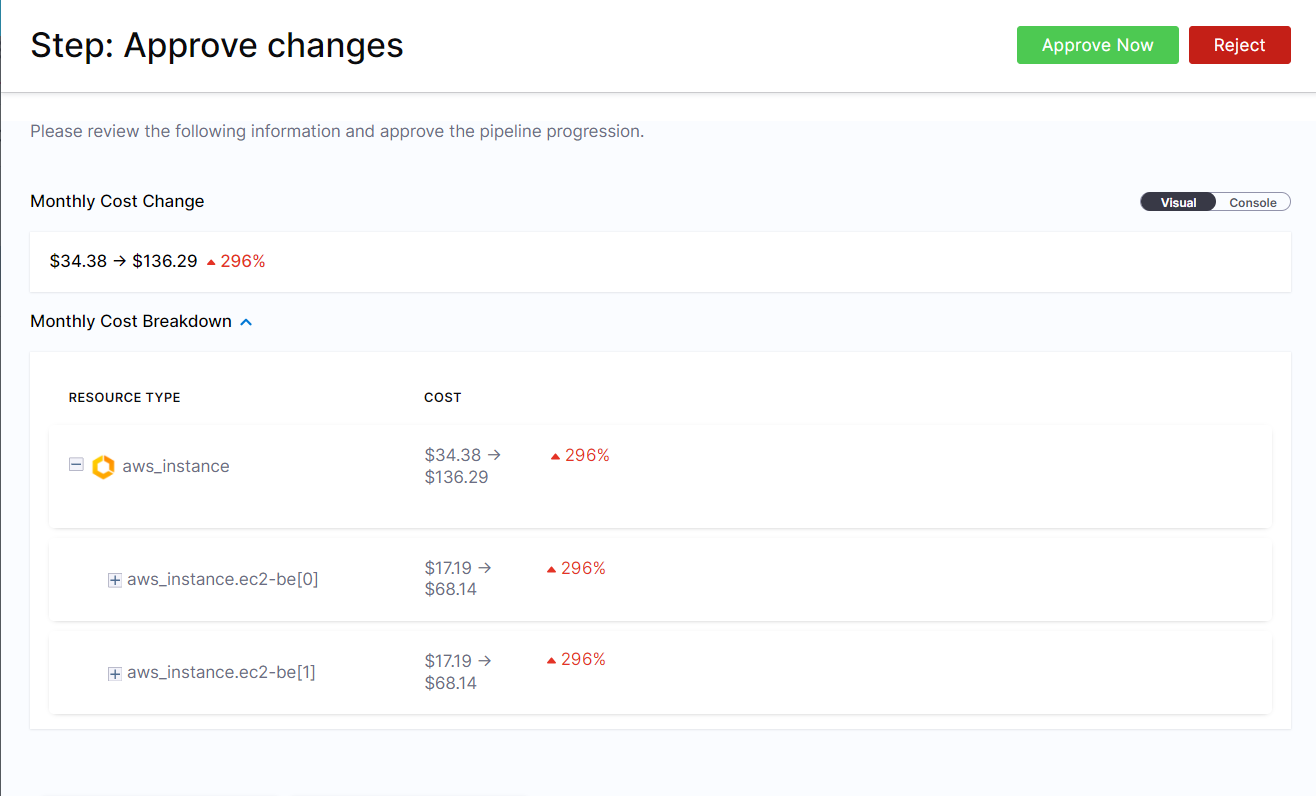
Infracost cost estimates displayed in the approval step alongside resource changes
The approval step shows the estimated monthly cost difference (increase or decrease) compared to the current infrastructure state.
Cost Change Estimation tab
For a complete audit trail, Harness stores Infracost cost estimation data for every pipeline execution in the Cost Change Estimation tab. You can review historical cost estimates for past runs, compare cost impacts across different changes, and track infrastructure spending trends over time.
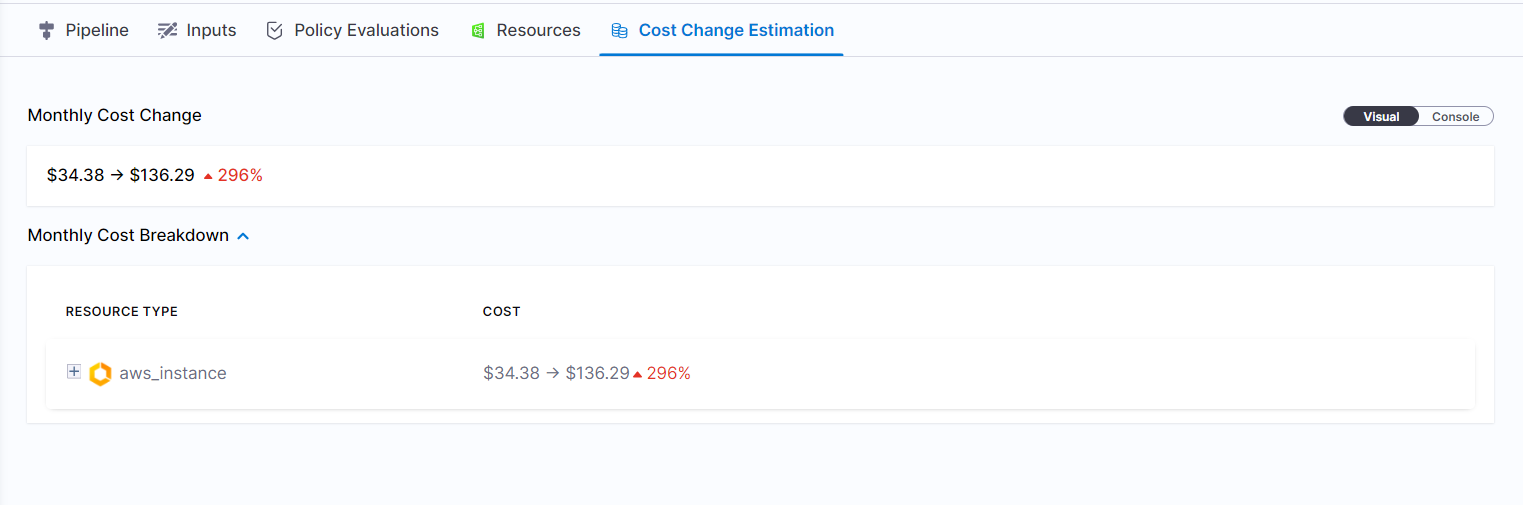
Cost Change Estimation tab showing historical Infracost data for pipeline executions
This tab is available in the pipeline execution details view and persists the cost data even after the pipeline completes.
Configure Infracost Cloud (optional)
Harness integrates Infracost into IaCM. Cost estimation uses Infracost's open-source pricing database and public list prices by default, so you get estimates without signing up for Infracost Cloud.
Configure an Infracost Cloud API key only when you meet both of the following:
- You subscribe to a paid Infracost Cloud plan.
- You maintain custom pricing in Infracost Cloud (for example, enterprise discounts or negotiated rates), and you want those rules applied to estimates in IaCM.
If you do not need custom pricing or do not have a paid Infracost Cloud plan, skip this step. An API key does not change the default experience.
To connect a paid Infracost Cloud organization that uses custom pricing:
- Use your paid Infracost Cloud account at Infracost Cloud.
- Generate an API key from the Infracost dashboard. Go to Infracost documentation to follow the setup instructions.
- In your workspace, go to the Connectors and Variables tab.
- Under Environment Variables, select + Add Variable, enter
INFRACOST_API_KEYas the key, and your API key as the value.
With a valid key from a paid plan, Infracost can apply the custom pricing rules you configure in Infracost Cloud where supported.
Limitations
Be aware of these limitations when using cost estimation:
- Cloud provider support: Cost estimation supports AWS, Azure, and Google Cloud Platform. Other cloud providers are not currently supported.
- Resource coverage: Not all Terraform resources have cost estimates. Infracost maintains pricing data for common infrastructure resources (compute instances, storage, databases, networking), but some specialized or newer resource types may show as "unsupported" or display $0 estimates.
- Estimation accuracy: Cost estimates are approximations based on standard pricing. Actual costs may vary due to enterprise agreements, reserved instances, committed use discounts, spot pricing, or usage-based charges that cannot be predicted from Terraform plans alone.
- OpenTofu compatibility: Cost estimation works with both Terraform and OpenTofu workspaces, but ensure you are using a recent version of Infracost that supports your OpenTofu version.
- Performance impact: Enabling cost estimation adds minimal overhead to Terraform plan operations. Most plans complete within seconds, but very large plans with thousands of resources may see a slight increase in execution time.
Troubleshooting
Cost estimates do not appear after enabling cost estimation
Verify that your pipeline includes a Terraform plan operation. Cost estimates only appear for plan operations, not for apply-only runs. Check the workspace Configuration tab to confirm cost estimation is toggled on.
Infracost API errors or authentication failures with Infracost Cloud
Verify the INFRACOST_API_KEY environment variable is correctly set in the workspace Connectors and Variables tab under Environment Variables. Test your API key by running infracost auth login locally. Ensure your Infracost Cloud account is active and the API key has not expired.
Cost estimate shows $0 or unavailable for specific resources
Some Terraform resources are not supported by Infracost's pricing database. Check the Infracost documentation for supported resources at https://www.infracost.io/docs/supported_resources/. If you need estimates that reflect negotiated rates, you need a paid Infracost Cloud plan with custom pricing and an API key configured as described under Configure Infracost Cloud (optional).
Cost estimate differs significantly from actual cloud bill
Cost estimates are based on standard cloud provider pricing and cannot account for enterprise agreements, reserved instances, spot pricing, or usage-based charges. Review your cloud provider's billing dashboard to understand the source of cost differences. Use cost estimates as directional guidance, not exact predictions.
Cloud Cost Management Integration shows no data on the workspace Overview tab despite the toggle being enabled in IaCM
Confirm the Harness CCM module is active on your account and that the workspace manages resources on AWS, Azure, or GCP. CCM Integration syncs approximately every 12 hours, so data may not appear immediately after enabling the toggle. If no data appears after 24 hours, verify that CCM has visibility into the cloud account where these resources are provisioned.
Next steps
Now that you understand how cost estimation works in IaCM, explore related workspace and governance topics:
- Create a workspace: Learn how to create and configure workspaces.
- Workspace RBAC: Control who can enable cost estimation and view cost estimates.
- IaCM pipelines: Understand how cost estimates integrate with Terraform plan and approval steps.
- Infracost documentation: Optional Infracost Cloud setup, API keys for paid plans, and supported resources.