Harness Policy As Code overview
Use Harness Policy As Code to implement governance across your Harness account and modules. Harness Policy As Code uses Open Policy Agent (OPA) as the central service to store and enforce policies for different entities and processes across the Harness platform. You can centrally define and store policies and then select where (which entities) and when (which events) they will be applied.
You can define and store policies directly in the OPA service in Harness or use the Git Experience to store policies in a Git repository.
What you will learn in this topic
By the end of this topic, you will be able to:
- Understand how Harness OPA Server manages and enforces policies across the platform.
- Create and test policies using Rego in the Harness policy editor.
- Organize policies into policy sets and associate them with entities and events.
- Apply policies to different Harness entities like pipelines, templates, feature flags, and services.
- Understand policy scope and inheritance across Account, Organization, and Project levels.
Before you begin
Before you implement governance with Harness Policy As Code, ensure you have the following:
- Harness account access: Permissions to create and manage policies at the appropriate scope (Account, Organization, or Project level). Go to RBAC in Harness for more information on role requirements.
- OPA and Rego knowledge: Familiarity with Open Policy Agent (OPA) and the Rego policy language is recommended. Go to OPA Policy Authoring for more information on a free online course from Styra founder and OPA co-creator Tim Hinrichs.
- Entity understanding: Knowledge of the Harness entities you want to govern (pipelines, templates, feature flags, services, or repositories).
Governance examples with Harness OPA
Review these examples to understand how policies are evaluated at different stages and the outcomes based on policy severity.
Example: Apply policy when saving a pipeline
When a pipeline is saved, there needs to be an Approval step before deploying to a production environment.
- Success: You configure an Approval Step in the pipeline and then proceed to configure a prod stage. When you save the pipeline, the policy rule is evaluated and returns
success. - Warning: A warning message appears:
You need an Approval step. If you save the pipeline and deploy, Harness will throw an error. - Failure: You configure a pipeline with a Deploy stage that deploys to a prod environment without an Approval stage before it. When you save the pipeline, Harness throws an error message indicating the rule was enforced and the pipeline fails validation.
Example: Apply policy when a pipeline runs
On deployment, I need my pod CPU and memory to be pre-defined.
- Success: You deploy the pipeline and during the dry run the pod CPU and memory have been defined and populated in the deployment manifest. As a result, the dry run progresses. Harness indicates that the rule was evaluated and the action was valid.
- Failure: Pod CPU and memory were not defined in the deployment manifest. As a result, the dry run fails. Harness indicates that a rule was enforced and the deployment is prevented.
Harness OPA Server
The Harness OPA Server is managed by Harness and evaluates policies whenever specific events occur in your Harness account, such as saving or running a pipeline.
In Harness, you add Rego policies to a policy set and select the Harness entities (for example, pipelines) for evaluation. At that point, the policies are configured on the Harness OPA Server via a Kubernetes ConfigMap.
When certain events happen (for example, saving or running a pipeline), Harness reaches out to the Harness OPA server to evaluate the action using the policy set.
Harness policies
A policy is a single rule written as code in the OPA Rego policy language. Policies define governance requirements but are not enforced until added to a policy set.
A policy itself is just the rule and it is not enforced anywhere. When a policy is added to a policy set, it is associated with the entity event on which it will be enforced (On Save, On Run, and others).
Policies are written against an input payload, which is the JSON representation of the entity that the policy is being enforced against (pipeline, feature flag, and others). Input JEXL expressions or variables are not resolved before the JSON is sent to OPA.
Policies are saved within the hierarchy in the Harness platform: Account, Organizations, and Projects.
Policy scope is determined by whether the policy is created at the account, Organization, or Project level. A policy added at the account level can be applied to all entities in the Organizations and Projects in the account. A policy added at the Project level can be applied to entities in that Project alone.
Policies can be tested individually, but they are not applied individually. To enforce a policy, it must be in a policy set.
Harness platform uses the Open Policy Agent (OPA) library version 0.62.0.
New to OPA Policy Authoring? Use the following resources to learn Rego:
- Highly recommend: Free online course on Rego from Styra founder and OPA co-creator Tim Hinrichs: OPA Policy Authoring.
- Go to Policy Language for more information from OPA. The Rego Cheatsheet is also helpful to have on hand.
Policy editor
Write and test Harness policies using the built-in policy editor. The policy editor provides a complete development environment with testing capabilities.
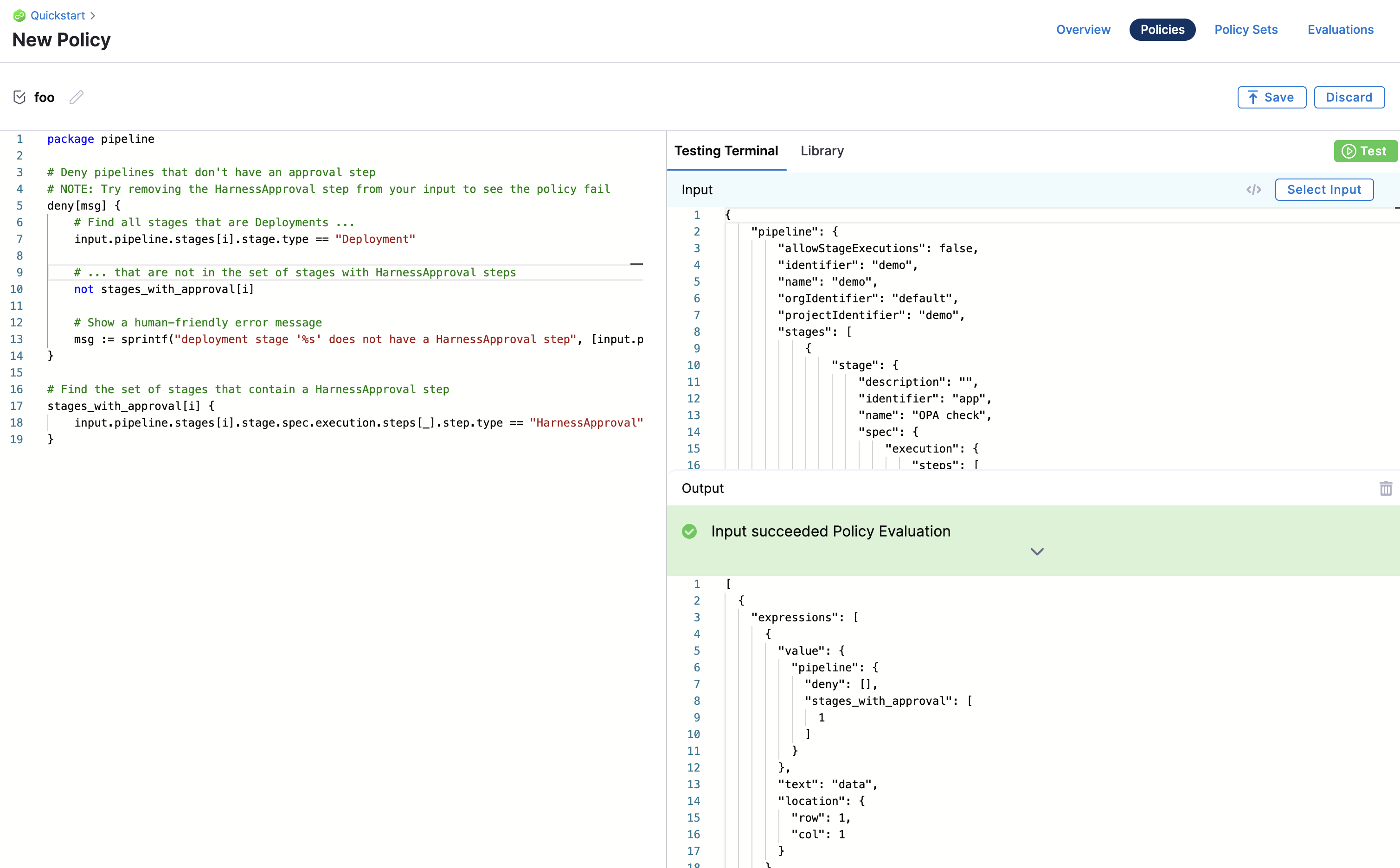
Go to Harness Policy As Code Quickstart for more information on how to use the policy editor.
Policy library
The Policy Editor includes a library of policies that cover many common governance scenarios. Use these library policies as references while writing your own policies or as starting points for your governance requirements.
Sample policies are also useful references while writing your policy. When you import an example, a sample payload is also loaded for testing the policy.
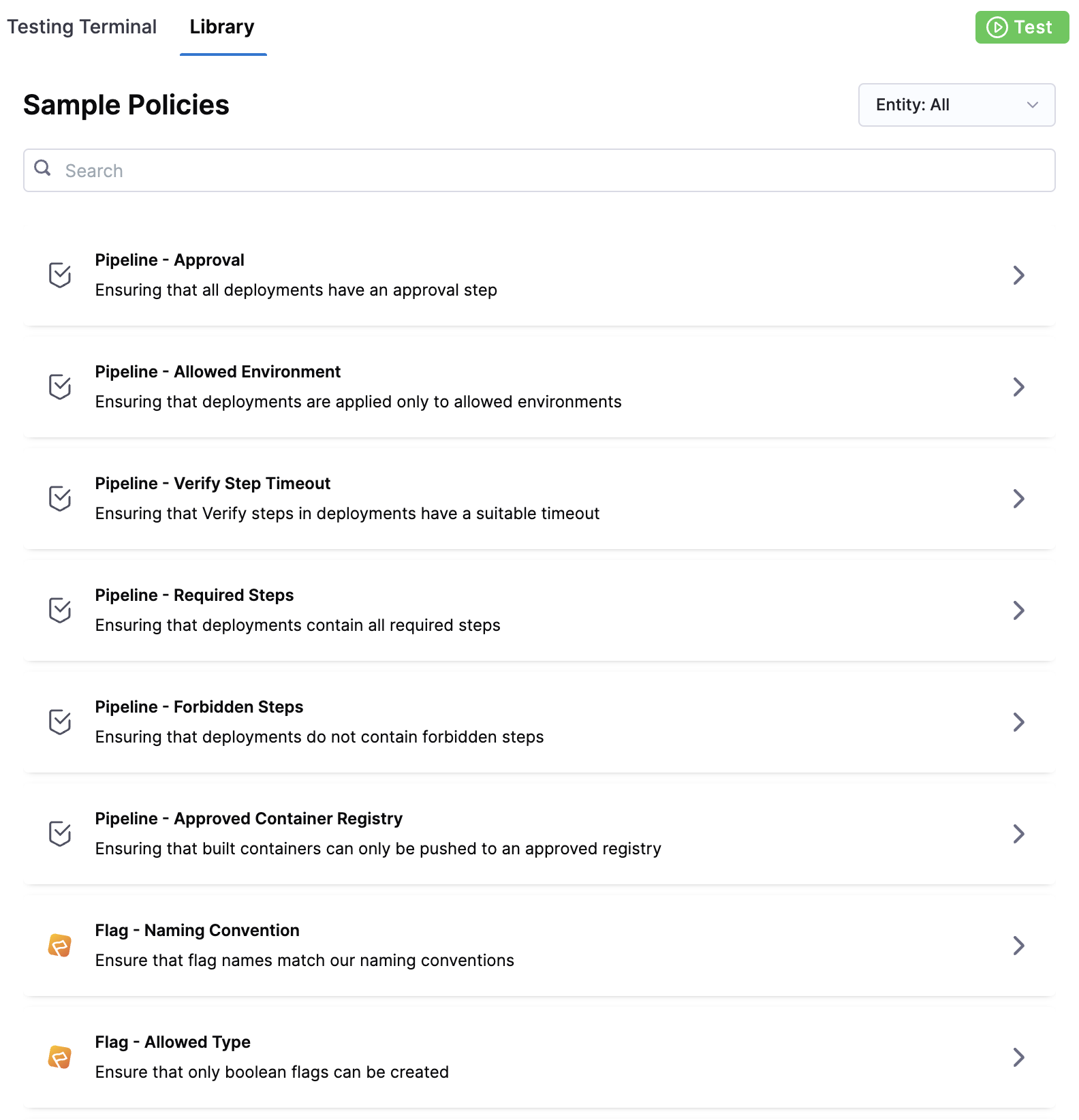
You can simply use the library policies to quickly generate the policy you want to create.
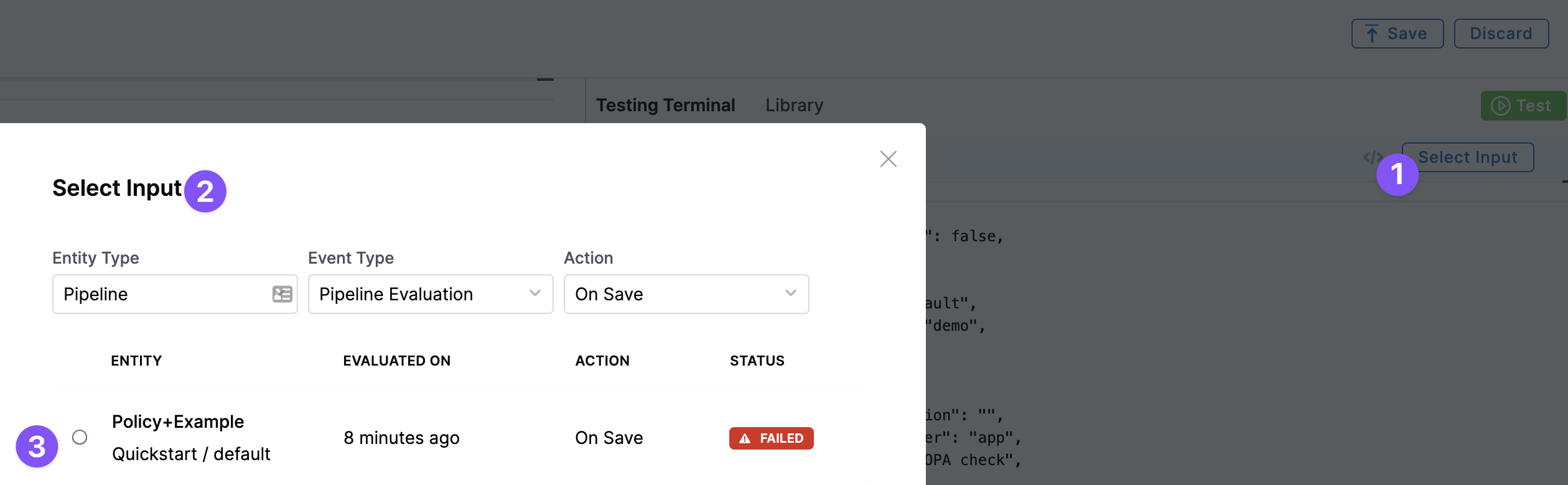
Select input
In the Policy Editor, you can select sample entities to test your policy on. For example, pipelines.
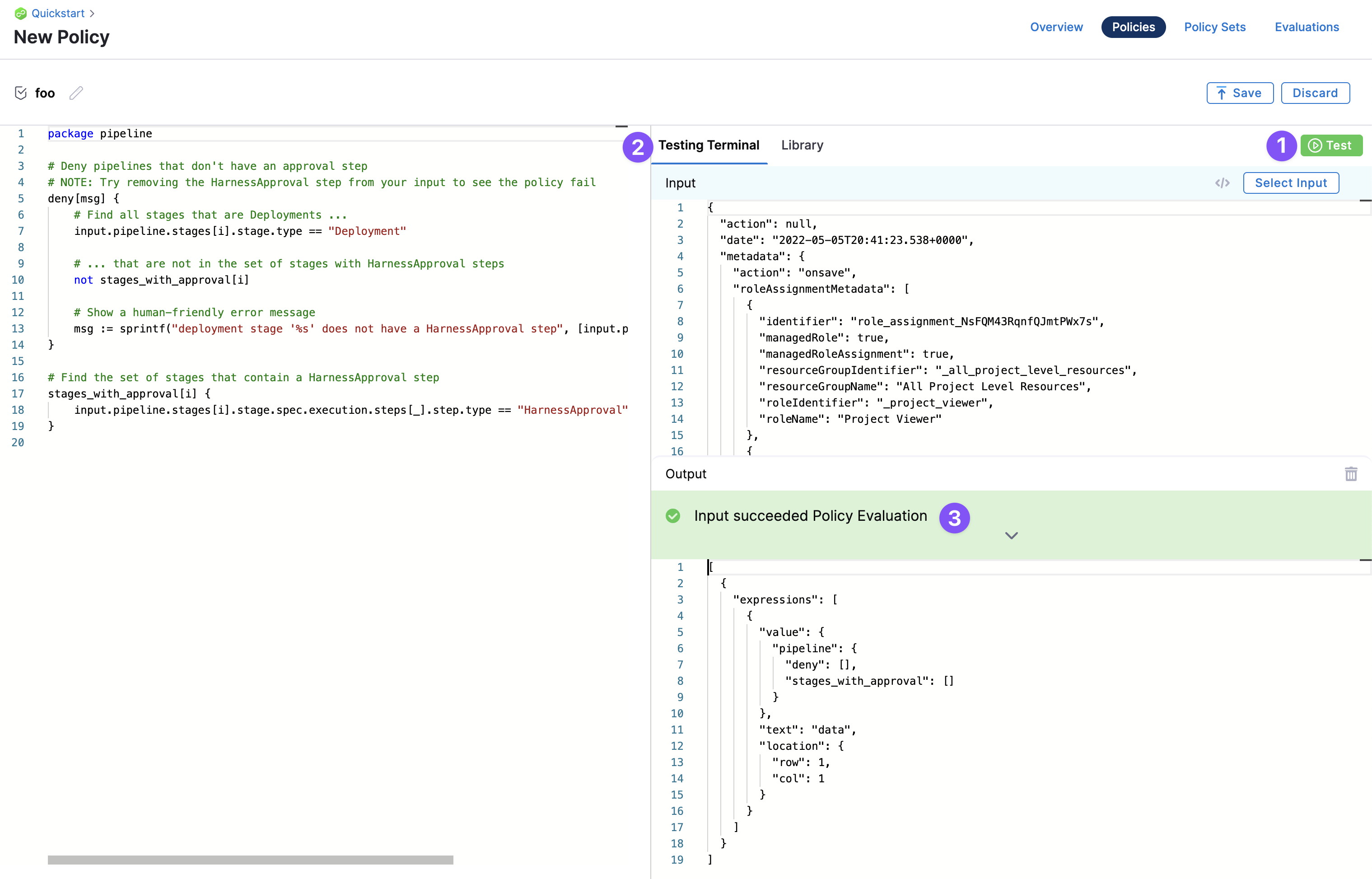
Testing terminal
The Testing Terminal lets you test the policy against real inputs while you are developing it. You can select input payloads from previous evaluations to test what will happen when your policy is evaluated.
Policy packages
Harness Policy As Code uses Open Policy Agent (OPA) as the central service to store and enforce policies for the different entities and processes across the Harness platform. OPA uses Rego as its policy language.
Policies in this language are organized into modules that can be imported as packages to other policies.
This feature is available in Harness and allows you to use and import policy packages from across scopes, including policies created in your project, organization, or account.
Define a package
To define a package, use the keyword package followed by your package name. For example:
package example1
Import a package
To import a package, use the keyword import followed by data.<package_name>. For example:
import data.example1
You can import a package from any accessible scope.
Policy package example
For example, you can define a function in a policy in your organization as follows:
package org1

is_even_number(x) {
  x % 2 == 0
}
and then you can import this policy into your project's policy as follows:
package project1

import data.org1

deny["Number is even"] {
  org1.is_even_number(10)
}
Policy input payload user metadata
The input payload contains user metadata for the user that initiated the event. Metadata includes roles, groups, and other attributes, and is added to every evaluation automatically. This enables enforcing policies with advanced and attribute-based access control use cases.
For example:
{
  "action": null,
  "date": "2022-05-05T20:41:23.538+0000",
  "metadata": {
    "action": "onsave",
    "roleAssignmentMetadata": [
      {
        "identifier": "role_assignment_NsFQM43RqnfQJmtPWx7s",
        "managedRole": true,
        "managedRoleAssignment": true,
        "resourceGroupIdentifier": "_all_project_level_resources",
        "resourceGroupName": "All Project Level Resources",
        "roleIdentifier": "_project_viewer",
        "roleName": "Project Viewer"
      }
    ],
    "timestamp": 1651783283,
    "type": "pipeline",
    "user": {
      "disabled": false,
      "email": "john.doe@harness.io",
      "externallyManaged": false,
      "locked": false,
      "name": "john.doe@harness.io",
      "uuid": "U6h_smb9QTGimsYfNdv6VA"
    },
    "userGroups": []
  },
...
Go to RBAC in Harness for more information on roles and permissions.
Harness policy sets
Define a set of rules (policies) that are evaluated together in a policy set. Policies are only enforced once they are added to a policy set.
In the policy set, policies are grouped and associated with a Harness entity and the event that will initiate evaluation.
Each policy in the set is also assigned a severity that determines what will happen if the policy evaluation fails (Error and Exit, Warn and Continue).
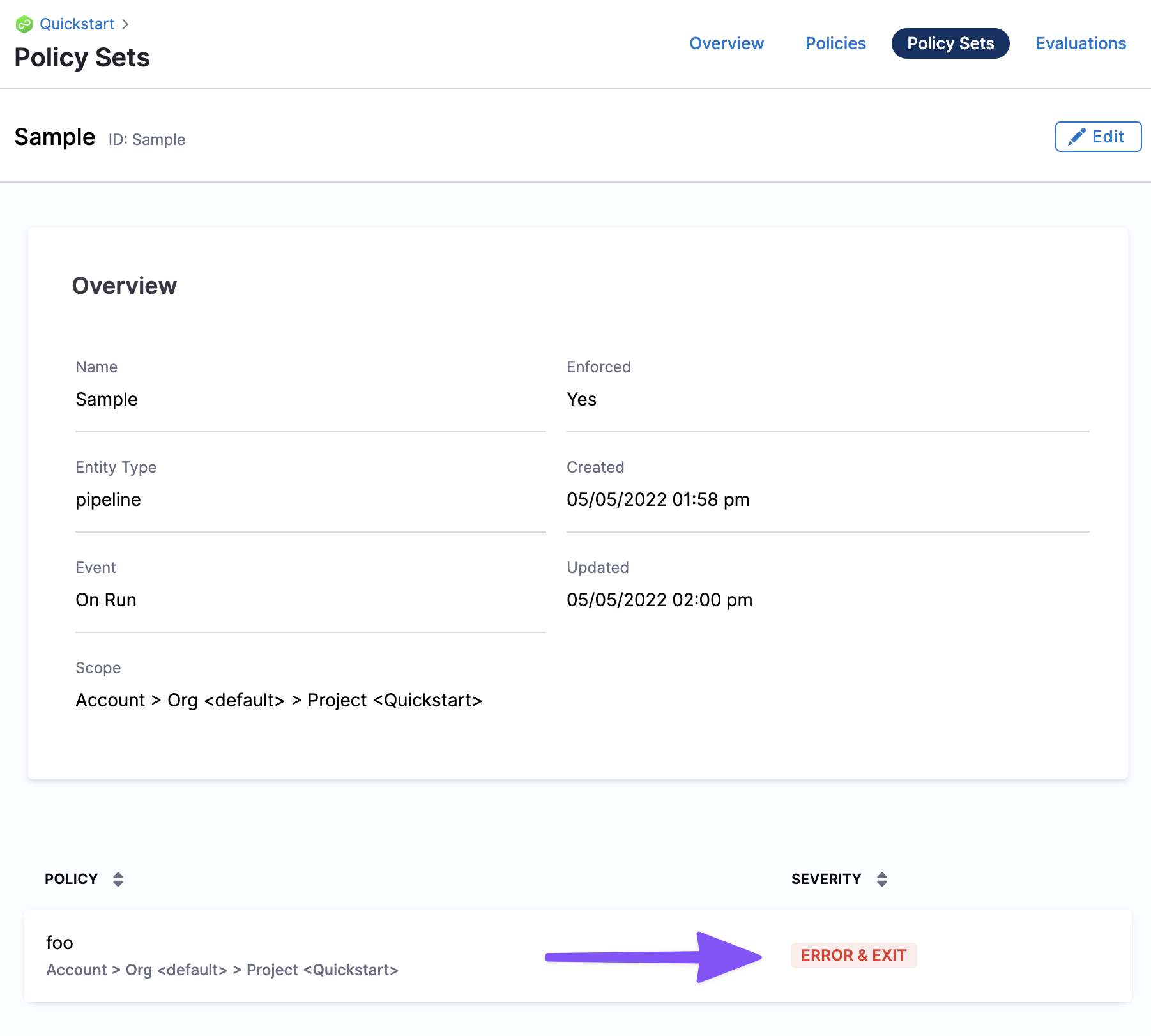
Policy sets are stored to the Harness OPA server for a given entity type and event in Harness. The entity (pipelines, and others) and event (On Save, On Run, and others) associated with a policy set determine when the policies in that set are evaluated.
Policy sets are saved at the Harness account, Organization, or Project level, and where they are saved determines the scope of the policy set.
A policy set at the account level applies to all entities in the Organizations and Projects in the account. A policy set at the Project level only applies to entities in that Project alone.
Filter the policy set list
On the Policy Sets listing page, you can narrow the list with the Type and Action filters, alongside the existing name search and sort controls. These filters match the ones on the Policy Evaluations page.
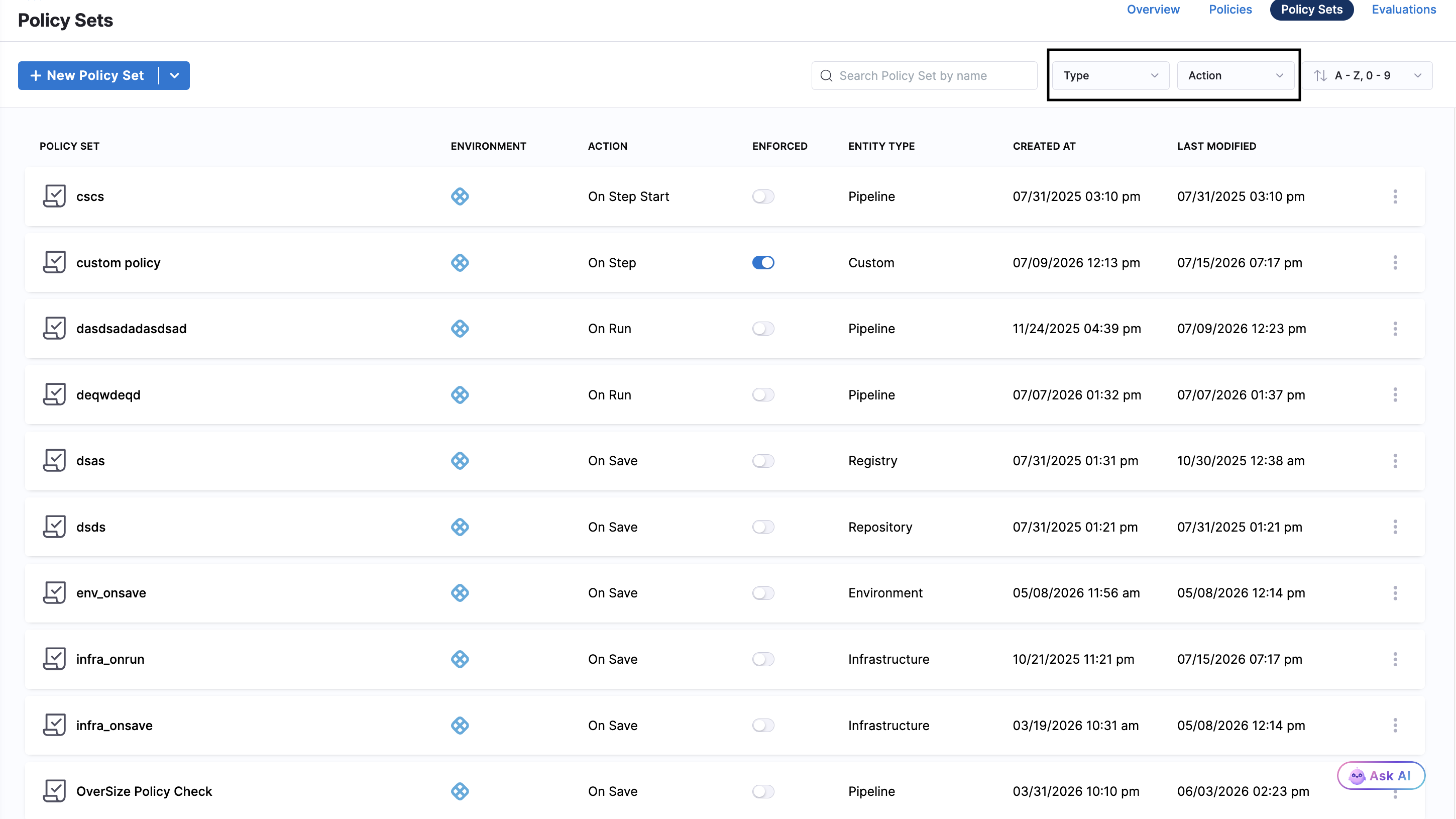
- Type: Select one or more entity types to filter policy sets by the entity they apply to. For example, select Pipeline to show only the policy sets that apply to pipelines.
- Action: Select the event that triggers evaluation to filter policy sets by their trigger event. For example, select On Run to show only the policy sets evaluated when a pipeline runs.
When you apply a filter, Harness immediately updates the list to show only the matching policy sets.
Entities and events
When you create a policy, you identify the Harness entities where the policy is applied. Currently, governance can be applied to the following Harness entities and events.
For example, here is a policy that applies the Harness Approval steps:
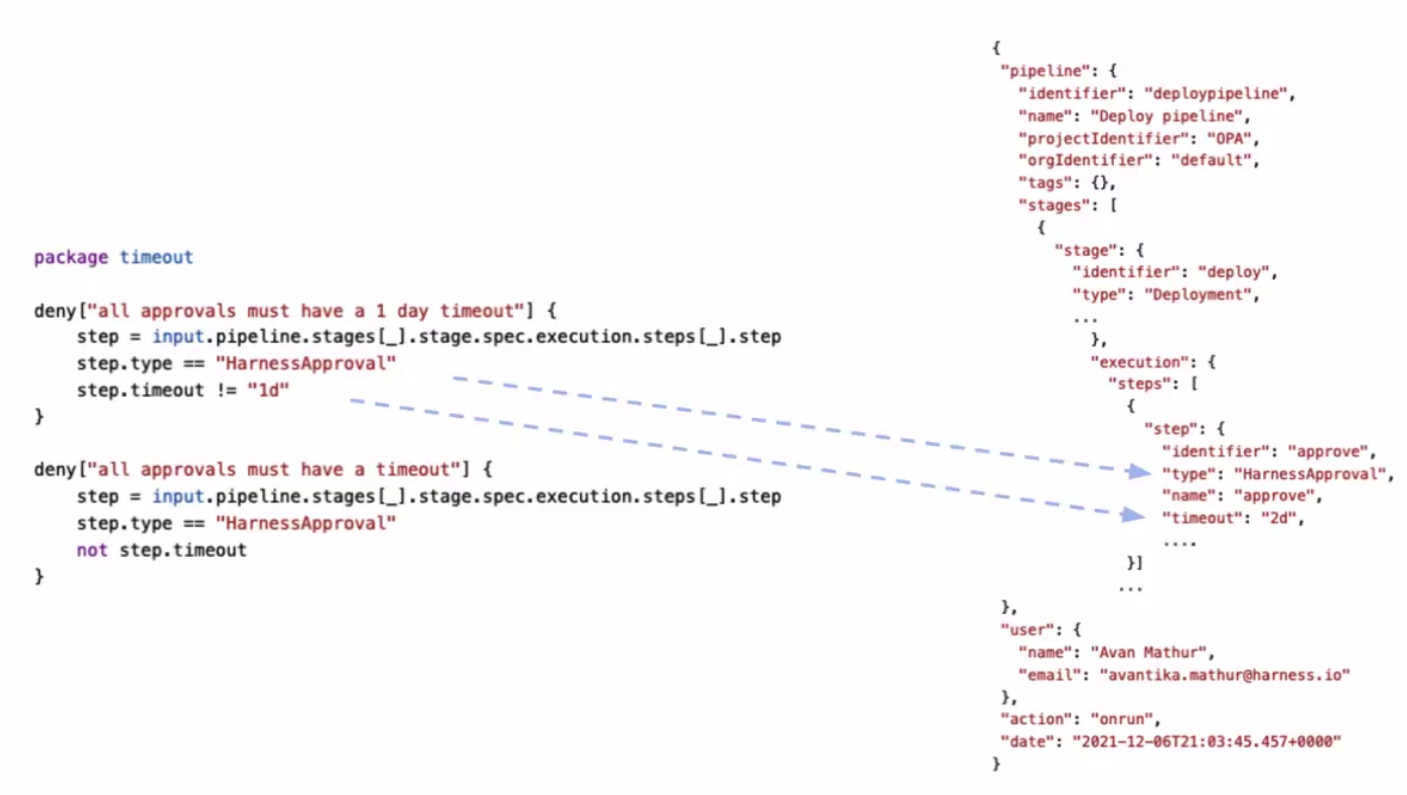
Soon, policies can be applied to more entities, such as Connectors, Services, Environments, Cloud Cost Management, Infrastructure Provisioners.
Pipelines
Policies are evaluated against Harness pipelines. The input payload is an expanded version of the pipeline YAML, including expanded references of stages and steps. Policy sets can be configured to be enforced automatically on pipeline Save, Run, and Step Start events.
Currently, On Step Start pipeline event is behind the feature flag PIPE_IS_PRE_STEP_OPA_POLICY_EVALUATION_ENABLED. Contact Harness Support to enable the feature.
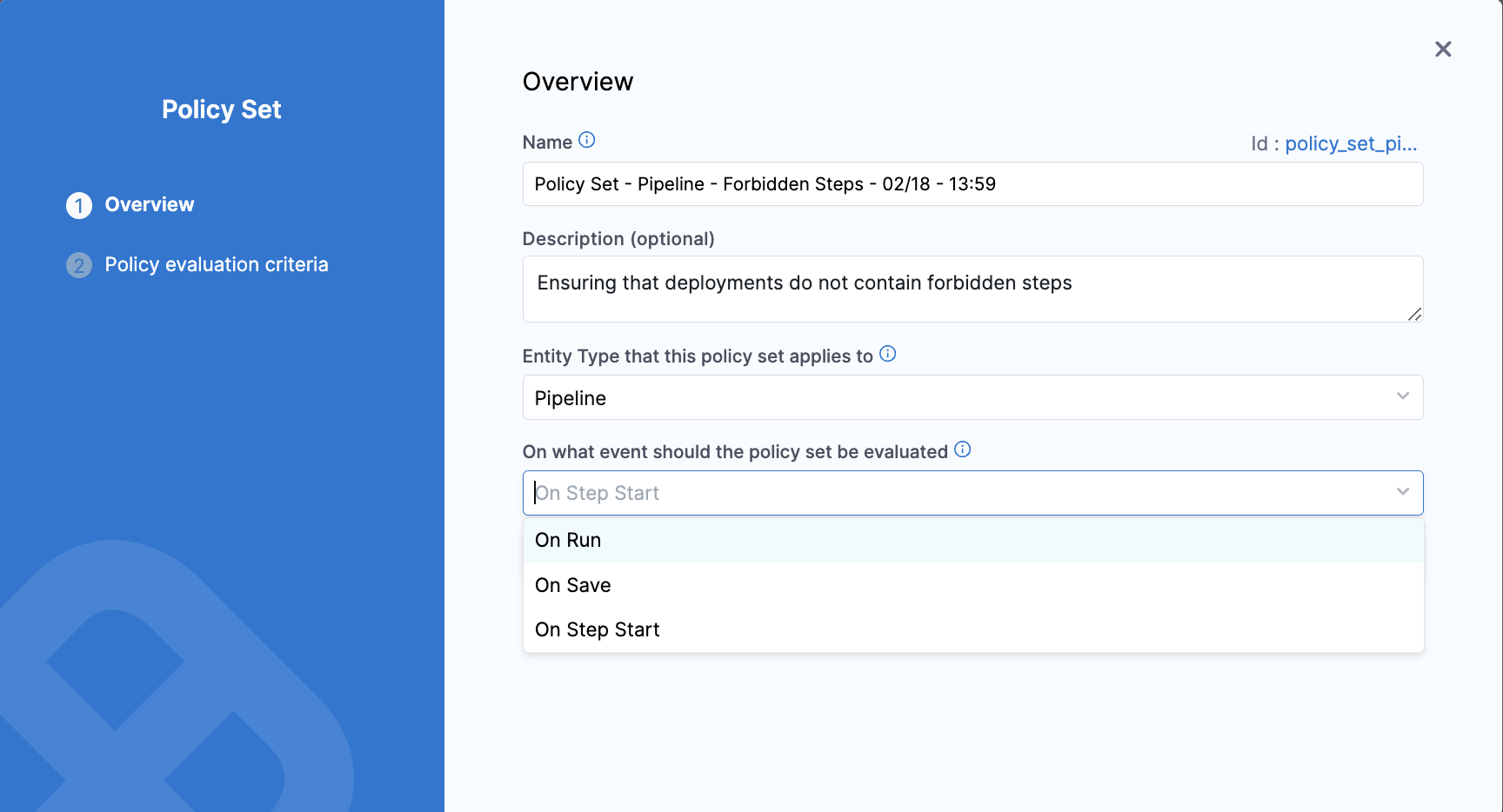
Policy sets can be configured to be enforced automatically on these pipeline events:
- On Save: Policies are evaluated when the pipeline is saved.
- On Run: Policy sets are evaluated after the preflight checks.
- On Step Start: Policy sets are evaluated when the step execution starts.
Severities:
- On error (Error and Exit): A message is shown and the action does not complete.
- On warning (Warn and Continue): A message is shown and the action is completed.
The Policy step in a pipeline also enables evaluating policies during pipeline execution. Go to Add a Governance Policy Step to a Pipeline for more information.
Templates
Policy sets can be configured to be enforced automatically on templates during On Save event.
Severities:
- On error (Error and Exit): A message is shown and the action does not complete.
- On warning (Warn and Continue): A message is shown and the action is completed.
You can also create policy that allows you to validate if the template stored is Remote or Inline.
We have a field storeType in YAML inside template that will help distinguish whether a template stored is Inline or Remote. Currently this feature is behind Feature Flag PIE_USE_OPTIMISED_TEMPLATE_RESOLUTION. Contact Harness Support to enable this Feature Flag.
Feature Flags
Policies are evaluated against Harness feature flags. Policy sets can be configured to evaluate policies on feature flag save, create, and toggle events.
Policy sets can be configured to evaluate policies on these feature flag events:
- Feature flag is saved.
- Flag is created.
- Flag is toggled on or off.
Go to Use Harness Policy As Code for Feature Flags for more information.
Repositories
Policies are evaluated against Harness Code repositories to enforce governance rules on repository configurations and operations.
Custom
Define policies with the entity type Custom to enforce policy evaluations against any input payload during pipeline execution. Custom entity types provide flexibility for unique governance requirements.
The Custom entity type provides flexibility to enforce policy evaluations against any input payload during pipeline execution. This is done using the Policy step. Go to Add a Governance Policy Step to a Pipeline for more information.
Custom entity types are open ended. There is no pre-set JSON schema that is used for Custom policies. The payload that the policy is evaluated against is determined by you (defined in the Policy step).
Service
Apply policies to the Service entity to enforce governance rules on service configurations and deployments. Policies can be applied to the Service entity during On Run and On Save events, allowing you to validate service definitions before they are saved or executed.
Currently this feature is behind the feature flag CDS_ENABLE_SERVICE_ON_RUN_OPA_EVAL. Contact Harness Support to enable the feature.
Review this interactive guide for selecting Service entity on policy set:
Policy and policy set hierarchy and inheritance
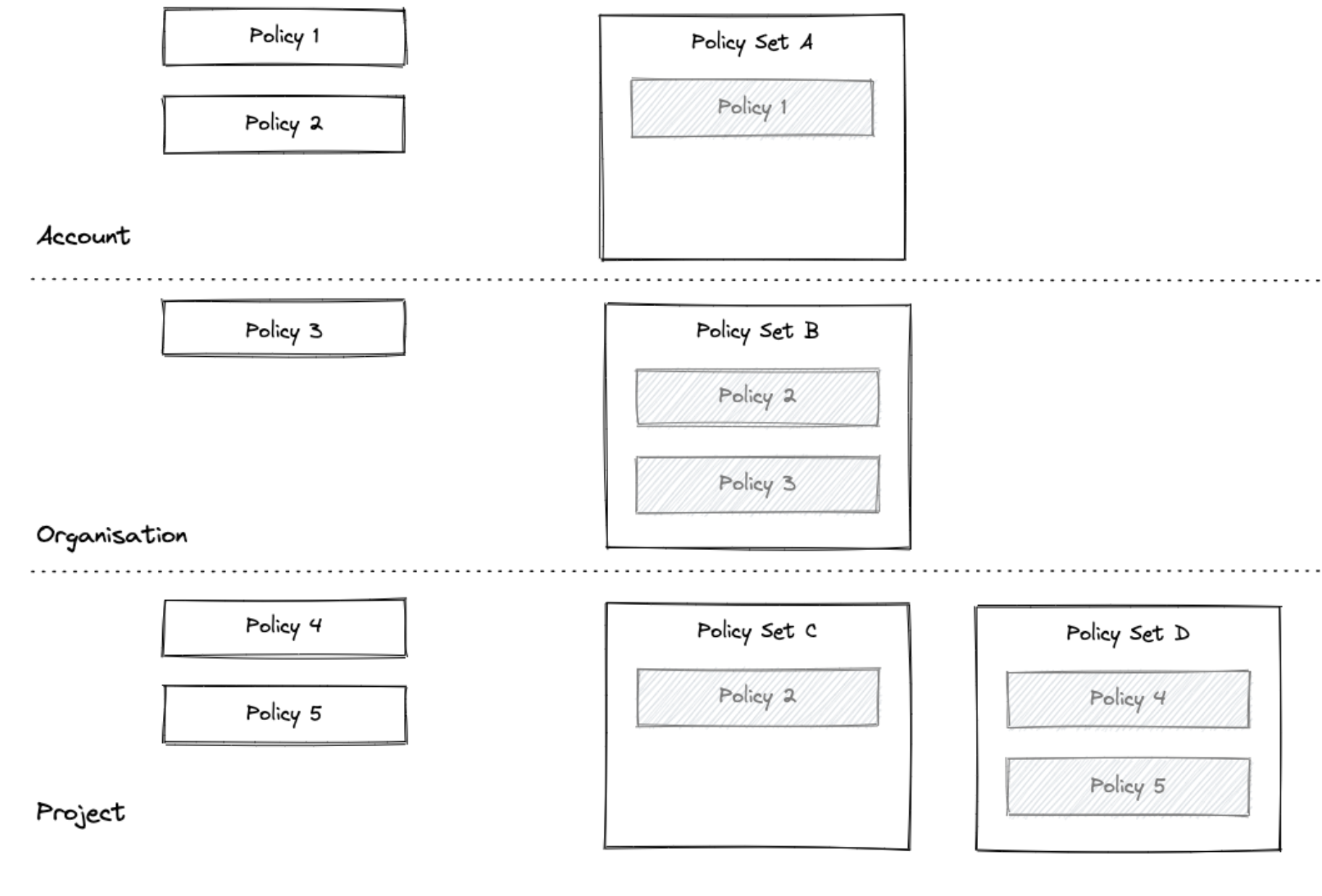
Understand how policy scope and inheritance work across Account, Organization, and Project levels. Where the policy or policy set is saved determines its scope and which entities it can be applied to.
Policies and policy sets are saved at the Harness Account, Organization, or Project level in Harness. Where the policy or policy set is saved determines its scope.
- Policies saved at the Account level can be added to policy sets in the Account, or Organizations and Projects within that account.
- A policy at the Organization level can only be added to policy sets in that organization and its project.
- A policy at the Project level can only be added to policy sets in that project.
Limits
Review the limitations and special behaviors of Harness Policy As Code, particularly when policies are managed outside the Harness UI.
Harness On Save policies
For Git-backed pipelines and templates, Harness can also evaluate onSave policies on commits made directly in Git and block pipeline execution when the latest commit fails policy evaluation. This enforcement is behind a feature flag. Go to Enforce onSave policies on Git entities to understand this enforcement.
Harness OPA On Save changes will flag and advise customers of a conflict with a policy if the changes are made via UI. However, if changes to the pipeline or environment are performed outside of the UI, for example, utilizing Harness's remote pipelines through Git Experience, or Terraform Provisioning, customers can expect the following behavior:
- Changes that are in conflict with a policy will not prevent a synchronization: Harness implements a sync process so customers have the opportunity to resolve these issues from the Harness UI, where there are clear indicators of the issue.
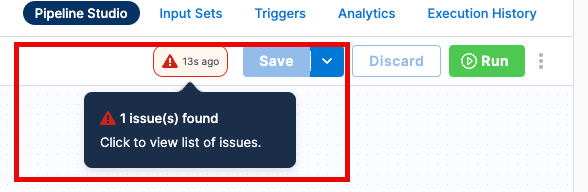
- Any issues to an existing On Save policy can be seen in the UI, with the cautionary flag:
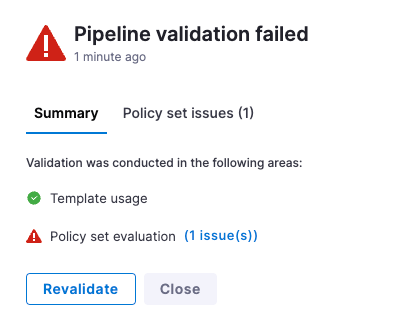
- Clicking on the flag will outline the policies that are in violation: The direct issues can be further investigated. Once changes are made, there is also the ability to re-validate the pipeline.
- Administrators should create a policy set of On Run policies: Check that there are no violations during runtime.
Related articles
- Harness Policy As Code Quickstart: Get started with creating your first policy and policy set.
- Add a Policy Step to a Pipeline: Learn how to evaluate policies during pipeline execution.
- Harness Policy As Code Overview for Feature Flags: Understand how to apply policies to feature flags.
- Configure Git Experience for OPA: Store policies in a Git repository.