Agent permissions
Agent permissions control what Worker Agents can access and modify within Harness at runtime. You can configure permissions at two levels: pipeline-level permissions for runtime execution scope, and Role-Based Access Control (RBAC) permissions for managing agent lifecycle operations.
What you will learn in this topic
By the end of this topic, you will be able to:
- Configure pipeline-level agent permissions for runtime execution.
- Run Worker Agents from triggers with an executor identity.
- Understand supported entities and permission values.
- Configure RBAC permissions for agent management.
Before you begin
Before you configure agent permissions, ensure you have the following:
- Worker Agent created: At least one Worker Agent configured in your project. Go to Worker Agents for more information on creating agents.
- Admin or RBAC permissions: Access to configure roles and permissions in your Harness account.
- Pipeline edit access: Permissions to edit pipeline YAML if configuring pipeline-level agent permissions.
Agent permissions (pipeline-level)
Configure resource-level permissions for Worker Agents directly in pipeline stage YAML to control runtime access.
Currently, this feature is behind the feature flag HARNESS_INJECT_TOKEN. Contact Harness Support to enable it.
Agent permissions allow you to define explicit resource-level permissions for a Worker Agent directly in the pipeline stage YAML. Each Agent step declares the permissions it needs as a set of resource: verb pairs, and Harness evaluates that grant against two things before the agent can act:
- The declared grant: the resource/verb pairs you list in the pipeline YAML.
- The invoking principal's RBAC: the effective permissions of the user or service account that triggers the pipeline, at that pipeline's account, org, or project scope.
An agent's effective permission is the intersection of the two. A declared grant can only narrow what the agent can do; it can never grant an agent more access than the invoking principal already has. This uses your existing RBAC scopes and resource groups. It is not a separate permission system to manage.
Permissions are declared per stage (CI, STO, SCS, IaCM) or per Containerized Step Group (CD, Custom), not pipeline-wide, so agents in different stages or step groups can carry different, narrowly scoped access. The scoped token applies to every step in the stage or step group where the block is declared.
Declare permissions for Agent steps
The placement of the permissions block differs by stage type. Select your stage below. Each resource key accepts a pipe-separated (|) list of verbs. Harness builds one permission per pair in the form module_resource_verb and intersects it with the invoking principal's RBAC when the pipeline runs.
Two rules govern what is accepted:
- Resource keys are validated. Only the keys listed under Supported permissions are recognized. An unrecognized key is dropped, so no permission is granted for it.
- Verbs are not checked against a fixed enum. Harness concatenates whatever verb you list into the permission key. The verb must match a real RBAC action for that resource (for example
view,edit,execute,access), otherwise the resulting key matches nothing and the grant resolves to no access.
- CI, STO, SCS, IaCM (Stage Level)
- CD, Custom (Step Group Level)
In CI, STO, SCS, and IaCM stages, the Agent step runs directly in the stage. Add the permissions block to the stage definition at the same level as spec:
stages:
  - stage:
      name: Agent
      identifier: Agent
      description: ""
      type: CI
      permissions:
        - pipeline: view|edit|create|delete|execute|abort
        - code_repository: view|edit|create|delete|push|review
        - artifact_registry: view|edit|delete|uploadartifact|downloadartifact|deleteartifact|quarantineartifact|firewallexceptionapprove
        - user: view|manage|invite|impersonate
        - ai_llm_gateway: access
      spec:
        cloneCodebase: true
Add the permissions block to the Containerized Step Group, not the stage. The scoped token is injected into every step in the group and exposed as the HARNESS_TOKEN and HARNESS_BASE_URL environment variables, which steps read to authenticate with Harness APIs.
- stepGroup:
    name: Container
    identifier: Container
    permissions:
      pipeline: execute|view
      code_repository: view
      artifact_registry: view|downloadartifact
    steps:
      - step:
          type: Run
          name: Run_1
          identifier: Run_1
          spec:
            connectorRef: account.your_docker_connector
            image: busybox
            shell: Sh
            command: |-
              # Do not run 'env' in production. It dumps all environment
              # variables, including HARNESS_TOKEN, to the build log.
              echo "HARNESS_TOKEN: $HARNESS_TOKEN"
              echo "HARNESS_BASE_URL: $HARNESS_BASE_URL"
    stepGroupInfra:
      type: KubernetesDirect
      spec:
        connectorRef: account.your_k8s_connector
        namespace: your-delegate-namespace
The token is scoped to exactly the permissions declared on the step group. In the example above, every step in the Container group can execute and view pipelines, view code repositories, and view or download artifacts. No other actions are permitted, even if the agent author holds broader permissions.
If an Agent step references an llmConnector, grant connector: view|access for that connector ID. Connector access is governed by this same grammar.
When you use a Harness-managed LLM connector, the agent authenticates to the LLM Gateway through the ML_HARNESS_MANAGED_LLM_CONNECTORS permission. This permission is included in the scoped token by default, so an agent that does not declare a permissions block has LLM Gateway access automatically.
Because a declared permissions block grants only the pairs you list, you must add ai_llm_gateway: access explicitly when you use a managed connector. Omit it and the scoped token no longer carries LLM Gateway access, so the agent cannot reach the managed connector.
permissions:
  ai_llm_gateway: access
  pipeline: view|execute
  code_repository: view
Example: least-privilege "deploy and reconcile" agent
Because this agent rolls back deployments and syncs GitOps apps, it runs in a CD stage, so the permissions block sits on the Containerized Step Group:
- stepGroup:
    name: Deploy & Reconcile
    identifier: Deploy_Reconcile
    permissions:
      pipeline:           view|execute
      environment:        view|access|rollback
      service:            view|access
      gitops_application: view|sync
      gitops_cluster:     view
      connector:          view|access
      secret:             view|access
    steps:
      - step:
          type: Agent
          name: Deploy & Reconcile
          identifier: Deploy_Reconcile
          spec:
            agentName: ca_deploy_reconcile_agent
            llmConnector: connector_Anthropic_112e
    stepGroupInfra:
      type: KubernetesDirect
      spec:
        connectorRef: account.your_k8s_connector
        namespace: your-delegate-namespace
This agent can run and roll back deployments and sync GitOps apps. It cannot create, edit, or delete any resource, because those verbs were never granted.
Trigger-started Worker Agent runs
A trigger-started pipeline must have an executor identity before Harness can derive the scoped token for its Worker Agent steps. Without that identity, the agent cannot authenticate to the LLM Gateway. The Agent step can show a login error even when the same pipeline succeeds after a manual execution.
When you assign an executor identity, Harness runs the pipeline as that user or service account. Harness intersects the identity's RBAC permissions with the pipeline's declared permissions block, then injects the resulting scoped token into the Worker Agent stage. Include ai_llm_gateway: access in the block when the Agent step uses a Harness-managed LLM connector.
Support for trigger-started Worker Agents is available in production. It requires both the HARNESS_INJECT_TOKEN and PIPE_ENFORCE_TRIGGER_EXECUTOR_IDENTITY feature flags. Contact Harness Support to enable them for your account.
Required configuration
Complete these steps before you start a pipeline that contains Worker Agent steps from a trigger:
- Enable feature flags: Enable
HARNESS_INJECT_TOKENandPIPE_ENFORCE_TRIGGER_EXECUTOR_IDENTITYfor the account. - Open pipeline settings: In your Harness account, go to Account Settings > Account Resources > Default Settings > Pipeline.
- Require an executor identity: Set Enforce Executor Identity for Triggers to True, then save the setting.
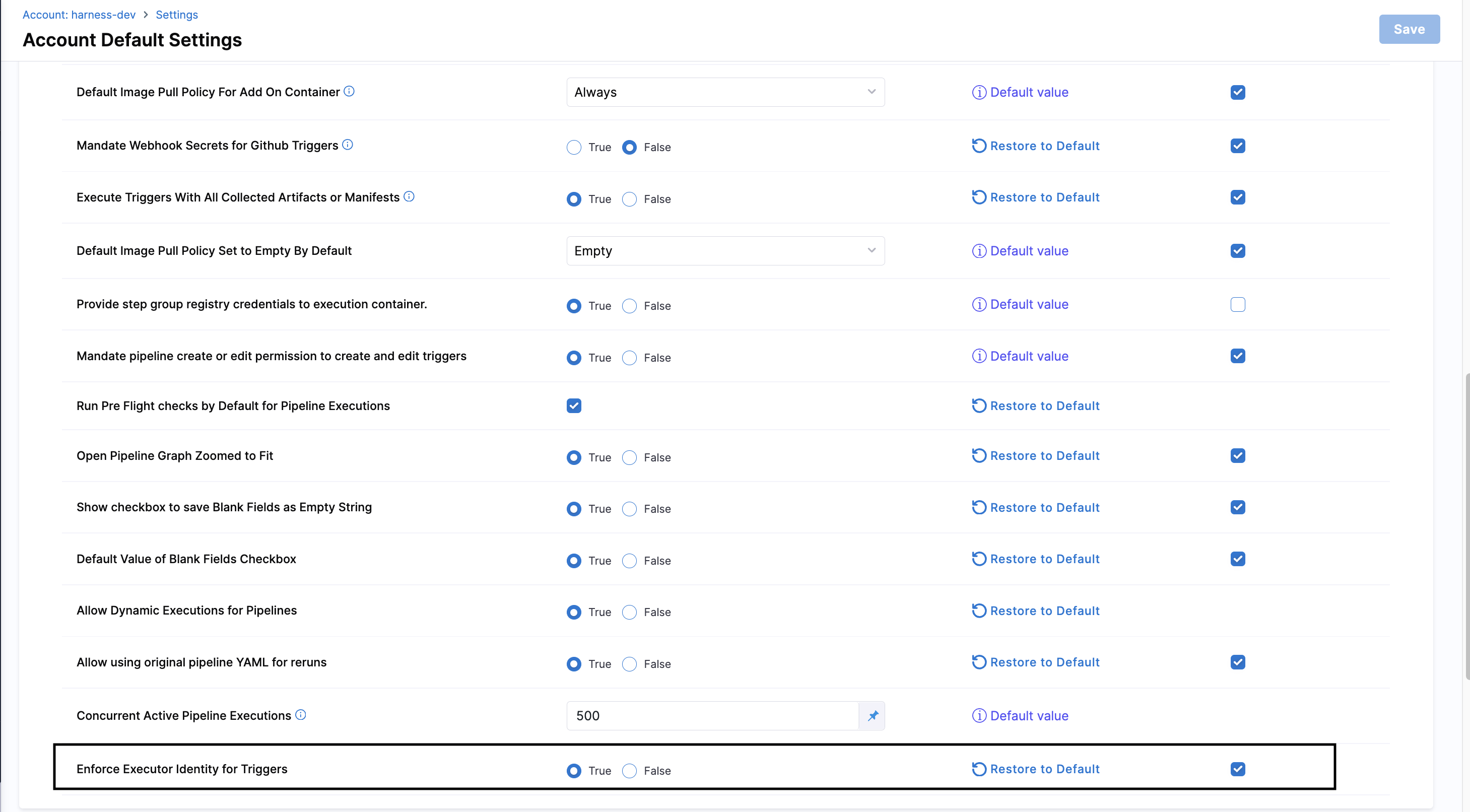
Enable Enforce Executor Identity for Triggers in the account pipeline settings.
- Open the trigger: In the pipeline, select Triggers, then create a trigger or edit an existing trigger.
- Assign the executor: In Run pipeline as, select your user identity or a service account that you can manage. The selected identity must have the permissions that the pipeline and its Worker Agent steps require. Go to Trigger executor identity to review identity selection and RBAC rules.
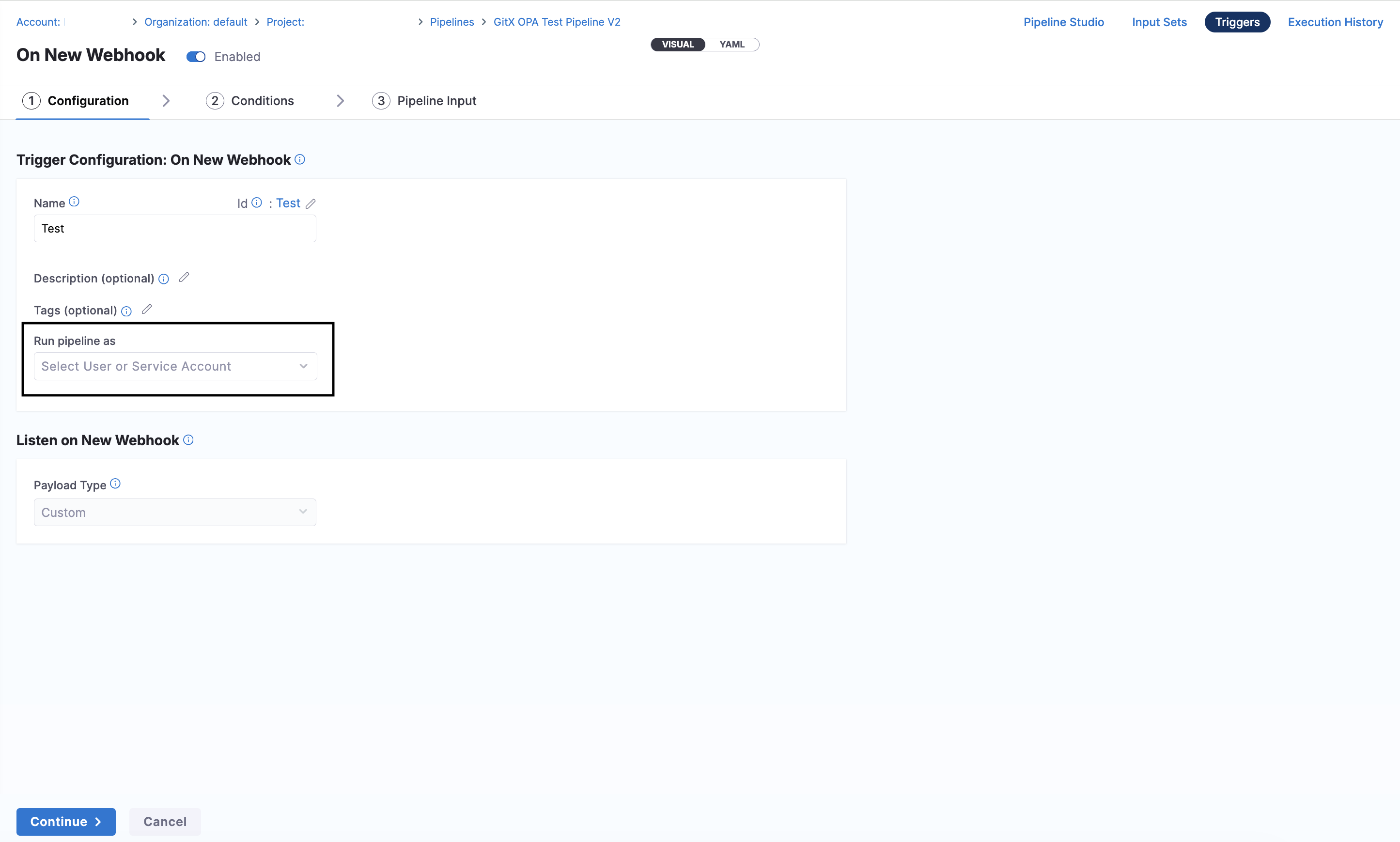
Select the identity that Harness uses for trigger-started pipeline executions.
- Save and start the trigger: Save the trigger, start it, and confirm that the Worker Agent steps pass authentication. The steps can now use the scoped token to access the LLM Gateway and Harness-managed models.
Trigger-compatible pipeline example
This CI pipeline defines the permission grant at the stage level. The ai_llm_gateway: access entry lets all three Agent steps use the Harness-managed Anthropic connector when a manual run or a trigger starts the pipeline.
This example reflects a broad QA test grant. Before you use it in production, remove every resource and verb that the Worker Agents do not require. If you retain permissions such as delete, manage, or impersonate, a compromised agent can perform those actions within the executor identity's RBAC scope.
pipeline:
  name: Worker Agent trigger example
  identifier: Worker_Agent_trigger_example
  tags: {}
  projectIdentifier: your_project
  orgIdentifier: your_organization
  properties:
    ci:
      codebase:
        repoName: your_repository
        build: <+input>
  stages:
    - stage:
        name: Agent
        identifier: Agent
        description: ""
        type: CI
        permissions:
          - pipeline: view|edit|create|delete|execute|abort
          - code_repository: view|edit|create|delete|push|review
          - artifact_registry: view|edit|delete|uploadartifact|downloadartifact|deleteartifact|quarantineartifact|firewallexceptionapprove
          - user: view|manage|invite|impersonate
          - ai_llm_gateway: access
        spec:
          cloneCodebase: true
          caching:
            enabled: true
            override: true
          buildIntelligence:
            enabled: true
          platform:
            os: Linux
            arch: Amd64
          runtime:
            type: Cloud
            spec: {}
          execution:
            steps:
              - step:
                  type: Agent
                  name: Feature Gen
                  identifier: Feature_Gen
                  spec:
                    agentName: ca_feature_generator
                    agentSettings:
                      llmConnector: account.harnessAnthropic
              - step:
                  type: Agent
                  name: Plan Gen
                  identifier: Plan_Gen
                  spec:
                    agentName: ca_plan_generator_agent
                    agentSettings:
                      llmConnector: account.harnessAnthropic
                      modelName: claude-sonnet-4-6
              - step:
                  type: Agent
                  name: Builder
                  identifier: Builder
                  spec:
                    agentName: ca_implementation_agent
                    agentSettings:
                      llmConnector: account.harnessAnthropic
                      modelName: claude-sonnet-4-6
Supported permissions
Each resource key accepts verbs that match real Harness RBAC actions for that resource. Pair any recognized key with a verb, separated by the pipe (|) character.
Verbs
Verbs are not drawn from a fixed list. Whatever you type is concatenated into the permission key module_resource_verb, so a verb only takes effect when it matches a real RBAC action for that resource. Use the same action names Harness RBAC uses. The table below groups the actions you will reach for most often.
| Class | Common verbs | Use |
|---|---|---|
| CRUD | view, create, edit, delete | Standard object lifecycle |
| Lifecycle / execution | execute, abort, rollback, sync, toggle | Runtime actions; higher blast radius |
| Usage | access | Reference or use a resource at runtime (secrets, connectors, templates, services) |
| Review / approval | approve, reject, review, reportstatuscheck | Approval workflows |
| Admin | manage, invite, impersonate | Administrative actions; use sparingly |
Because there is no verb enum, a mistyped or unsupported verb does not raise an error. It produces a permission key that matches nothing, so the agent silently gets no access for that pair. Confirm the exact action names against the resource's RBAC permissions before relying on them. Go to the permissions reference to review the actions each resource supports.
Treat high blast-radius verbs, including delete, execute, abort, rollback, and any admin-class verb, as opt-in. Declare them explicitly only on the resource keys where the agent needs them.
Supported resources by module
These are the resource keys each module recognizes. A key not listed here is dropped when the token is built, so it grants nothing. Pair any recognized key with a verb that matches a real RBAC action for that resource (see Verbs). Expand a module to review its keys.
Core (Platform)
pipeline, user, secret, connector, service, environment, environment_group, template, variable, setting, delegate, organization, project, usergroup, role, resourcegroup, serviceaccount, inputset, gitxwebhooks, deploymentfreeze, dashboards, audit
Artifact Registry
artifact_registry
Code Repository
code_repository
Harness AI
ai_rules, ai_llm_gateway
Continuous Delivery and GitOps
gitops_agent, gitops_application, gitops_repository, gitops_cluster, gitops_gpgkey, gitops_cert, gitops_applicationset, gitops_argoproject
Infrastructure as Code Management (IaCM)
iac_workspace, iac_registry, iac_provider_registry, iac_variable_set, iac_inventory, iac_playbook
Database DevOps
db_instance, db_schema
Feature Flags
feature_flag, ff_environment, ff_target_group, ff_target, ff_proxy_api_key
Feature Management and Experimentation (FME)
fme_environment, fme_traffic_type, fme_feature_flag, fme_segment, fme_large_segment, fme_metric, fme_experiment
Chaos Engineering
chaos_hub, chaos_infrastructure, chaos_experiment, chaos_gameday, chaos_image_registry, chaos_probe, chaos_fault, chaos_action, chaos_security_governance, dr_test
Security Testing Orchestration (STO)
sto_test_target, sto_exemption, sto_issue, sto_scan, sto_ticket
Supply Chain Security (SCS)
ssca_remediation_tracker, ssca_enforcement_exemption, scs_integration, scs_external_ticket, scs_configuration, scs_pr_creation, scs_evidence_vault
Cloud Cost Management (CCM)
ccm_perspective, ccm_budget, ccm_cost_category, ccm_autostopping_rule, ccm_folder, ccm_unit_cost, ccm_currency_preference, ccm_governance_rule, ccm_governance_rule_set, ccm_governance_enforcement, ccm_anomalies, ccm_recommendations
Internal Developer Portal (IDP)
idp_catalog, idp_workflow, idp_plugin, idp_scorecard, idp_layout, idp_catalog_access_policy, idp_integration, idp_advanced_configuration, idp_environment, idp_environment_blueprint, idp_aggregation_rule
Incident Response (IRO)
iro_manager, iro_metric_source, iro_alert, iro_alert_rule, iro_incident, iro_runbook, iro_escalation_policy, iro_schedule, iro_schedule_override, iro_service_directory, iro_third_party_integrations
AI DLC Insights (AIDI)
sei_data_settings, sei_developers, sei_integrations, sei_teams, sei_canvas, sei_profiles, sei_goals, sei_insights_category
Monitoring and Service Discovery
monitoring_agent, network_map
Default permissions
If a stage or step group has no permissions block, Harness injects a small read-only default so the agent can still resolve common context. Most modules inject nothing; only the modules below define a default.
| Module | Default permission key |
|---|---|
| Core | core_pipeline_view, core_user_view, core_service_view, core_environment_view, core_environmentgroup_view, core_connector_view, core_usergroup_view, core_inputset_view |
| Artifact Registry | artifact_artregistry_view |
| Code Repository | code_repo_view |
| Harness AI | ai_rules_view |
| CCM | ccm_perspective_view |
| Feature Management & Experimentation | fme_fmefeatureflag_view |
| IaCM | iac_workspace_view |
| IRO | iro_incident_view |
| STO | sto_scan_view |
Modules not listed (Chaos, Database DevOps, Feature Flags, GitOps, IDP, Monitoring, SEI, Service Discovery, SCS) inject no default. To grant an agent any access in those modules, declare an explicit permissions block. Once you declare a block, only the keys you list apply. The defaults are not merged in.
How agent permissions work
Understand how pipeline-level agent permissions are evaluated and applied at runtime.
- The
permissionsblock scopes the agent's access token down to only the specified entities and actions. The token cannot perform any action you do not list, even if the agent author holds broader permissions. - The agent receives a runtime token with these permissions injected, then intersected with the invoking principal's RBAC, independent of the pipeline author's personal permissions.
- This replaces the default behavior where the agent inherits the authoring user's credentials via an MCP Connector for Harness.
- Permissions are evaluated at pipeline execution time and apply for the duration of the agent step.
An agent gets no access for a pair when any of these is true:
- The pair is not in the declared grant.
- The verb exceeds the invoking principal's own RBAC, so the intersection removes it.
- The resource key is not recognized, or the verb does not match a real RBAC action, so the built permission key matches nothing.
The first two cases surface as a permission-denied error when the agent calls the corresponding Harness API. The third is silent, since the invalid key or verb is simply dropped when the token is built.
Best practices
- Grant only the resource types and verbs the agent's task requires. Start narrow and add verbs as needed rather than granting broadly.
- Avoid
managewhere an atomic verb (view,create,edit,delete) covers the same action. Reservemanagefor resources that do not expose atomic verbs. - Treat
delete*,impersonate, and other admin-class verbs as opt-in only, and review them explicitly during pipeline review. - Remember the grant is a ceiling, not a guarantee. An agent's actual access still depends on the invoking principal's RBAC at that pipeline's scope.
Current limitations
- Trigger support requires two feature flags: Trigger-started Worker Agent runs require both
HARNESS_INJECT_TOKENandPIPE_ENFORCE_TRIGGER_EXECUTOR_IDENTITY. This capability is available in production when both feature flags are enabled. - Verbs are unvalidated: There is no verb enum, so a mistyped or unsupported verb fails silently rather than raising an error. Confirm every verb against the resource's RBAC actions.
- Resource keys not listed are dropped: Any key outside Supported resources by module grants nothing. New keys are added as modules onboard to the scoped-token model.
scs_evidence_vault(Beta): Requires the corresponding feature flag.
RBAC for Worker Agents
Worker Agents have dedicated RBAC permissions in Harness. Administrators can control who can view, create, modify, and delete agents through role-based access control.
Available permissions
| Permission | Description |
|---|---|
| View | View agent definitions in the catalog |
| Create | Create new Worker Agents |
| Edit | Modify existing Worker Agent definitions |
| Delete | Remove Worker Agents from the catalog |
Configure RBAC permissions
- Navigate to Settings, then select Access Control.
- Select or create a Role.
- Under the AI Agents resource, enable the permissions you want to grant (View, Create, Edit, Delete).
- Assign the role to the appropriate users or user groups.
Go to RBAC in Harness for more information on role-based access control. Go to Manage roles for more information on creating and assigning roles.
Next steps
- Harness worker agents: Execute tasks inside Harness pipelines.
- Harness agents example: Use different roles for Harness agents.