Use Worker Agents in pipelines
Worker Agents execute as pipeline steps inside Harness CI and CD stages. Reference an agent by name and version in your pipeline YAML, and Harness runs the agent container at execution time with access to your codebase, trigger context, and platform data via MCP connectors. Agent steps publish output variables that downstream steps read to gate deployments, route approvals, or trigger notifications based on the agent decisions. This integration embeds AI-powered reviews, compliance checks, and risk assessments directly into your delivery workflows.
What you will learn in this topic
By the end of this topic, you will be able to:
- Add a Worker Agent step to a pipeline.
- Understand the Agent step YAML reference syntax.
- Reference agent output variables in downstream steps.
- Use a Worker Agent for PR review automation.
- Gate deployments based on agent risk assessments.
Before you begin
Before you add a Worker Agent to a pipeline, ensure you have the following:
- Worker Agent created: A Worker Agent must exist in your account. Go to Worker Agents overview to create one.
- Model Connector configured: At least one Anthropic or OpenAI connector. Go to Model Connectors for setup instructions.
- Pipeline access: Permission to create and edit pipelines in your Harness project.
Use a Worker Agent in a pipeline
Worker Agents are referenced in pipeline YAML using the Agent step type. Add an Agent step to your pipeline, specify the agent by name and version, and Harness automatically inherits all inputs and environment variables from the agent definition at runtime.
The pipeline YAML only contains a reference to the agent (agentName: name@version). It does not contain the agent's instructions, inputs, outputs, environment variables, or container image. That configuration lives in the Worker Agent Catalog. To view or edit the full agent definition, go to AI > Worker Agents, select the agent, and switch to the YAML tab.
Add an Agent step
Add a Worker Agent step to your pipeline to execute AI-powered tasks during pipeline execution. The Agent step integrates directly with your CI or CD stages and runs the agent container with full access to pipeline context.
- Open your pipeline in the Pipeline Studio.
- Click Add Step in the stage execution panel.
- In the step library, select Agents in the right sidebar, then select Agent.
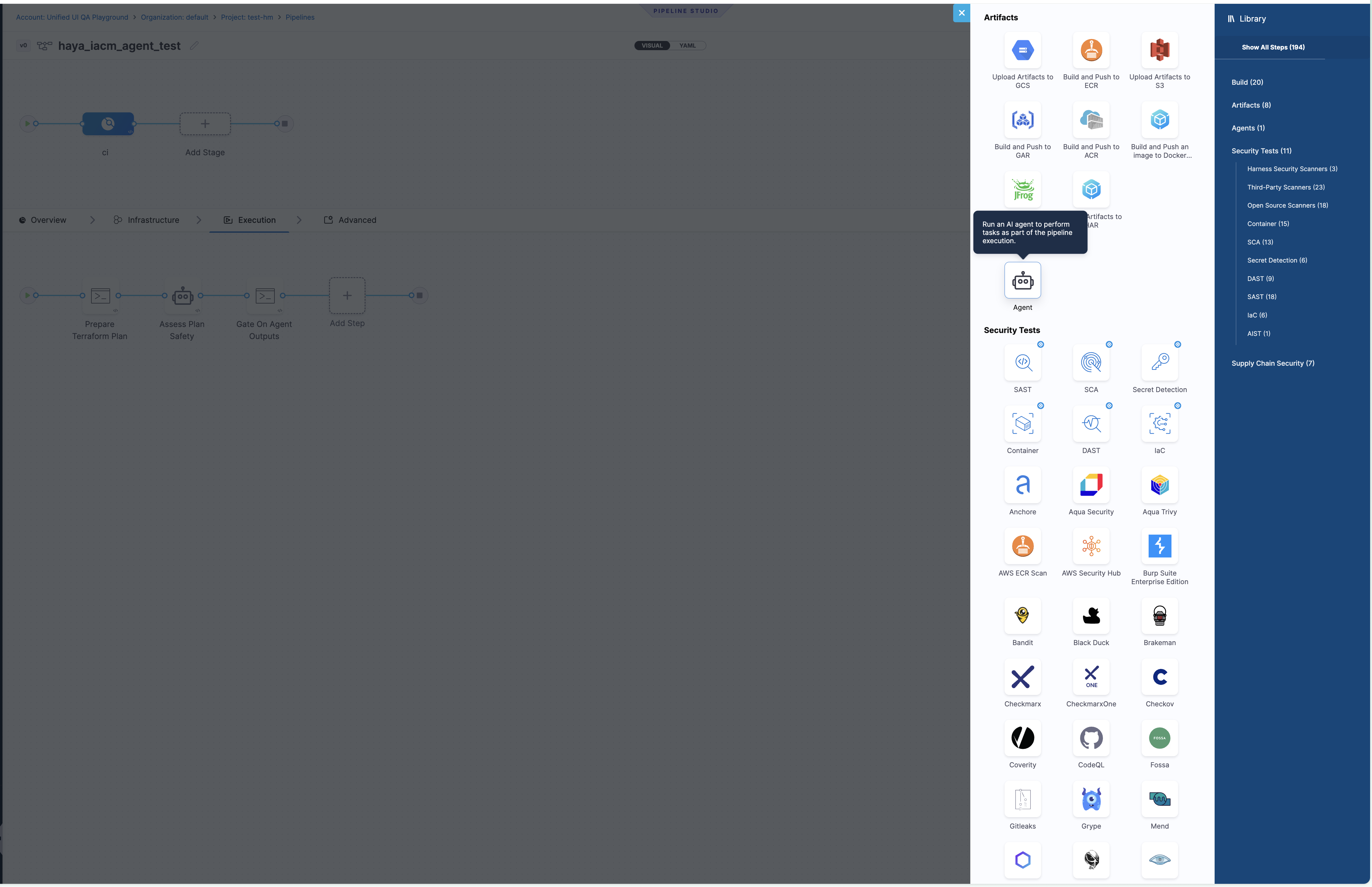
Select the Agent step from the Agents category in the step library
- In the Step Parameters panel, enter a Name for the step.
- Select the Agent from the dropdown. This lists all Worker Agents available in your project scope.
- Select the Version to pin the step to a specific agent version, or choose Always use stable to use the latest stable version automatically.
- (Optional) Fill in any override fields such as LLM Connector or Model Name. These fields override the values configured in the agent definition for this specific pipeline step. If you leave them empty, the agent uses the connector and model from its own definition.
- Click Apply Changes.
Configure the Model Connector in the agent definition (AI > Worker Agents > select the agent). The agent definition is the source of truth for which LLM provider and model the agent uses. The LLM Connector field on the pipeline Agent step is an optional override. Leave it empty to use the connector already configured on the agent. Use the override only when you need a specific pipeline to use a different connector or model than the agent default.
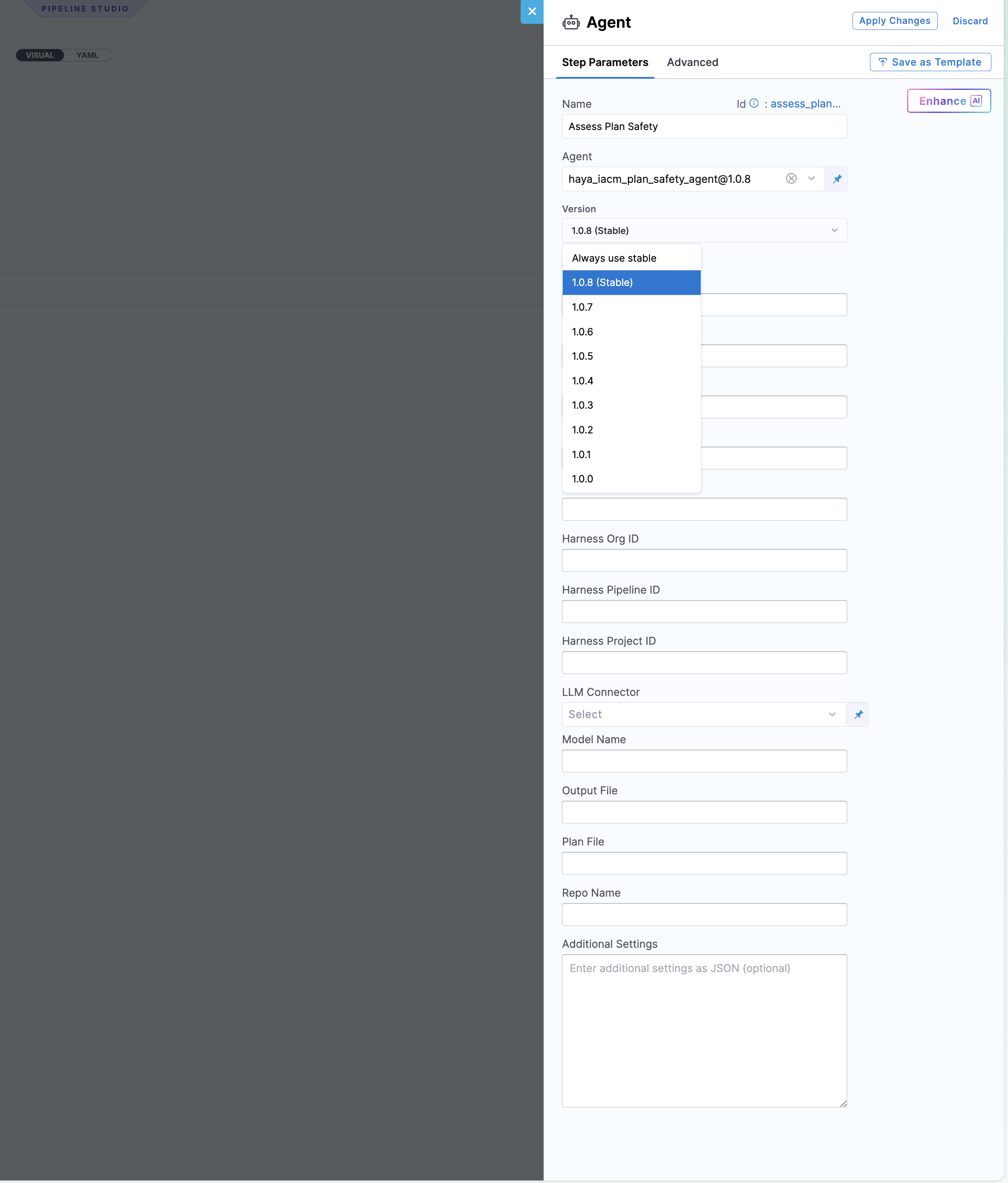
Agent step configuration with version selection and input fields
Step reference syntax
The Agent step YAML syntax follows a simple structure. The agentName field references the agent by identifier and version, and Harness resolves the full agent definition at execution time.
- step:
    type: Agent
    name: <Display Name>
    identifier: <step_identifier>
    spec:
      agentName: <agent_name>@<version>
      agentSettings: ""
The following table describes each field in the Agent step:
| Field | Description |
|---|---|
type: Agent | Identifies this as a Worker Agent step. |
agentName | The agent identifier and version in name@version format (such as pr_review_agent@1.0.6). |
agentSettings | Reserved for future per-step agent overrides. Leave as empty string. |
Agent step expands to a step group at runtime
Understanding how Harness expands Agent steps is critical for referencing output variables. At execution time, Harness converts the Agent step into a step group, which changes the expression path you use to access agent outputs.
At execution time, Harness expands the Agent step into a step group containing the agent's internal run step. This affects how you reference output variables. The expression path includes the outer step identifier (the Agent step) and the inner step name (derived from the agent name and version):
<+steps.<agent_step_id>.steps.<agent_name_version>.output.outputVariables.<KEY>>
For example, if the Agent step identifier is assess_plan_safety and the agent is iacm_plan_safety_agent@1.0.8, the inner step name is iacm_plan_safety_agent_1 and the expression is:
<+steps.assess_plan_safety.steps.iacm_plan_safety_agent_1.output.outputVariables.RECOMMENDATION>
When you add a Run step after the Agent step and configure its command field to read output variables, the pipeline UI displays an input field. Paste or type the full expression into that input field.
Run the pipeline once. In the execution view, expand the Agent step group to see the inner step name. Use that name in your output variable expressions.
Example: PR pipeline with Agent step in a CI stage
This example demonstrates a PR review pipeline that triggers on pull request events, clones the source code, and runs a Worker Agent to review the changes.
This pipeline runs on every pull request, clones the codebase from the go-example repository, and executes the pr_review_agent Worker Agent inside the CI stage.
pipeline:
  name: PR Pipeline V0
  identifier: pr_pipeline_v0
  tags: {}
  projectIdentifier: testhm
  orgIdentifier: default
  stages:
    - stage:
        name: ci
        identifier: ci
        type: CI
        spec:
          cloneCodebase: true
          caching:
            enabled: false
          execution:
            steps:
              - step:
                  type: Agent
                  name: PR Review Agent
                  identifier: pr_review_agent
                  spec:
                    agentName: pr_review_agent@1.0.6
                    agentSettings: ""
          platform:
            os: Linux
            arch: Amd64
          runtime:
            type: Cloud
            spec: {}
  properties:
    ci:
      codebase:
        connectorRef: connector_git_go_example
        repoName: go-example
        prCloneStrategy: SourceBranch
        build:
          type: PR
          spec:
            number: <+trigger.prNumber>
How it works end-to-end
The PR pipeline executes the following sequence when triggered by a pull request event.
- A PR is opened or updated on the
go-examplerepository. - The pipeline trigger fires and populates
<+trigger.prNumber>,<+trigger.repoName>,<+trigger.sourceBranch>,<+trigger.targetBranch>,<+trigger.commitSha>, and<+trigger.baseCommitSha>. - The CI stage clones the source branch at the head commit.
- The
Agentstep launches thepr_review_agentWorker Agent container. - The agent uses Harness MCP to fetch the exact PR diff and produces a structured review with findings and an approval decision.
Example: IaC plan safety gate with agent outputs
This example demonstrates an infrastructure deployment pipeline that uses a Worker Agent to assess Terraform plan safety and gate deployment based on the agent risk assessment.
This pipeline prepares a Terraform plan, runs a safety assessment agent, and gates deployment based on the agent's output variables. It demonstrates a three-step pattern: prepare data, run the agent, and validate outputs in a downstream step.
pipeline:
  name: iacm_agent_safety_gate
  identifier: iacm_agent_safety_gate
  tags: {}
  projectIdentifier: testhm
  orgIdentifier: default
  stages:
    - stage:
        name: ci
        identifier: ci
        type: CI
        spec:
          cloneCodebase: true
          caching:
            enabled: false
          execution:
            steps:
              - step:
                  type: Run
                  name: Prepare Terraform Plan
                  identifier: prepare_terraform_plan
                  spec:
                    shell: Sh
                    command: |
                      set -eu
                      mkdir -p /harness/.agent/output
                      test -f deployment-risk-score-plugin/testdata/small_plan.json
                      cp deployment-risk-score-plugin/testdata/small_plan.json \
                        /harness/.agent/output/tfplan.json
                      echo "Prepared plan at /harness/.agent/output/tfplan.json"
                      jq '.resource_changes | length' /harness/.agent/output/tfplan.json
              - step:
                  type: Agent
                  name: Assess Plan Safety
                  identifier: assess_plan_safety
                  spec:
                    agentName: iacm_plan_safety_agent@1.0.8
                    agentSettings: ""
                    agentIdentifier: assess_plan_safety
              - step:
                  type: Run
                  name: Gate On Agent Outputs
                  identifier: gate_on_agent_outputs
                  spec:
                    shell: Sh
                    command: |
                      set -eu

                      RECOMMENDATION="<+pipeline.stages.ci.spec.execution.steps.assess_plan_safety.steps.iacm_plan_safety_agent_1.output.outputVariables.RECOMMENDATION>"
                      RISK_LEVEL="<+pipeline.stages.ci.spec.execution.steps.assess_plan_safety.steps.iacm_plan_safety_agent_1.output.outputVariables.RISK_LEVEL>"
                      MAX_RISK_SCORE="<+pipeline.stages.ci.spec.execution.steps.assess_plan_safety.steps.iacm_plan_safety_agent_1.output.outputVariables.MAX_RISK_SCORE>"
                      VALIDATION_STATUS="<+pipeline.stages.ci.spec.execution.steps.assess_plan_safety.steps.iacm_plan_safety_agent_1.output.outputVariables.VALIDATION_STATUS>"
                      RISK_ASSESSMENT_PATH="<+pipeline.stages.ci.spec.execution.steps.assess_plan_safety.steps.iacm_plan_safety_agent_1.output.outputVariables.RISK_ASSESSMENT_PATH>"

                      echo "Recommendation: $RECOMMENDATION"
                      echo "Risk level: $RISK_LEVEL"
                      echo "Max score: $MAX_RISK_SCORE"
                      echo "Validation status: $VALIDATION_STATUS"
                      echo "Risk assessment path: $RISK_ASSESSMENT_PATH"

                      if [ "$VALIDATION_STATUS" = "FAIL" ]; then
                        echo "IaC plan rejected by safety agent."
                        exit 1
                      fi

                      echo "IaC plan passed safety gate."
          platform:
            os: Linux
            arch: Amd64
          runtime:
            type: Cloud
            spec: {}
  properties:
    ci:
      codebase:
        connectorRef: harness0_agentplugins_v0
        repoName: agentPlugins
        build:
          type: branch
          spec:
            branch: feat/IAC-6528
This pipeline follows three steps:
- Prepare Terraform Plan: Copies a Terraform JSON plan file to the shared agent output directory at
/harness/.agent/output/tfplan.json. - Assess Plan Safety: The
iacm_plan_safety_agentWorker Agent reads the plan, evaluates risk across destructive actions, public exposure, encryption removal, and IAM expansion, then publishes output variables (RECOMMENDATION,RISK_LEVEL,MAX_RISK_SCORE,VALIDATION_STATUS,RISK_ASSESSMENT_PATH). - Gate On Agent Outputs: A downstream Run step reads the agent's output variables using Harness expressions and fails the pipeline if
VALIDATION_STATUSisFAIL, blocking unsafe infrastructure changes from proceeding.
Next steps
- Worker Agent configuration: Configure instructions, MCP connectors, inputs, and environment variables.
- Worker Agent permissions: Understand RBAC requirements for Worker Agents.
- Worker Agents overview: Learn how to create and manage Worker Agents.