Configure per-project concurrency
Per-project concurrency allows you to define a concurrency limit independently for each project.
You can configure a Default Project Concurrency Limit that applies to every project and optionally configure a different Project Concurrency Limit Override for an individual project.
The account's total concurrency limit remains the maximum number of pipeline executions that can run concurrently across the entire account.
Per-project concurrency does not divide the account into High and Low priority partitions. Each project is evaluated against its own concurrency limit.
This feature is behind feature flags PIPE_PROJECT_LEVEL_EXECUTION_CONCURRENCY, PIPE_ENABLE_QUEUE_BASED_PLAN_CREATION, and PIPE_PER_PROJECT_CONCURRENCY_OVERRIDES. Contact Harness Support to enable the feature.
What you will learn in this topic
- How to configure the default project concurrency limit.
- How to set project-level overrides.
- How to understand effective concurrency limits.
- How to understand execution behavior when limits are reached.
Before you begin
- Account administrator access: Only account administrators can configure the account-level default project concurrency settings. Go to RBAC in Harness to review role requirements.
- Feature flags enabled: The per-project concurrency mode requires the
PIPE_PROJECT_LEVEL_EXECUTION_CONCURRENCY,PIPE_ENABLE_QUEUE_BASED_PLAN_CREATION, andPIPE_PER_PROJECT_CONCURRENCY_OVERRIDESfeature flags. Contact Harness Support if these flags are not enabled.
Configure the default project concurrency limit
To set the default concurrency limit for projects:
-
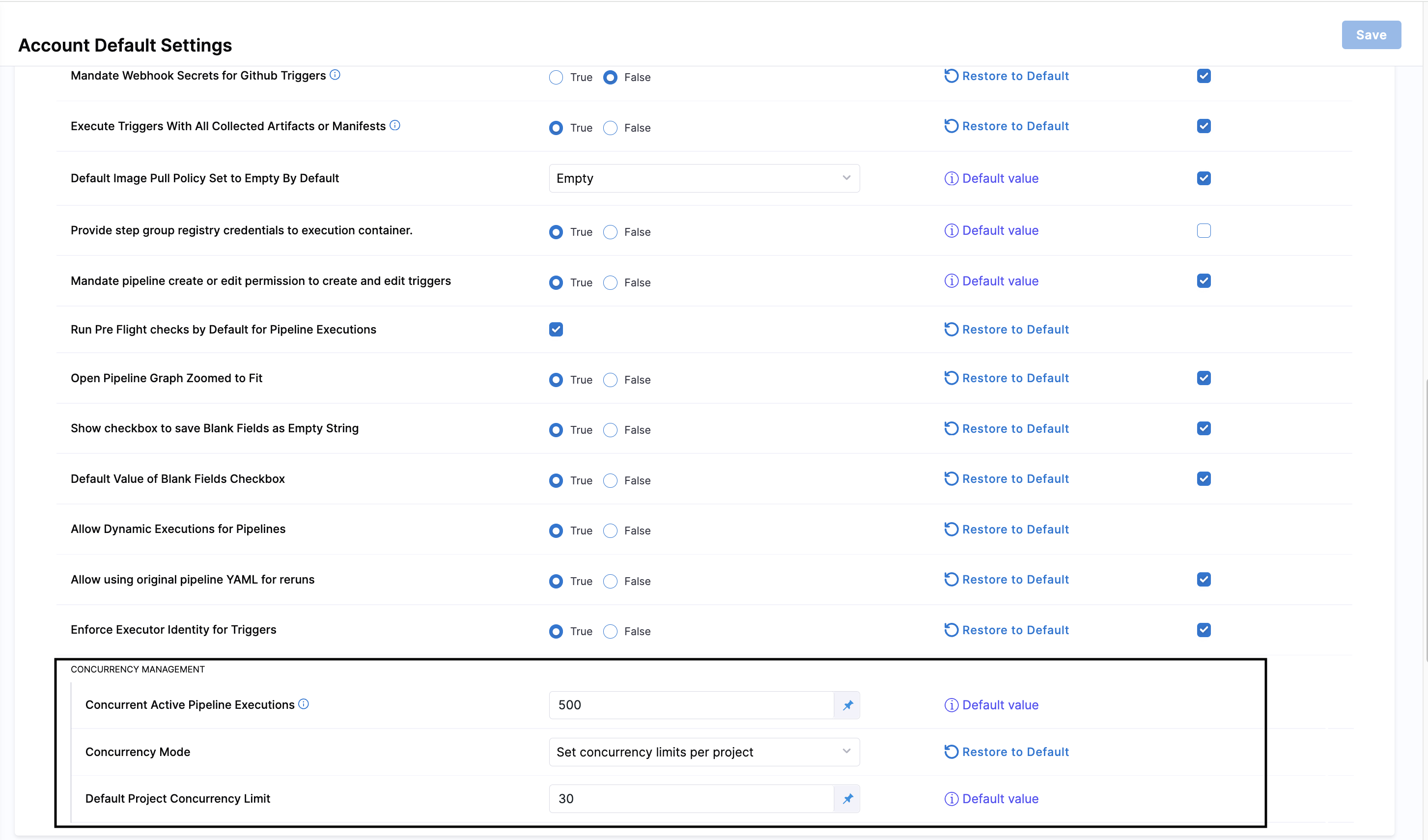
Navigate to Account Settings > General > Default Settings > Pipeline > CONCURRENCY MANAGEMENT.
-
In Concurrency Mode, select Set concurrency limits per project.
-
Confirm the change when Harness prompts you. Changing the concurrency mode affects pipeline executions across the account.
-
In Default Project Concurrency Limit, enter the concurrency limit that should apply to every project that does not have a project-specific override.
The value must be a positive whole number and cannot exceed
100,000.
The default project concurrency limit applies to every project unless a project has a specific concurrency override.
Project-level overrides
You can optionally configure a different concurrency limit for an individual project.
To configure a different concurrency limit for an individual project:
-
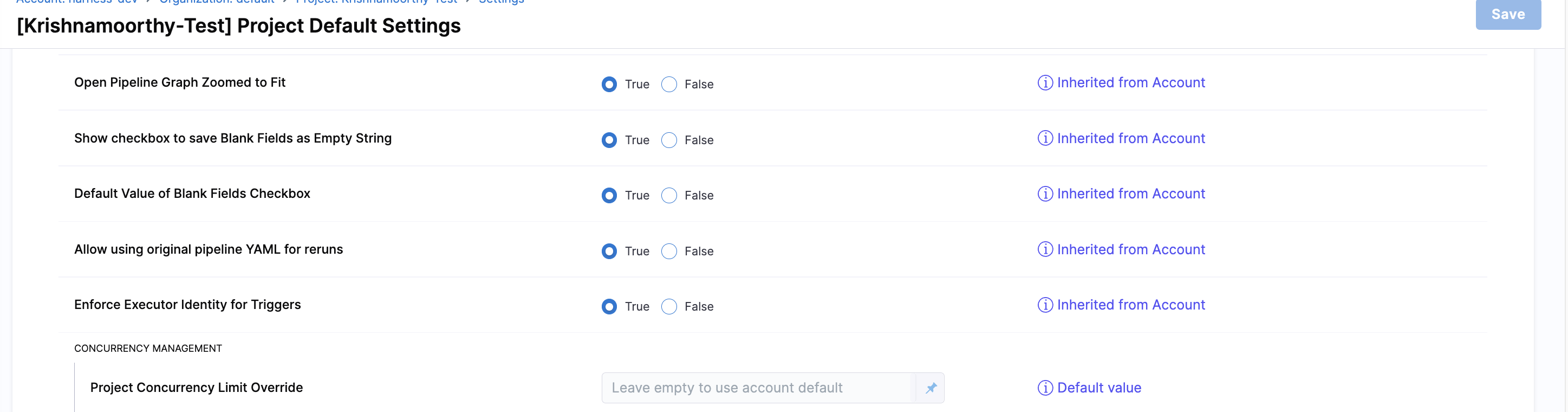
Navigate to Project Settings > General > Default Settings > Pipeline > CONCURRENCY MANAGEMENT.
-
In Project Concurrency Limit Override, enter the concurrency limit for the project.
-
Leave the field empty to use the account-level default.
A project-specific concurrency override cannot exceed the account's total concurrency limit.
The Default Project Concurrency Limit is configured at the account scope and applies to projects that do not have an override.
The Project Concurrency Limit Override applies only to the project where it is configured.
Effective concurrency limits
Harness determines the effective concurrency limit for a project as follows:
- If the project has a Project Concurrency Limit Override, Harness uses that value.
- If the project does not have an override, Harness uses the Default Project Concurrency Limit configured at the account level.
The account's total concurrency limit remains the hard ceiling across all projects.
Project limits are independent limits. They do not reserve or divide the account's total concurrency capacity into separate partitions.
Execution behavior
When the number of running pipeline executions in a project reaches that project's concurrency limit, additional executions for that project are queued.
When the project falls below its concurrency limit, a queued execution starts automatically.
Harness displays the following message when a project reaches its concurrency limit:
Max number of concurrent executions reached for the project
Pipelines in Approval Pending status are excluded from the project concurrency limit.
Example
Consider an account with the following configuration:
- Account total concurrency:
100 - Default project concurrency:
10 - Project A override:
30 - Project B: no override
Project A can run up to 30 pipeline executions concurrently because it has a project-specific override.
Project B uses the account default and can run up to 10 executions concurrently.
Other projects without overrides also use the default limit of 10.
The account can never exceed 100 concurrent pipeline executions in total, regardless of the individual project limits.
If Project A reaches its limit of 30 executions, additional executions for Project A are queued. This does not prevent other projects from using their available concurrency.
The project concurrency limit controls the number of executions that can run concurrently within that project. The account-level concurrency limit continues to control the total number of concurrent executions across the account.
Next steps
- Go to Configure High/Low priority partitions to learn about the alternative concurrency mode.
- Go to Pipeline settings to configure other account-level pipeline settings.
- Go to Use looping strategies to understand how parallelism interacts with concurrency limits.