PrivateLink for Harness Cloud
What is this?
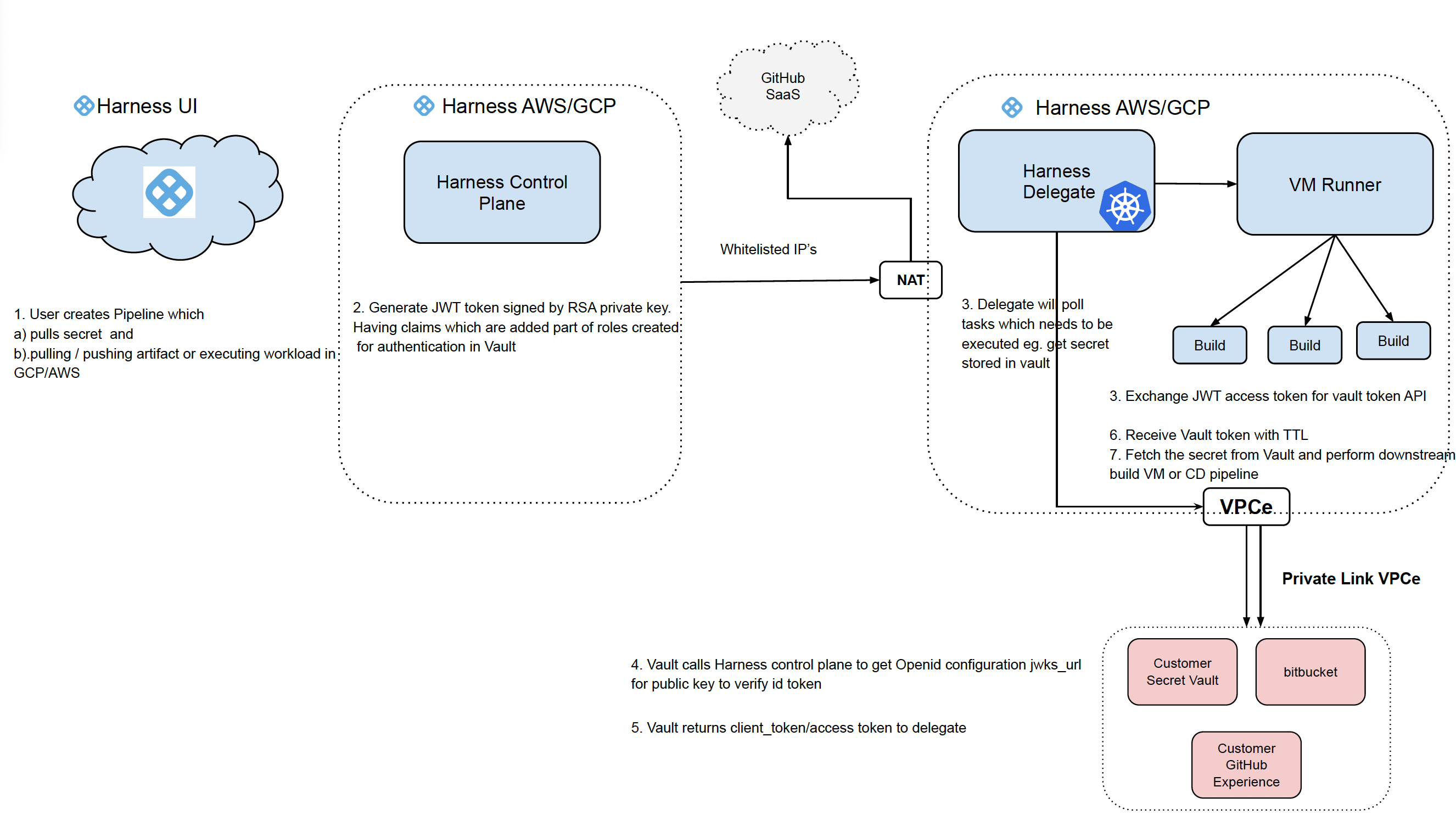
Harness Cloud can securely access services inside your private cloud (like GitHub Enterprise, Bitbucket Server, Artifact registries, internal APIs) over AWS PrivateLink or GCP Private Service Connect instead of the public internet.
This means your builds run on Harness-hosted runners, but traffic to your private services stays on private networking paths.
Why use it?
Problems this solves
Using private networking for Harness Cloud helps you:
- Avoid public internet exposure
No need to open firewall rules to Harness public IPs. - Reduce attack surface
Access to code hosts and internal services happens through private endpoints only. - Meet compliance requirements
Many orgs require private-only access paths for source code and artifacts. - Simplify allowlisting
You don’t have to maintain IP allowlists that can change over time.
When you need this
Use AWS PrivateLink / Google Private Service Connect if your Harness Cloud pipelines must access:
- GitHub Enterprise / GitHub Server
- Jfrog enterprise
- Bitbucket Data Center / Server
- Private artifact repositories
- Internal dev/test APIs
- Anything reachable only inside your VPC/VNet
This includes services that are not publicly addressable, for example, resources with no public IP, services behind internal-only load balancers, endpoints reachable only via internal DNS, or workloads running in isolated VPCs or accounts. As long as you can expose the service via an AWS PrivateLink Endpoint Service or GCP Private Service Connect service attachment on your side, Harness Cloud can reach it through the private connection.
How it works (high level)
- You create a PrivateLink/Private Service Connect endpoint in your cloud.
- That endpoint connects privately to Harness Cloud networking.
- Your pipelines use a Harness connector pointing to the private DNS name.
- Builds access your services through the private endpoint.
Setup process (AWS and GCP)
Important: PrivateLink/Private Service Connect setup is cloud-specific.
You can enable AWS PrivateLink or GCP Private Service Connect(PSC) for Harness Cloud, but they can’t be configured together in the same Harness Cloud account at once.
Step 1: Find your Harness account ID (AWS/GCP)
Go to:
- AWS: Harness PrivateLink setup page
- GCP: Harness Private Service Connect setup page
Copy your Harness Account ID.
You’ll need this to create the private connection invite.
Add the exact links you want customers to click:
https://…aws-privatelink-setuphttps://…gcp-psc-setup
Step 2: Create a private endpoint per service
You need one endpoint per service you want Harness Cloud to access.
Examples:
- Endpoint 1 → GitHub Enterprise
- Endpoint 2 → Bitbucket Server
- Endpoint 3 → Artifact Registry
In your cloud account:
AWS
- Create a Network Load Balancer (NLB) in your VPC.
- Register targets for your private service (GitHub/Bitbucket/etc).
- Create a PrivateLink Endpoint Service backed by that NLB.
Add the Harness AWS Account ID as an allowed principal. - Note the private DNS name you want Harness builds to use.
GCP
- Create a backend service for your private service.
- Create a Private Service Connect (PSC) service attachment.
- Add the Harness GCP Project/Account ID as an allowed consumer.
- Note the private DNS name you want Harness builds to use.
Step 3: Send Harness the connection details
Send these to Harness Support (or via your ticket):
- Your cloud type (AWS or GCP)
- Private endpoint service / attachment ID
- DNS name you want to use for the service
- List of services you’re exposing (GitHub Enterprise, Bitbucket, etc.)
Step 4: Open a Support case to enable PrivateLink/Private Service Connect on Harness side
Open a ticket with Harness Support and include the details above.
Harness will:
- Create the matching VPC Endpoint (AWS) or Private Service Connect Consumer Endpoint (GCP)
- Attach Harness Cloud networking to your private endpoint
- Configure Harness Cloud build infrastructure routing
Step 5: Wait for confirmation
Support will reply confirming:
- Private connection is accepted and active
- Endpoint is reachable from Harness Cloud runners
Step 6: Configure Harness connectors to use the private DNS name
In Harness:
- Go to Project → Connectors
- Create or edit the connector for your service.
- Set the URL/Host to the private DNS name from Step 2.
- Save.
Examples:
https://github.internal.companyhttps://bitbucket.internal.company
Step 7: Test your pipeline
Run a small CI pipeline to confirm:
- Code clone works through the private path
- Artifacts can be pulled/pushed privately
- No public egress is required
If anything fails:
- Verify endpoint target health in your cloud
- Confirm DNS resolves correctly inside PrivateLink/Private Service Connect
- Share pipeline logs with Support
Notes & best practices
- One endpoint per service
Don’t reuse a single endpoint for multiple unrelated services. - Use stable DNS names
Avoid temporary DNS. Pipelines will rely on these long-term. - Lock down target access
Limit backend service exposure to only Harness Cloud endpoints. - Plan for scaling
If your CI load increases, ensure your NLB/PSC backend can handle it. - Plan for Set Up
The set up can take 2-3 days given the handshake process needs to be established and tested.