Creating Phases
Phases are the fundamental building blocks of release processes in Release Orchestration. They represent major milestones or stages in your software delivery workflow, grouping related activities together to create logical, manageable segments of your release.
This guide covers how to create, configure, and organize phases to model your release workflows effectively.
Understanding Phases
Before creating phases, it's important to understand what they represent and how they structure your release process.
What is a Phase?
A phase is a logical grouping of activities that represents a major stage or milestone in your release process. Each phase:
- Contains one or more activities that accomplish a specific goal
- Has a clear purpose and deliverable (e.g., "Build completed", "Tests passed", "Deployment successful")
- Can execute independently once its dependencies are met
- Can run in parallel with other phases that have no dependencies
- Tracks its own execution status and progress
Creating Phases
You can create phases using AI-based generation or manual configuration.
Using Harness AI
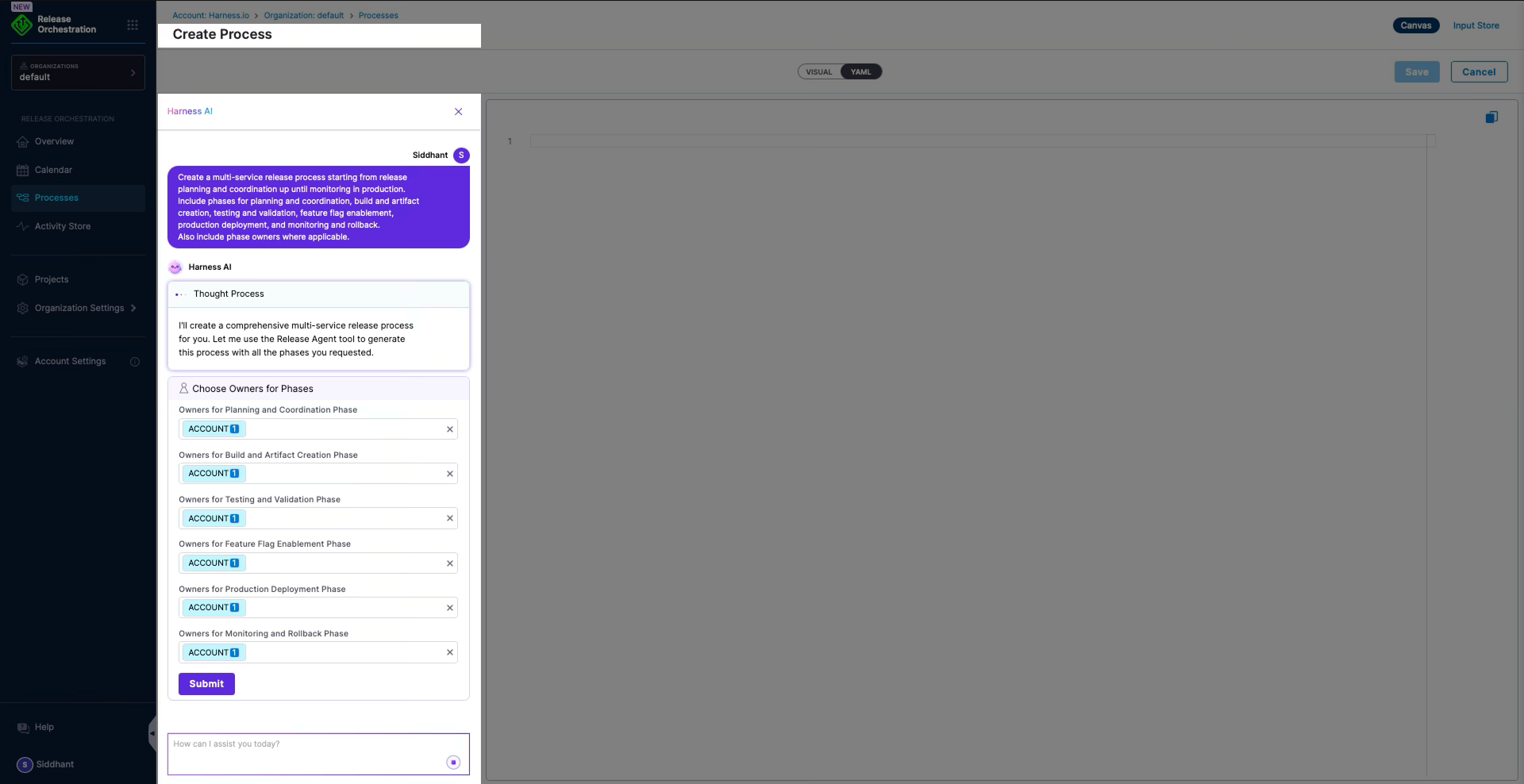
The fastest way to create phases is to use Harness AI, which automatically structures your release process based on your description.
- Navigate to Processes and click Create Process
- Provide a description of your release workflow
- Harness AI automatically:
- Identifies logical phase groupings
- Creates phases with appropriate names
- Suggests phase owners
- Determines phase dependencies
- Generates activities within each phase
Example AI Prompt:
Create a release process for a microservices application that includes:
- Build phase for compiling services and creating Docker images
- Testing phase with unit, integration, and E2E tests
- Security phase for vulnerability scanning and compliance checks
- Deployment phase for staging and production
- Monitoring phase for observability and alerting setup
Manual Phase Creation
For more control over your process structure, you can create phases manually.
Step 1: Define Phase Purpose
Before creating a phase, clearly define:
Primary Goal
- What milestone does this phase represent?
- What deliverable or outcome does it produce?
Scope
- What activities belong in this phase?
- What work should NOT be in this phase?
Prerequisites
- What must complete before this phase can start?
- Which phases does this phase depend on?
Post-Phase Actions
- What happens after this phase completes?
- Which phases depend on this phase?
Ownership
- Which team or role is responsible for this phase?
- Who should be notified when this phase starts or completes?
Step 2: Add Phase to Process
Add the phase to your process using YAML or the UI.
Using YAML:
process:
  id: sample_release_process
  name: Sample Release Process
  phases:
    - phase:
        id: build_phase
        name: Build and Package
        description: Compile source code, run static analysis, and create deployment artifacts
        owners:
          - Development Team
        depends-on: []
        activities: []
Using the UI:
- Navigate to your process
- Click + Add Phase
- Configure phase details:
- Name: Descriptive name for the phase
- Description: Explanation of the phase's purpose
- Owners: Teams or individuals responsible
- Dependencies: Phases that must complete first
- Save the phase
Step 3: Configure Phase Properties
Each phase has several configurable properties:
Basic Properties
| Property | Description | Example |
|---|---|---|
| ID | Unique identifier (auto-generated) | build_phase |
| Name | Display name | Build and Package |
| Description | Purpose and scope | Compile source code and create artifacts |
Ownership
| Property | Description | Example |
|---|---|---|
| Owners | Teams or roles responsible | Development Team, DevOps Team |
Dependencies
| Property | Description | Example |
|---|---|---|
| depends-on | Phases that must complete first | [planning_phase, approval_phase] |
Outputs (Advanced)
| Property | Description | Example |
|---|---|---|
| outputs | Values to expose to later phases | BUILD_VERSION, ARTIFACT_URL |
Configuring Phase Dependencies
Phase dependencies control execution order and ensure prerequisites are met before a phase begins.
Understanding Dependencies
Dependencies define the relationship between phases:
No Dependencies (depends-on: [])
- Phase can start immediately when the release begins
- Executes in parallel with other independent phases
Single Dependency
- Phase waits for one other phase to complete
- Creates a sequential execution chain
Multiple Dependencies
- Phase waits for all specified phases to complete
- Enables complex orchestration patterns
Dependency Patterns
Pattern 1: Linear Chain (Sequential Execution)
Each phase depends on the previous one, creating a straight line of execution.
process:
  phases:
    - phase:
        id: build_phase
        name: Build
        depends-on: []  # No dependencies, starts immediately

    - phase:
        id: test_phase
        name: Test
        depends-on:
          - build_phase  # Waits for Build to complete

    - phase:
        id: deploy_phase
        name: Deploy
        depends-on:
          - test_phase  # Waits for Test to complete
Execution Flow:
Build → Test → Deploy
When to use:
- Simple release processes
- When each phase must complete before the next begins
- When phases produce outputs needed by subsequent phases
Pattern 2: Parallel Execution
Multiple phases with no dependencies execute simultaneously.
process:
  phases:
    - phase:
        id: unit_tests
        name: Unit Tests
        depends-on: []

    - phase:
        id: integration_tests
        name: Integration Tests
        depends-on: []

    - phase:
        id: security_scan
        name: Security Scan
        depends-on: []
Execution Flow:
Unit Tests     ─┐
Integration Tests ─┤ (All run in parallel)
Security Scan  ─┘
When to use:
- Independent validation activities
- To reduce total release duration
- When phases don't share dependencies
Pattern 3: Fan-Out / Fan-In
One phase triggers multiple parallel phases, which then converge to a single phase.
process:
  phases:
    - phase:
        id: build_phase
        name: Build
        depends-on: []

    - phase:
        id: unit_tests
        name: Unit Tests
        depends-on:
          - build_phase

    - phase:
        id: integration_tests
        name: Integration Tests
        depends-on:
          - build_phase

    - phase:
        id: security_scan
        name: Security Scan
        depends-on:
          - build_phase

    - phase:
        id: deploy_phase
        name: Deploy
        depends-on:
          - unit_tests
          - integration_tests
          - security_scan  # Waits for all three
Execution Flow:
                Unit Tests        ─┐
Build → Integration Tests ─┼→ Deploy
                Security Scan     ─┘
When to use:
- Multiple validation activities after a build
- When deployment requires all validations to pass
- Complex quality gates
Pattern 4: Multiple Independent Chains
Different release tracks that execute independently.
process:
  phases:
    # Backend chain
    - phase:
        id: build_backend
        name: Build Backend
        depends-on: []
    - phase:
        id: deploy_backend
        name: Deploy Backend
        depends-on:
          - build_backend

    # Frontend chain
    - phase:
        id: build_frontend
        name: Build Frontend
        depends-on: []
    - phase:
        id: deploy_frontend
        name: Deploy Frontend
        depends-on:
          - build_frontend
Execution Flow:
Build Backend → Deploy Backend

Build Frontend → Deploy Frontend

(Chains run in parallel)
When to use:
- Multi-service or multi-component releases
- When services can deploy independently
- When different teams own different components
Dependency Best Practices
Use Dependencies for Data Flow
When one phase produces outputs that another phase needs, use dependencies:
- phase:
    id: generate_version
    name: Generate Version
    outputs:
      RELEASE_VERSION: "..."

- phase:
    id: deploy
    name: Deploy
    depends-on:
      - generate_version  # Ensures version is available
Minimize Dependencies for Speed
Only add dependencies when truly necessary. Unnecessary dependencies serialize execution and slow releases.
Unnecessary dependency:
- phase:
    id: unit_tests
    depends-on:
      - build  # Not needed if tests can run independently
Better:
- phase:
    id: unit_tests
    depends-on: []  # Run in parallel with build
Avoid Circular Dependencies
Never create circular dependencies (Phase A depends on Phase B, which depends on Phase A):
# This will fail:
- phase:
    id: phase_a
    depends-on:
      - phase_b
- phase:
    id: phase_b
    depends-on:
      - phase_a  # Circular!
Adding Activities to Phases
Once a phase is created, add activities that accomplish the phase's goals.
Selecting Activities
Activities can come from:
Activity Store
- Pre-built, reusable activities
- Organization-wide templates
- Harness-provided activities
Custom Activities
- Activities you create for specific needs
- Team-specific templates
- One-off activities
Activity Organization Within Phases
Group Related Activities
Keep related activities in the same phase:
phase:
  id: testing_phase
  name: Testing and Validation
  activities:
    - activity: unit_tests
    - activity: integration_tests
    - activity: e2e_tests
    - activity: performance_tests
Configure Activity Dependencies
Activities within a phase can have dependencies:
activities:
  - activity: build_app
    id: build_app
    depends-on: []

  - activity: run_tests
    id: run_tests
    depends-on:
      - build_app  # Tests run after build

  - activity: security_scan
    id: security_scan
    depends-on:
      - build_app  # Scan runs after build (in parallel with tests)
Phase Configuration Examples
Example 1: Standard CI/CD Process
process:
  name: Standard CI/CD Release
  phases:
    # Phase 1: Source and Build
    - phase:
        id: build
        name: Build and Package
        description: Checkout code, compile, and create artifacts
        owners:
          - Development Team
        depends-on: []
        activities:
          - activity: checkout_code
          - activity: compile_application
          - activity: create_artifacts

    # Phase 2: Testing (parallel tracks)
    - phase:
        id: testing
        name: Automated Testing
        description: Run all automated test suites
        owners:
          - QA Team
        depends-on:
          - build
        activities:
          - activity: unit_tests
          - activity: integration_tests
          - activity: e2e_tests

    # Phase 3: Security and Compliance
    - phase:
        id: security
        name: Security Validation
        description: Security scans and compliance checks
        owners:
          - Security Team
        depends-on:
          - build
        activities:
          - activity: vulnerability_scan
          - activity: compliance_check

    # Phase 4: Deployment
    - phase:
        id: deployment
        name: Production Deployment
        description: Deploy to production environment
        owners:
          - DevOps Team
        depends-on:
          - testing
          - security  # Waits for both testing and security
        activities:
          - activity: deploy_to_staging
          - activity: staging_validation
          - activity: deploy_to_production

    # Phase 5: Post-Deployment
    - phase:
        id: validation
        name: Post-Deployment Validation
        description: Validate deployment and monitor
        owners:
          - Operations Team
        depends-on:
          - deployment
        activities:
          - activity: smoke_tests
          - activity: health_checks
          - activity: enable_monitoring
Example 2: Hotfix Release
process:
  name: Emergency Hotfix Release
  phases:
    # Streamlined phases for speed
    - phase:
        id: emergency_approval
        name: Emergency Approval
        description: Fast-track approval for critical fix
        owners:
          - Release Manager
        depends-on: []
        activities:
          - activity: emergency_approval_gate

    - phase:
        id: hotfix_build
        name: Hotfix Build
        description: Build hotfix from branch
        owners:
          - Development Team
        depends-on:
          - emergency_approval
        activities:
          - activity: build_hotfix
          - activity: minimal_tests  # Reduced testing for speed

    - phase:
        id: hotfix_deploy
        name: Hotfix Deployment
        description: Deploy fix to production
        owners:
          - DevOps Team
        depends-on:
          - hotfix_build
        activities:
          - activity: backup_current_version
          - activity: deploy_hotfix
          - activity: validate_hotfix
Phase Naming Conventions
Use clear, consistent naming for phases to make your process easy to understand.
Recommended Naming Patterns
Action-Oriented Names
Focus on what the phase does. Good examples include Build and Package, Deploy to Production, and Run Integration Tests. Avoid vague names like Phase 1 or Stuff that don't convey the phase's purpose.
Environment-Specific Names
When deploying to environments, include the environment name in the phase identifier. Examples include Deploy to Staging, Production Deployment, and QA Environment Testing.
Milestone-Based Names
When representing checkpoints, use milestone-based names such as Code Complete, Testing Complete, and Release Ready.
Naming Consistency
Maintain consistent patterns across processes:
If using verb-noun format:
Build ApplicationRun TestsDeploy Services
If using noun-verb format:
Application BuildTest ExecutionService Deployment
Custom Phase Scenarios
Phases can be customized for organization-specific needs.
Compliance-Driven Phases
For regulated industries:
- phase:
    id: compliance_review
    name: Regulatory Compliance Review
    description: Validate SOC2, HIPAA, and GDPR requirements
    owners:
      - Compliance Team
    activities:
      - activity: soc2_checklist
      - activity: hipaa_validation
      - activity: gdpr_review
      - activity: audit_log_generation
Multi-Region Deployment Phases
For global releases:
- phase:
    id: deploy_us
    name: Deploy US Regions
    depends-on:
      - validation
    activities:
      - activity: deploy_us_east
      - activity: deploy_us_west

- phase:
    id: deploy_eu
    name: Deploy EU Regions
    depends-on:
      - deploy_us  # Roll out region by region
    activities:
      - activity: deploy_eu_central
      - activity: deploy_eu_west
Feature Flag Phases
For feature rollout:
- phase:
    id: feature_flag_setup
    name: Feature Flag Configuration
    activities:
      - activity: create_feature_flags
      - activity: configure_targeting_rules

- phase:
    id: gradual_rollout
    name: Gradual Feature Rollout
    depends-on:
      - feature_flag_setup
    activities:
      - activity: enable_for_internal_users
      - activity: enable_for_beta_users
      - activity: enable_for_percentage_of_users
      - activity: enable_for_all_users
Phase Execution Behavior
Understanding how phases execute helps you design effective processes.
Execution States
Phases progress through these states:
- Pending - Waiting for dependencies to complete
- Scheduled - Ready to start, waiting for resources
- Running - Actively executing activities
- Completed - All activities finished successfully
- Failed - One or more activities failed
- Paused - Execution paused (manual intervention or condition)
- Skipped - Phase was skipped based on conditions
Conditional Phase Execution
Phases can execute conditionally based on variables or expressions:
- phase:
    id: deploy_to_production
    name: Deploy to Production
    if: <+releaseInput.environment> == "production"
    depends-on:
      - testing
This phase only executes if the condition evaluates to true.
Troubleshooting Phase Configuration
Phase Doesn't Start
Symptom: Phase remains in "Pending" or "Scheduled" state.
Possible Causes:
- Dependencies not met (check
depends-onconfiguration) - Condition not satisfied (check
ifexpressions) - Resource constraints (check system capacity)
Solution: Review dependencies and verify all prerequisite phases completed successfully.
Phases Execute Out of Order
Symptom: Phase starts before its dependencies complete.
Possible Causes:
- Missing or incorrect
depends-onconfiguration - Dependency references wrong phase ID
Solution: Verify depends-on lists correct phase IDs (case-sensitive).
Phase Takes Too Long
Symptom: Phase execution time is excessive.
Possible Causes:
- Too many activities in one phase
- Activities running sequentially when they could be parallel
- Resource-intensive activities
Solution:
- Split large phases into smaller, focused phases
- Remove unnecessary activity dependencies to enable parallelism
- Optimize activity configurations
Common Phase Examples
Different organizations structure their releases differently, but common phases include:
Build and Compilation
- Checkout source code
- Compile code
- Run static analysis
- Create artifacts
- Package applications
Testing and Quality
- Run unit tests
- Execute integration tests
- Perform security scans
- Run performance tests
- Generate test reports
Deployment
- Deploy to staging
- Deploy to production
- Database migrations
- Configuration updates
- Service restarts
Validation and Verification
- Smoke tests
- Health checks
- Data validation
- Rollback verification
- Monitoring setup
Compliance and Governance
- Security approval
- Change management approval
- Compliance checks
- Audit trail generation
- Documentation updates