Ingest results from unsupported scanners
You can ingest custom issues from any scanning tool. STO supports a generic JSON format for ingesting data from unsupported scanners that cannot publish to SARIF.
Important notes for importing data from unsupported scanners into STO
-
This workflow is intended for scanners that have no supported integration in STO. Harness recommends that you always use the documented workflow for supported scanners. For a list of all STO-supported scanners, go to What's supported and click Harness STO scanner support to expand.
-
SARIF is an open data format supported by many scan tools. If your scanner supports this format, publish your results to SARIF. For more information, go to Ingest SARIF results.
-
For STO to ingest your scan results, the ingestion file must match the JSON format specified below.
Required steps to ingest data from unsupported scanners into STO
-
Add a shared path such as
/shared/scan_resultsto the stage. Go to Overview > Shared Paths in the visual editor, or add it to the YAML like this:- stage:spec:sharedPaths:- /shared/scan_results -
Generate your issues data in the required JSON format described below and then save it in the shared folder.
You might want to set up a Run step to generate your scans automatically whenever the pipeline runs. Go to Ingest Scan Results into an STO Pipeline for an example. -
Add a Custom Ingest step and configure the scanner to ingest the results of the scan. For information about how to configure this step, go to Custom Ingest settings reference.
JSON data format reference
The following example illustrates the required format for your data. This comprehensive example shows all supported fields:
{
    "meta": {
        "key": ["issueName"],
        "subproduct": "MyCustomScanner"
    },
    "issues": [
        {
            "issueType": "SAST",
            "issueName": "Complete Example Issue",
            "issueDescription": "This is a comprehensive example showing every possible field in the RefinedIssue class.",
            "subproduct": "MyCustomScanner",
            "referenceIdentifiers": [
                {
                    "type": "cve",
                    "id": "2023-12345"
                },
                {
                    "type": "cwe",
                    "id": "79"
                },
                {
                    "type": "ghsa",
                    "id": "xxxx-yyyy-zzzz"
                }
            ],
            "cvssVector": "CVSS:3.1/AV:N/AC:L/PR:N/UI:R/S:C/C:L/I:L/A:N",
            "cvssVersion": "CVSS v3.1",
            "cvss": 6.1,
            "baseScore": 6.1,
            "exploitabilityScore": 2.8,
            "impactScore": 2.7,
            "epss": 0.45,
            "confidence": "High",
            "effort": "Medium",
            "originalSeverity": "High",
            "severity": 8.0,
            "remediationSteps": "Fix me fast by applying the latest security patch.",
            "referenceUrls": "https://example.com/advisory,https://nvd.nist.gov/vuln/detail/CVE-2023-12345",
            "fileName": "homepage-jobs.php",
            "lineNumber": 127,
            "endLine": 130,
            "startCol": 8,
            "linesOfCodeImpacted": 4,
            "codeSnippet": "```php\necho $_GET['input'];\n// More vulnerable code here\n```",
            "libraryName": "vulnerable-lib",
            "licenseName": "MIT",
            "currentVersion": "1.2.3",
            "upgradeVersion": "1.2.4",
            "author": "Library Author",
            "fixAvailable": true,
            "imageRegistry": "docker.io/mycompany/webapp",
            "imageTag": "v2.1.0",
            "dockerManifestDigest": "sha256:abcdef1234567890abcdef1234567890abcdef1234567890abcdef1234567890",
            "dockerIndexDigest": "sha256:1234567890abcdef1234567890abcdef1234567890abcdef1234567890abcdef",
            "imageLayerId": "sha256:layer1234567890abcdef",
            "host": "https://api.example.com",
            "ip": "192.0.2.100",
            "port": 8443,
            "path": "/api/v1/users",
            "method": "POST",
            "project": "MyProjectName",
            "_raw": {
                "scannerVersion": "2.5.1",
                "ruleId": "CUSTOM-001",
                "customMetric": 42,
                "tags": ["security", "injection", "web"],
                "anyOtherField": "Scanners can include any additional custom data here"
            }
        }
    ]
}
- The
issueTypefield can be one of:SAST,DAST,SCA,IAC,SECRET,MISCONFIG,BUG_SMELLS,CODE_SMELLS,CODE_COVERAGE,EXTERNAL_POLICY.
The basic schema includes a “meta” section, which requires the following:
-
“key”The name of the attribute used to deduplicate multiple occurrences of an issue. In the example data file above,
"key"="issueName". Thus if the data includes multiple occurrences of an issue with the same"issueName", the pipeline combines these occurrences into one issue. The resulting issue includes a list of all occurrences and the data for each individual occurrence.The key used for deduplication must be a Harness field. Do not try to deduplicate based on non-Harness fields.
-
“subproduct”The scan tool name to apply to the overall issue. The product will be "Custom", so specifying a subproduct like "MyScanner" will display as "Custom - MyScanner" in the Harness UI (in scanner dropdowns, etc.).
The full JSON takes the form:
"meta":
     { ... },
     "issues": [
        { "issue-1" : "data" },
        { "issue-2" : "data" },
        { "issue-3" : "data" }
}
Required fields
| Name | Format | Description |
issueName | String | Name of vulnerability, license issue, compliance issue, etc. |
issueDescription | String (long) | Description of vulnerability, license issue, compliance issue, etc. Supports Markdown formatting, which will be rendered in the Harness UI. |
subProduct | String | The scan tool name to apply to the individual occurrence of the issue. Displays as "Custom - [subProduct]" in the Harness UI. |
severity | Float | CVSS 3.0 score (a number from 1.0-10.0). |
Other supported fields
| Name | Format | Description |
issueType | String | Type of issue. Valid values: SAST, DAST, SCA, IAC, SECRET, MISCONFIG, BUG_SMELLS, CODE_SMELLS, CODE_COVERAGE, EXTERNAL_POLICY. |
referenceIdentifiers | Array | An array of vulnerability identifiers, such as cve, cwe, ghsa, etc. Note that the type value must be lowercase. Example: "referenceIdentifiers": [{"type": "cve", "id": "2023-12345"}, {"type": "cwe", "id": "79"}] |
remediationSteps | String (long) | Remediation instructions, often provided by the scan tool. |
referenceUrls | String | Comma-separated list of reference URLs for the vulnerability. |
cvss | Float | The CVSS score value. |
cvssVector | String | The full CVSS vector string. Example: "CVSS:3.1/AV:N/AC:L/PR:N/UI:R/S:C/C:L/I:L/A:N" |
cvssVersion | String | The CVSS version used. Example: "CVSS v3.1" |
baseScore | Float | The CVSS base score. |
exploitabilityScore | Float | The CVSS exploitability sub-score. |
impactScore | Float | The CVSS impact sub-score. |
epss | Float | The Exploit Prediction Scoring System (EPSS) score (0.0-1.0). |
originalSeverity | String | The original severity as reported by the scanner. Example: High, Medium, Low, Critical. |
confidence | String | Confidence level of the finding. Example: High, Medium, Low. |
effort | String | The estimated effort required to remediate. Example: Low, Medium, High. |
fileName | String | The file where the issue was found. |
lineNumber | Integer | The starting line number of the issue. |
endLine | Integer | The ending line number of the issue. |
startCol | Integer | The starting column number of the issue. |
linesOfCodeImpacted | Integer | The number of lines of code affected by the issue. |
codeSnippet | String | A code snippet showing the vulnerable code. Supports Markdown code blocks. |
libraryName | String | The name of the vulnerable library or dependency. |
currentVersion | String | The current version of the vulnerable library. |
upgradeVersion | String | The recommended version to upgrade to for remediation. |
fixAvailable | Boolean | Indicates whether a fix is available for the vulnerability. |
licenseName | String | The license of the library. Example: MIT, Apache-2.0. |
author | String | The author or maintainer of the library. |
imageRegistry | String | The container image registry and repository. Example: docker.io/mycompany/webapp |
imageTag | String | The container image tag. Example: v2.1.0 |
dockerManifestDigest | String | The SHA256 digest of the Docker manifest. |
dockerIndexDigest | String | The SHA256 digest of the Docker index. |
imageLayerId | String | The ID of the image layer where the issue was found. |
imageNamespace | String | Logical metadata field for image namespace. |
host | String | The target host URL. Example: https://api.example.com |
ip | String | The target IP address. |
port | Integer | The target port number. |
path | String | The URL path where the issue was found. Example: /api/v1/users |
method | String | The HTTP method used. Example: GET, POST, PUT, DELETE. |
url | String | The full URL where the issue was found. |
project | String | Logical metadata field that can be used for tracking of project(s). |
product | String | Logical metadata field that can be used for tracking of product(s). |
scanSeverity | String | The severity as reported by the scan tool. |
scanStatus | String | Recommended for measuring scan duration and status. |
tags | String | Logical metadata tags for describing asset owners, teams, business units, etc. |
link | String | A link to additional information about the issue. |
Custom fields
You can add custom fields to an issue to include scanner specific data that isn't covered by the standard fields. There are two approaches:
Option 1: Use the _raw object
You can include a _raw object in your issue to store any additional custom data. This is the recommended approach for grouping related custom fields:
{
    "issueName": "Example Issue",
    "issueDescription": "Description here...",
    "_raw": {
        "scannerVersion": "2.5.1",
        "ruleId": "CUSTOM-001",
        "customMetric": 42,
        "tags": ["security", "injection", "web"],
        "anyOtherField": "Scanners can include any additional custom data here"
    }
}
Option 2: Use _raw prefix for individual fields
Alternatively, you can add the prefix _raw to individual field names:
{
   "issueName": "hardcode_tmp_directory",
   "referenceIdentifiers": [
      {
         "type": "cwe",
         "id": "79"
      }
    ],
   "_rawIssueCwe": {
     "id": 377,
     "link": "https://cwe.mitre.org/data.definitions/377.html"
   },
   "_rawMoreInfo": "https://bandit.readthedocs.io/en/1.7.4/plugins/b108_hardcoded_tmp_directory.html",
   "_rawColOffset": 31
}
You cannot use any of the Reserved keywords for custom field names.
The custom fields will get grouped together at the end of the issue details like this:
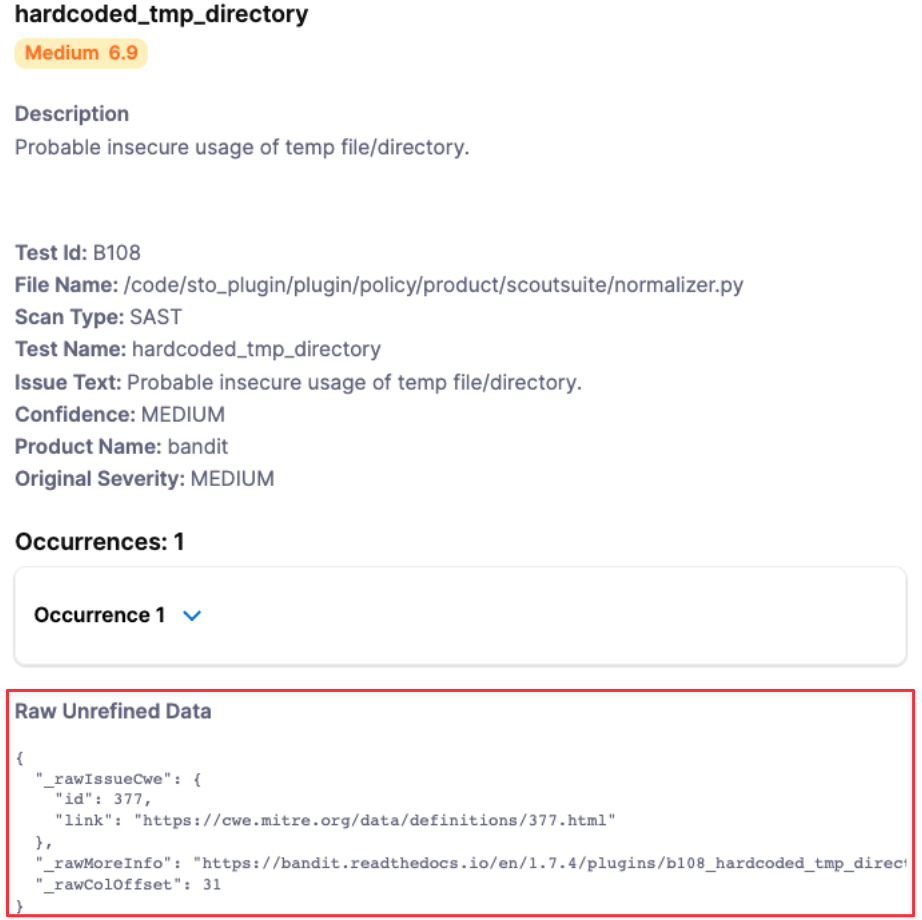
Reserved keywords for Harness STO JSON schema
The following keywords are reserved and cannot be used in your JSON file:
alertRulesetscustomerIddiscoveryIssueIddiscoveryRunTimediscoveryTimespanignoreignoreRulesetsjobIdpolicyIdpolicyNamerefinementVersionremediationRunTimeremediationTimespanrunTimescenarioIdseverityCodetargettargetId
Pipeline example for ingesting data from an unsupported schema into STO
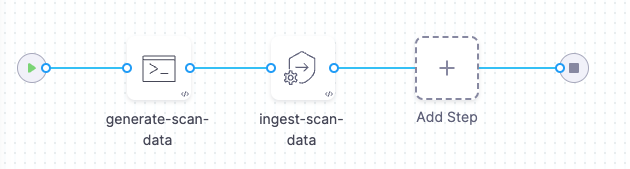
The following pipeline shows an end-to-end ingestion workflow. The pipeline consist of a Security stage with two steps:
-
A Run step that generates a JSON data file
/shared/scan_results/example.jsonin the format described above. -
A Custom Ingest step that ingests and normalizes the data from
/shared/scan_results/example.json.
pipeline:
  projectIdentifier: myProject
  orgIdentifier: default
  tags: {}
  stages:
    - stage:
        name: custom-scan-stage
        identifier: customscanstage
        type: SecurityTests
        spec:
          cloneCodebase: false
          execution:
            steps:
              - step:
                  type: Run
                  name: generate-scan-data
                  identifier: Run_1
                  spec:
                    connectorRef: CONTAINER_IMAGE_REGISTRY_CONNECTOR
                    image: alpine:latest
                    shell: Sh
                    command: |-
                      cat <<EOF >> /shared/scan_results/example.json
                      {
                         "meta":{
                            "key":[
                               "issueName"
                            ],
                            "subproduct":"MyCustomScanner"
                         },
                         "issues":[
                            {
                               "subproduct":"MyCustomScanTool",
                               "issueName":"Cross Site Scripting",
                               "issueDescription":"Lorem ipsum...",
                               "fileName":"homepage-jobs.php",
                               "remediationSteps":"Fix me fast.",
                               "risk":"high",
                               "severity":8,
                               "status":"open",
                               "referenceIdentifiers":[
                                  {
                                     "type":"cwe",
                                     "id":"79"
                                  }
                               ]
                            }
                         ]
                      }
                      EOF
                      ls /shared/scan_results
                      cat /shared/scan_results/example.json
              - step:
                  type: CustomIngest
                  name: ingest-scan-data
                  identifier: CustomIngest_1
                  spec:
                    mode: ingestion
                    config: default
                    target:
                      name: external-scanner-test
                      type: repository
                      variant: main
                    advanced:
                      log:
                        level: info
                    ingestion:
                      file: /shared/scan_results/example.json
          sharedPaths:
            - /shared/scan_results
          caching:
            enabled: false
            paths: []
          platform:
            os: Linux
            arch: Amd64
          runtime:
            type: Cloud
            spec: {}
  identifier: custom_ingestion_JSON_test
  name: custom ingestion JSON test
jq filters
You can use jq filters to transform scanner results into the format needed for ingestion. Find the specific filter for your scanner below. Save this filter to a file (e.g., my_filter.jq). Then, process the scan results by passing the filter file and the results file to jq like this:
jq -f my_filter.jq scanner_output.json > formatted_results.json
This command uses the filter to generate the correctly formatted output.
- Crowdstrike Falcon
- Mend v3 SCA
- Mend v3 SAST
{
  "meta": {
    "subproduct": "CrowdStrike Falcon",
    "key": ["issueName"]
  },
  "issues": [
    .Vulnerabilities[] | {
      "subproduct": "CrowdStrike Falcon",
      "issueName": .Vulnerability.CVEID?,
      "issueDescription": .Vulnerability.Details.description?,
      "fileName": "\(.ImageInfo.Repository?):\(.ImageInfo.Tag?)",
      "remediationSteps": (
        if .Vulnerability.FixedVersions? != null and (.Vulnerability.FixedVersions? | length) > 0 then
          "Upgrade to: " + (.Vulnerability.FixedVersions? | join(", "))
        else
          null
        end
      ),
      "risk": .Vulnerability.Details.severity?,
      "severity": (.Vulnerability.Details.cvss_v3_score.base_score? | tonumber? // null),
      "status": "open",
      "referenceIdentifiers": [
        {
          "type": "cve",
          "id": .Vulnerability.CVEID?
        }
      ]
    }
  ]
}
{
  meta: {
    key: [
      "issueName"
    ],
    subproduct: "mend v3 sca"
  },
  issues: (
    [
      .. |
      select(type == "object" and .vulnerabilities? != null) |
      .vulnerabilities[] |
      {
        subproduct: "mend v3 sca",
        issueName: .name,
        issueDescription: (if .description then .description else "No description provided" end),
        fileName: (input_filename // "unknown"),
        remediationSteps: (.topFix.fixResolution // "No remediation steps provided"),
        risk: (
          if .severity == "HIGH" or .severity == "CRITICAL" then "high"
          elif .severity == "MEDIUM" then "medium"
          else "low"
          end
        ),
        severity: (
          if .score then .score
          elif .severity == "CRITICAL" then 9
          elif .severity == "HIGH" then 7
          elif .severity == "MEDIUM" then 5
          else 3
          end
        ),
        status: (issue.status // "open"),
        referenceIdentifiers: [
          {
            type: (if (.name | startswith("CVE-")) then "cve"
                  elif (.name | startswith("CWE-")) then "cwe"
                  else "other" end),
            id: (if (.name | startswith("CVE-")) then (.name | .[4:])
                elif (.name | startswith("CWE-")) then (.name | .[4:])
                else .name end)
          }
        ]
      }
    ] | unique_by(.issueName + .fileName)
  )
}
def get_reference_identifiers(issue_type):
  [
    (if issue_type.cwe != null and issue_type.cwe.url != "" then [{type: "cwe", id: (issue_type.cwe.url | split("/")[-1] | split(".")[0])}] else [] end),
    (issue_type.references // [] | map({type: "reference", id: .}) | map(select(.id != ""))),
    (if issue_type.pcidss != null and issue_type.pcidss.title != "" then [{type: "pcidss", id: issue_type.pcidss.title}] else [] end),
    (if issue_type.nist != null and issue_type.nist.url != "" then [{type: "nist", id: issue_type.nist.url}] else [] end),
    (if issue_type.hipaa != null and issue_type.hipaa.title != "" then [{type: "hipaa", id: issue_type.hipaa.title}] else [] end),
    (if issue_type.hitrust != null and issue_type.hitrust.title != "" then [{type: "hitrust", id: issue_type.hitrust.title}] else [] end),
    (if issue_type.owasp != null and issue_type.owasp.url != "" then [{type: "owasp", id: issue_type.owasp.url}] else [] end),
    (if issue_type.owasp2021 != null and issue_type.owasp2021.url != "" then [{type: "owasp2021", id: issue_type.owasp2021.url}] else [] end),
    (if issue_type.capec != null and issue_type.capec.url != "" then [{type: "capec", id: issue_type.capec.url}] else [] end),
    (if issue_type.sansTop25 != null and issue_type.sansTop25.title != "" then [{type: "sansTop25", id: issue_type.sansTop25}] else [] end)
  ] | add;

def transform_issue(language; issue):
  {
    subproduct: language,
    issueName: issue.type.name,
    issueDescription: issue.type.description,
    fileName: (issue.Findings // [] | map(.sharedStep.File) | .[0] // "Unknown"),
    remediationSteps: (issue.type.recommendation | join("; ")),
    risk: issue.type.risk | ascii_downcase,
    severity: (issue.type.risk | ascii_downcase |
      if . == "high" then 8
      elif . == "medium" then 5
      elif . == "low" then 2
      else 0 end),
    status: (issue.status // "open"),
    referenceIdentifiers: get_reference_identifiers(issue.type)
  };

{
  meta: {
    key: ["issueName"],
    subproduct: "mend v3 SAST"
  },
  issues: [
    .[] | .results[] | . as $outer |
    $outer.results[] | transform_issue($outer.language; .)
  ]
}